Visual Paradigm AI Chatbot: Transforming Ideas into Models via the VP AI Ecosystem
The traditional workflow for creating architectural and process models often involves a steep learning curve and significant manual overhead. Stakeholders have ideas, but translating those ideas into syntactically correct diagrams like UML, BPMN, or ArchiMate requires specialized skills. This disconnect frequently slows down the design phase and creates friction between business requirements and technical implementation.
Visual Paradigm has revolutionized this landscape with the introduction of its AI-driven conversational ecosystem. By leveraging the AI VPP Chatbot (introduced in Visual Paradigm 18.1), organizations can now bridge the gap between plain-language concepts and professional-grade visual models. This tutorial explores how this ecosystem functions, focusing on the seamless pipeline from ideation to documentation.
The Four-Step AI Modeling Pipeline
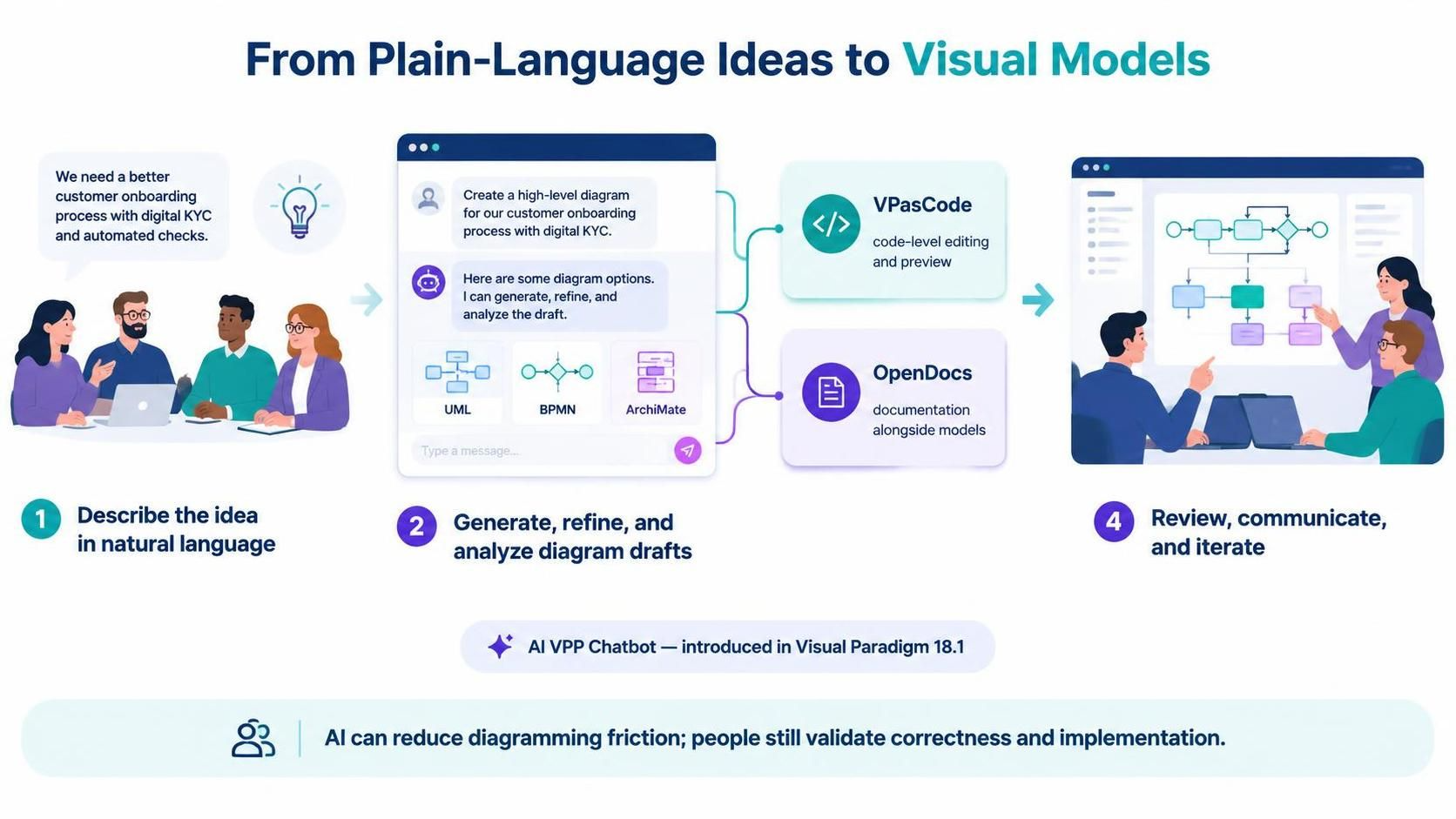
The core of this workflow is a streamlined process that mimics natural human communication while producing rigorous technical outputs. The system operates through four distinct stages:
1. Describing the Idea in Natural Language
The journey begins where human collaboration starts: conversation. Instead of opening a blank canvas and searching for the correct shapes, users simply describe their intent. For example, a business analyst might type, “We need a better customer onboarding process with digital KYC and automated checks.” This natural language input serves as the seed for the entire modeling process, requiring no knowledge of diagramming syntax.
2. Generating, Refining, and Analyzing Diagram Drafts
Once the prompt is submitted, the AI VPP Chatbot acts as a generative engine. It interprets the context and offers multiple diagram options. The chatbot does not just generate a single static image; it provides a dynamic workspace where users can:
- Generate: Instantly create high-level diagrams in UML, BPMN, or ArchiMate.
- Refine: Ask the AI to modify specific elements, such as adding a decision gate or changing a process flow.
- Analyze: Request an analysis of the draft to identify bottlenecks or logical errors.
3. Integration with the Ecosystem (VPasCode & OpenDocs)
Visual Paradigm distinguishes itself by offering two powerful integration points that allow for deep customization and documentation:
- VPasCode: For users who prefer code-based control or need precise logic, the system integrates with VPasCode. This tool allows for code-level editing and preview, bridging the gap between visual modeling and programming logic.
- OpenDocs: To ensure the model remains a “living” asset rather than a static snapshot, the AI populates OpenDocs. This creates documentation that sits alongside the model, ensuring that the written requirements always match the visual representation.
4. Review, Communicate, and Iterate
The final stage focuses on collaboration. The generated models are presented in a professional interface, allowing stakeholders to review the logic, communicate changes, and iterate on the design. The AI reduces the friction of diagramming, allowing humans to focus on what matters most: validating correctness and implementation.
Why This Architecture Matters
By moving away from manual shape-dragging and toward a conversational interface, Visual Paradigm effectively democratizes the modeling process. It allows technical teams to focus on the logic of the system rather than the mechanics of the drawing tool. Whether you are mapping a simple customer onboarding flow or a complex enterprise architecture, this AI ecosystem ensures that your visual models are generated faster, documented better, and aligned with your business goals.