![Free eBooks of IT [BooksOfAll]](https://www.booksofall.com/wp-content/uploads/2022/06/booksofall-logo-2.png)
From Text to Architecture: A Hands-On Review of VPasCode and AI-Driven Diagramming
As a product manager who has spent years bridging the gap between technical teams and business stakeholders, I’ve always struggled with one persistent pain point: keeping architectural documentation in sync with actual code. Traditional diagramming tools often feel like a separate universe—clunky, disconnected from version control, and quickly outdated. That’s why I was intrigued when I first heard about VPasCode by Visual Paradigm, a tool that promises to merge AI capabilities with Diagram-as-Code (DaC) methodologies. After diving deep into its features, I’m ready to share my experience with this innovative approach to software design.
What Is VPasCode?
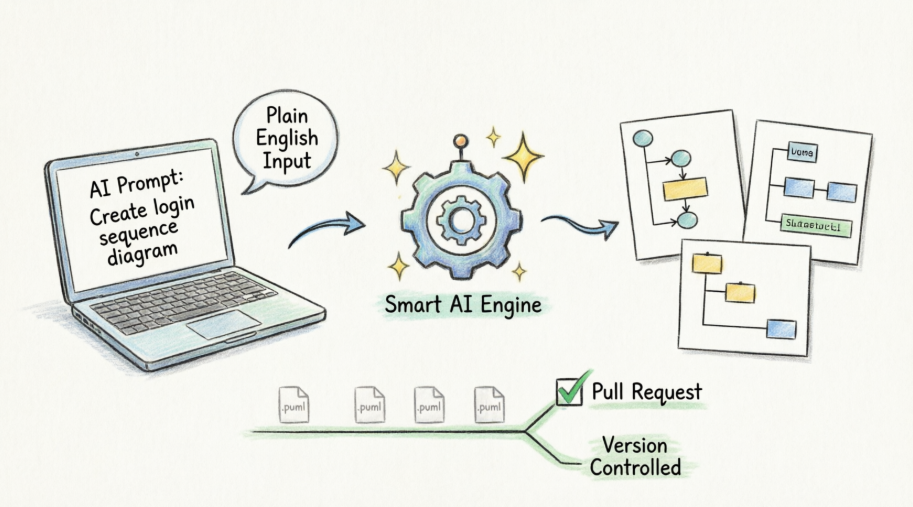
VPasCode is not just another diagramming tool; it’s a paradigm shift in how we think about system documentation. At its core, it allows software teams to design, iterate, and track system architecture using pure text formats like PlantUML, while leveraging artificial intelligence to streamline the entire workflow. Instead of dragging and dropping shapes in a GUI, you write code-like descriptions that get rendered into professional diagrams. But the real magic happens when AI enters the picture.
How VPasCode and AI Transform Software Development
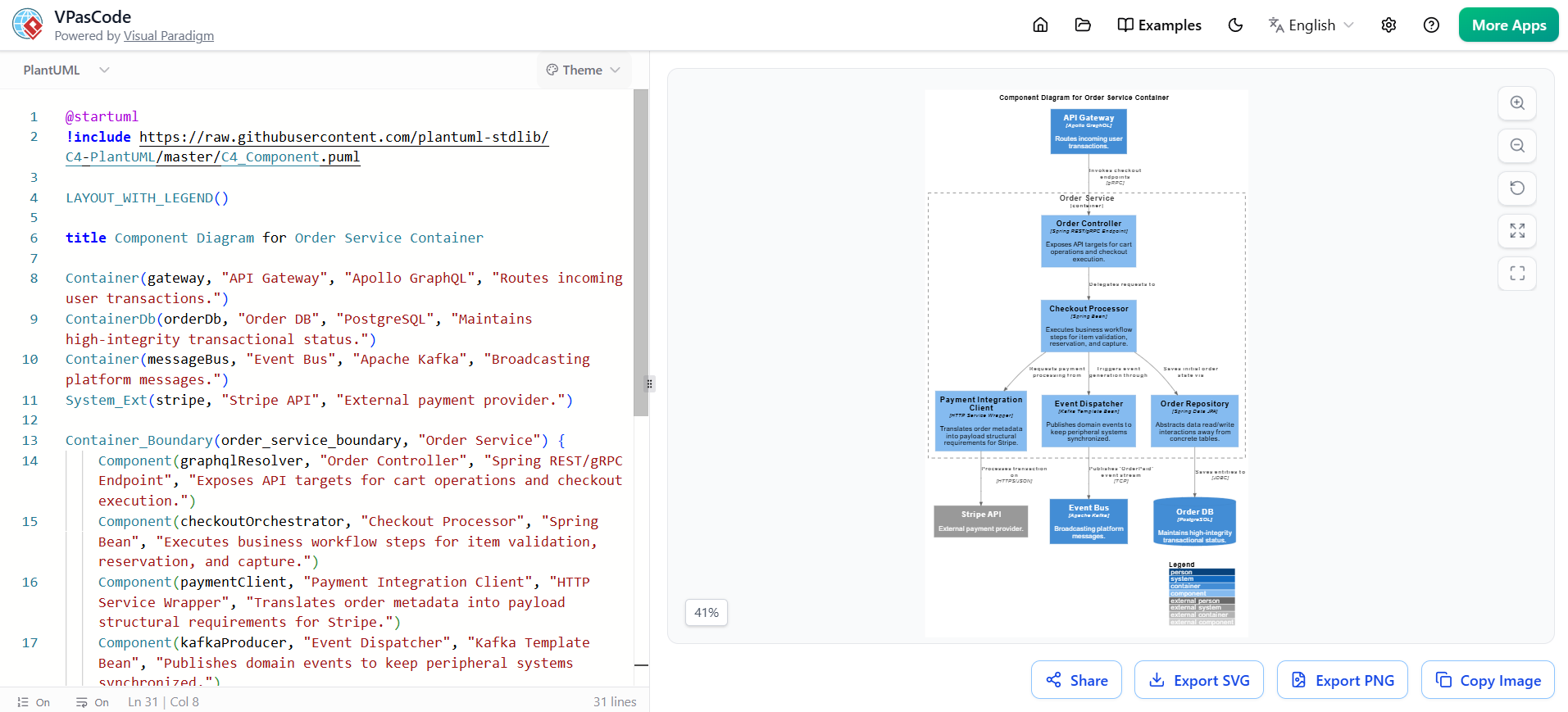
VPasCode acts as a vital bridge between high-level system requirements and clean architectural implementation. By utilizing integrated AI features, development teams can accelerate project delivery through several clear avenues:
Prompt-to-Diagram Generation
One of the most impressive features is the ability to generate diagrams from plain English. Developers simply describe their application logic in natural language, and the integrated AI instantly generates production-ready PlantUML code. This eliminates the steep learning curve often associated with diagramming syntax and allows teams to focus on design rather than formatting.
Automated Syntax Fixing
Let’s be honest: nobody enjoys debugging syntax errors in diagram code. VPasCode’s AI continuously monitors the code editor to automatically find and fix typos or broken structural definitions on the fly. This real-time assistance keeps the workflow smooth and prevents frustration during complex modeling sessions.
Layout Optimization
Complex systems often result in messy diagrams with overlapping connections and unclear relationships. VPasCode’s AI re-orders the text structures to produce clean, easily readable system visuals. This automatic layout optimization ensures that your diagrams remain professional and comprehensible, even as your architecture grows in complexity.
Living Documentation and Git Integration
Perhaps the most compelling feature for engineering teams is the seamless Git integration. Since diagrams are managed as text code, developers save .puml files directly inside Git repositories alongside application code. This makes design reviews standard parts of normal pull requests, ensuring that documentation evolves with the codebase rather than becoming an afterthought.
Practical Examples in PlantUML Code
To truly understand the power of VPasCode, let’s look at some practical examples that demonstrate how AI prompts translate into actionable diagrams.
1. Requirements Tracking: Use Case Diagram
Early in the development process, teams need to establish user roles and functional boundaries. VPasCode makes this effortless by generating comprehensive use case diagrams from simple descriptions.
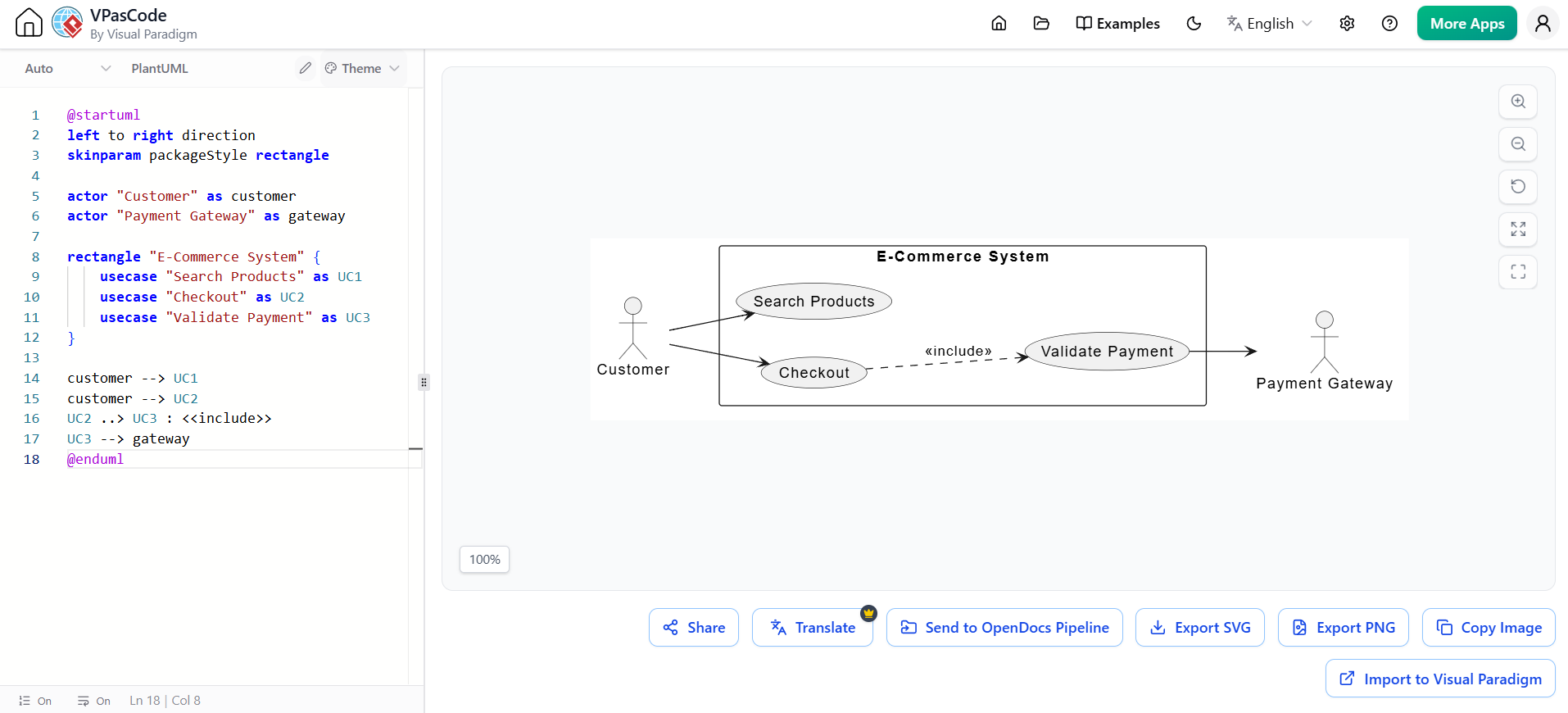
AI Prompt: “Create a PlantUML use case diagram for an E-Commerce platform where a Customer can search products and checkout. Checkout includes payment validation.”
PlantUML
Edit PlantUML in VPasCode
@startuml
left to right direction
skinparam packageStyle rectangle

actor "Customer" as customer
actor "Payment Gateway" as gateway

rectangle "E-Commerce System" {
    usecase "Search Products" as UC1
    usecase "Checkout" as UC2
    usecase "Validate Payment" as UC3
}

customer --> UC1
customer --> UC2
UC2 ..> UC3 : <<include>>
UC3 --> gateway
@enduml
This generated diagram clearly illustrates the relationship between the customer, the e-commerce system, and external payment services. The <<include>> relationship properly shows that payment validation is a mandatory part of the checkout process.
2. Structural Design: Class Diagram
Before writing application logic, teams need to establish object-oriented code architecture and domain models. VPasCode excels at translating conceptual models into precise class diagrams.
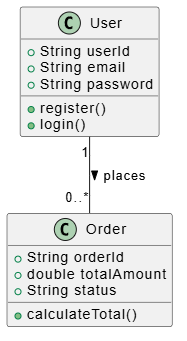
AI Prompt: “Generate a PlantUML class diagram for a basic User and Order domain model.”
PlantUML
Edit PlantUML in VPasCode
@startuml
class User {
    +String userId
    +String email
    +String password
    +register()
    +login()
}

class Order {
    +String orderId
    +double totalAmount
    +String status
    +calculateTotal()
}

User "1" -- "0..*" Order : places >
@enduml
The resulting diagram cleanly displays the attributes and methods of both classes, along with their one-to-many relationship. This visual representation helps developers understand the domain model before implementing any code.
3. Behavioral Design: Sequence Diagram
Understanding how components interact is crucial for building robust systems. Sequence diagrams outline precise component behaviors and asynchronous API communication paths.
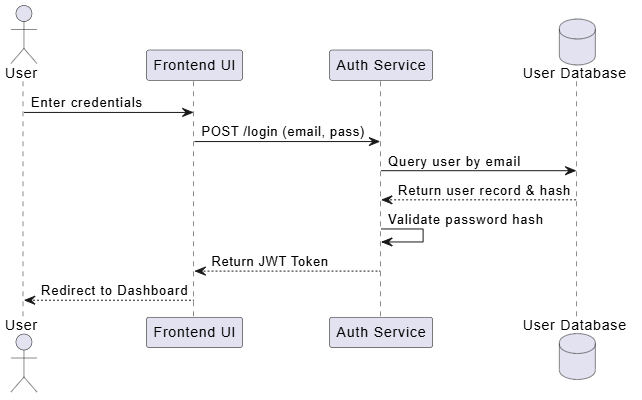
AI Prompt: “Create a sequence diagram for a user login flow involving a Frontend, Auth Service, and Database.”
PlantUML
Edit PlantUML in VPasCode
@startuml
actor User
participant "Frontend UI" as FE
participant "Auth Service" as Auth
database "User Database" as DB

User -> FE : Enter credentials
FE -> Auth : POST /login (email, pass)
Auth -> DB : Query user by email
DB --> Auth : Return user record & hash
Auth -> Auth : Validate password hash
Auth --> FE : Return JWT Token
FE --> User : Redirect to Dashboard
@enduml
This sequence diagram provides a clear, step-by-step visualization of the authentication flow. It shows exactly how data moves between the frontend, authentication service, and database, making it invaluable for both developers and security reviewers.
Why This Matters for Modern Development Teams
What sets VPasCode apart from traditional diagramming tools is its alignment with modern development practices. By treating diagrams as code, it brings documentation into the same workflow as application development. This means:
-
Version Control: Every change to your architecture is tracked in Git, providing a complete history of design decisions.
-
Collaboration: Team members can review diagram changes through pull requests, just like code changes.
-
Consistency: Text-based diagrams are easier to maintain consistency across large projects.
-
Automation: CI/CD pipelines can automatically generate and update documentation as code evolves.
The AI integration further enhances these benefits by reducing the cognitive load on developers. Instead of memorizing PlantUML syntax or spending hours adjusting diagram layouts, teams can focus on architectural decisions while the AI handles the mechanical aspects of diagram creation.
Final Thoughts
VPasCode represents a significant evolution in how we approach software architecture documentation. By combining the precision of Diagram-as-Code with the intelligence of AI, it addresses many of the pain points that have plagued traditional diagramming tools. For teams looking to keep their documentation alive, accurate, and integrated with their development workflow, VPasCode offers a compelling solution.
While there is still a learning curve associated with adopting any new tool, the benefits of having living, version-controlled documentation that evolves with your codebase are undeniable. As software systems continue to grow in complexity, tools like VPasCode will become increasingly essential for maintaining clarity and alignment across development teams.
Whether you’re a seasoned architect or a developer just starting to think more deeply about system design, VPasCode deserves a place in your toolkit. It’s not just about creating pretty diagrams—it’s about building a sustainable practice of architectural documentation that supports rather than hinders your development process.
References
- Comprehensive Guide to VPasCode by Visual Paradigm: An in-depth overview of VPasCode features and capabilities for AI-powered diagramming.
- Mastering VPasCode: The Ultimate Guide to AI-Powered Diagram as Code with Multi-Engine Support: Advanced techniques for leveraging VPasCode with multiple diagramming engines.
- How the Visual Paradigm AI Chatbot and VPasCode Function as an Integrated Ecosystem for Diagramming: Exploration of the synergy between AI chatbot features and VPasCode functionality.
- From Prompt to Pattern: Mastering UML Class Diagrams with AI and Diagram as Code: Detailed guide on creating class diagrams using AI prompts and DaC methodologies.
- VPasCode Category Archive: Collection of articles and resources related to VPasCode implementation and best practices.
- Visual Paradigm Online: Web-based platform for accessing Visual Paradigm tools including VPasCode.
- Architecting the Agile Way: A Beginner’s Guide to C4 Modeling, Diagram as Code, and AI: Introduction to modern architectural modeling approaches using C4 and AI.
- VPasCode Features Overview: Official feature list and capabilities of the VPasCode tool.
- From Code to Clarity: A Beginner’s Guide to Seamless Diagramming with VPasCode and OpenDocs: Tutorial on getting started with VPasCode and integrating it with documentation workflows.
- Mastering Modern UML: A Beginner’s Guide to Diagram as Code and AI-Driven Design: Comprehensive introduction to modern UML practices with AI assistance.
- From Diagram to Documentation: A Beginner’s Guide to the Visual Paradigm Pipeline: Guide on integrating diagrams into comprehensive documentation pipelines.
- Architecting the Agile Future: A Beginner’s Guide to UML Diagram as Code and AI-Powered Design: Forward-looking perspective on agile architecture with AI-enhanced tools.
- From Prompt to Production: A Beginner’s Guide to AI-Enhanced UML and Diagram as Code with Visual Paradigm: End-to-end guide on using AI prompts to create production-ready diagrams.
- UML Use Case Diagram Generator: Interactive tool for generating use case diagrams through the Visual Paradigm chat interface.
- PlantUML for Developers: A Practical Approach: Developer-focused guide to using PlantUML effectively in real-world projects.
- Use Case Diagramming Examples: Collection of practical use case diagram examples and best practices.
- UML Mastery for Beginners: Your Visual Blueprint to Clean Software Architecture: Beginner-friendly guide to mastering UML for software architecture.
- VPasCode Documentation: Official documentation and API reference for VPasCode.


Comments (0)