![Free eBooks of IT [BooksOfAll]](https://www.booksofall.com/wp-content/uploads/2022/06/booksofall-logo-2.png)
The Complete Guide to BPMN Choreography Diagrams: Patterns, Gateways, and Best Practices
📝 Introduction: Orchestrating Complex B2B Interactions with Precision
In modern software delivery and vendor management, the most critical processes rarely happen in isolation. They are negotiations—complex, multi-party exchanges involving requests, feasibility checks, alternative proposals, and formal approvals. Modeling these interactions requires more than just drawing boxes and arrows; it demands a notation that explicitly captures who communicates with whom, what messages are exchanged, and how decisions drive the flow forward. This is where BPMN 2.0 Choreography Diagrams become indispensable.
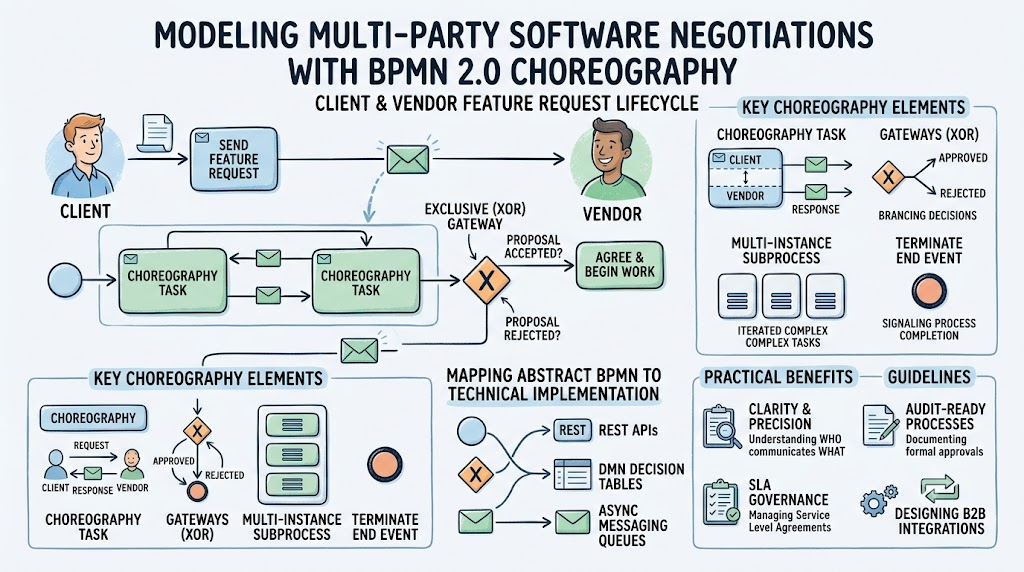
This comprehensive guide dissects a real-world “Send Feature Request” choreography between a Client and a Vendor, unpacking key patterns such as Exclusive (XOR) Gateways, Multi-Instance Subprocesses, Terminate End Events, and bidirectional message flows. Beyond explaining the symbols, we provide actionable guidelines on when to use choreography over collaboration diagrams, how to avoid common modeling pitfalls, and practical tips for mapping abstract BPMN elements to concrete technical implementations like REST APIs, DMN decision tables, and async messaging queues. Whether you are a business analyst documenting SLA-governed workflows, a solution architect designing B2B integrations, or a process owner seeking audit-ready process documentation, this guide equips you with the knowledge to model negotiation-heavy lifecycles with clarity, precision, and confidence.
.
1. Overview of the Diagram
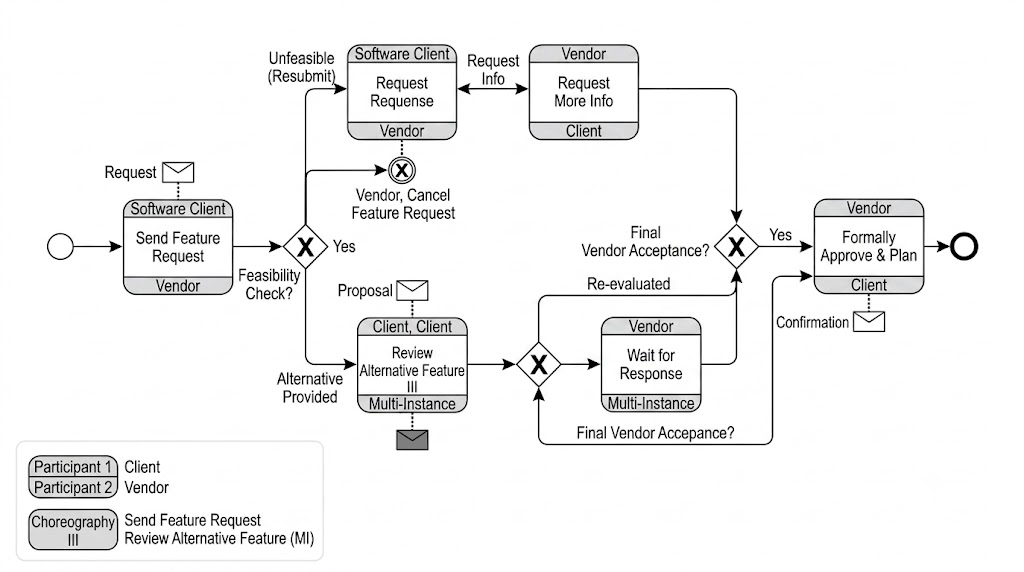
This is a BPMN 2.0 Choreography Diagram titled “Send Feature Request”, modeling the interaction between two participants:
| Participant | Role |
|---|---|
| Participant 1 – Client | Initiates feature requests, reviews alternatives, gives final acceptance |
| Participant 2 – Vendor | Receives requests, performs feasibility checks, proposes alternatives, formally approves & plans |
The diagram also references a sub-choreography: “Review Alternative Feature (MI)” — a Multi-Instance subprocess used when alternative features are proposed.
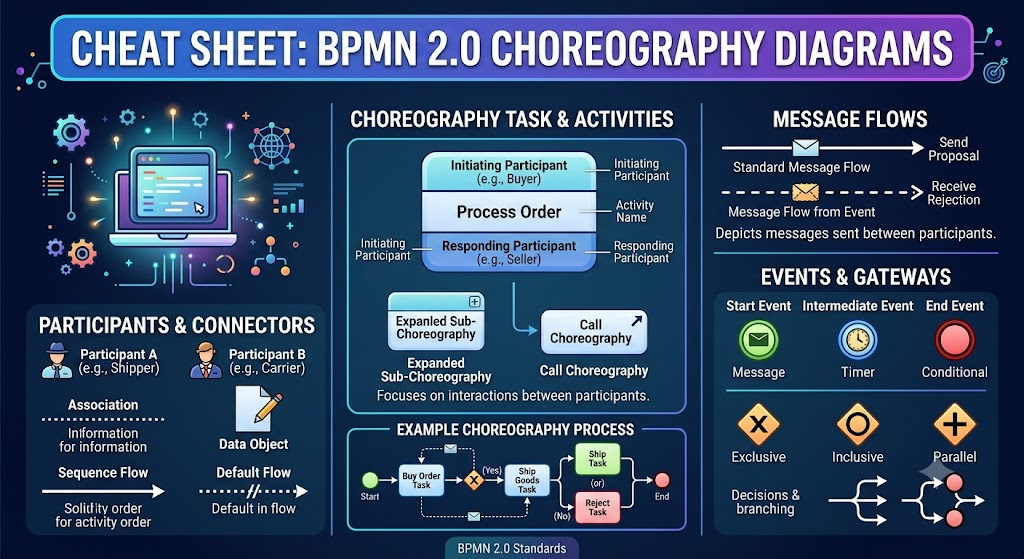
A choreography diagram is populated with choreography tasks, where each task must have at least two participants: an initiating and a non-initiating participant [[4]].
2. Step-by-Step Process Walkthrough
Phase 1: Initiation
[Start Event] → [Send Feature Request]
-
The Client sends a formal feature request to the Vendor.
-
This is represented as a choreography task with a message envelope icon, indicating inter-participant communication.
Phase 2: Feasibility Check (XOR Gateway)
[XOR Gateway: Feasibility Check?]
   ├── Unfeasible (Resubmit) → loops back to Send Feature Request
   ├── Yes → proceeds forward
   └── Alternative Provided → triggers Review Alternative Feature (MI)
-
The Vendor evaluates whether the requested feature is feasible.
-
Three possible outcomes exist, but only one path is taken per instance — this is the defining characteristic of an XOR gateway [[13]].
-
If unfeasible, the flow loops back for resubmission (a classic retry pattern).
-
If feasible (“Yes”), the process continues toward vendor approval.
-
If an alternative is provided, a multi-instance subprocess is triggered.
Phase 3A: Request More Info (Parallel/Optional Branch)
[Request Info] ↔ [Request Response]
-
At any point before final approval, either party can request additional information.
-
This is modeled as a bidirectional choreography task between Vendor and Client.
Phase 3B: Review Alternative Feature (Multi-Instance Subprocess)
[Review Alternative Feature III] ← MI marker
         ↓
[Wait for Response] ← MI marker
-
When alternatives are proposed, both parties enter a multi-instance loop — meaning the review-and-wait cycle repeats for each alternative option.
-
A multi-instance activity executes once for each element in a collection, similar to a
for-eachloop in programming [[8]]. -
The dashed arrow from the subprocess to the message envelope indicates asynchronous message exchange during each iteration.
Phase 4: Final Vendor Acceptance (XOR Gateway)
[XOR Gateway: Final Vendor Acceptance?]
   ├── No → Re-evaluated → loops back into the MI subprocess
   └── Yes → Formally Approve & Plan
-
After all alternatives have been reviewed (or if no alternatives were needed), a final decision gate is reached.
-
If rejected, the process re-enters the multi-instance review loop — enabling iterative refinement.
-
If accepted, the process moves to formal approval.
Phase 5: Formal Approval & Completion
[Formally Approve & Plan] → [Confirmation Message] → [End Event]
-
The Vendor formally approves the feature and creates an implementation plan.
-
A confirmation message is sent to the Client.
-
The thick-bordered circle marks the End Event, signifying successful process completion.
Exception Path: Cancel
[XOR Gateway] → [Vendor, Cancel Feature Request] → [Terminate End Event]
-
At the feasibility check stage, the Vendor may unilaterally cancel the request entirely, terminating the process immediately.
3. Key BPMN Concepts Illustrated
3.1 Choreography Tasks vs. Collaboration Tasks
| Concept | Description |
|---|---|
| Choreography Task | Shows message exchange between participants; each task has an initiator and responder shown as colored bands on the task rectangle |
| Collaboration Diagram | Uses separate pools/lanes per participant; focuses on internal process logic |
| When to use Choreography | When the primary concern is who communicates with whom rather than internal steps |
In a choreography diagram, each task must have at least two participants — an initiating and a non-initiating participant [[4]].
3.2 XOR (Exclusive) Gateways
-
Represented by a diamond with an “X” inside.
-
Only one outgoing path is taken based on a condition or decision [[16]].
-
Used here at three critical decision points: Feasibility Check, Final Vendor Acceptance, and the cancellation branch.
-
Best practice: Always label outgoing sequence flows with clear conditions [[14]].
3.3 Multi-Instance (MI) Marker
-
Shown as three vertical lines (
|||) at the bottom of a task/subprocess box. -
Indicates the activity runs multiple times in parallel or sequentially for each item in a collection [[9]].
-
In this diagram, it applies to both “Review Alternative Feature” and “Wait for Response,” meaning each alternative goes through the full review-response cycle independently.
-
Think of it as a business-process-level
foreachloop [[12]].
3.4 Message Events & Envelopes
-
The envelope icons on sequence flows indicate asynchronous message passing between participants.
-
Messages like “Proposal,” “Request,” and “Confirmation” are explicit artifacts that cross organizational boundaries.
-
Showing message envelopes makes the communication contract visible and auditable [[2]].
3.5 Terminate End Event
-
The solid black circle with thick border after “Cancel Feature Request” is a Terminate End Event.
-
It immediately ends all active process instances, not just the current token — useful for hard cancellations.
4. When to Use This Type of Diagram
✅ Ideal Use Cases
| Scenario | Why Choreography Fits |
|---|---|
| B2B integration processes | Clearly shows message contracts between organizations |
| Vendor-client onboarding workflows | Models negotiation, proposal, and approval cycles |
| SLA-governed service requests | Makes response obligations and escalation paths explicit |
| Regulatory/compliance documentation | Provides auditable proof of who communicated what and when |
| API/service orchestration design | Maps directly to message-based microservice interactions |
| Contractual workflow definition | Each choreography task represents a binding communication obligation |
❌ When NOT to Use Choreography
| Scenario | Better Alternative |
|---|---|
| Internal departmental processes | Standard BPMN Collaboration diagram with lanes |
| Purely sequential single-party workflows | Simple BPMN Process diagram |
| Data transformation pipelines | DMN decision tables or ETL diagrams |
| Real-time event streaming architectures | CQRS/Event Storming notation |
5. Guidelines & Best Practices
Modeling Guidelines
-
Keep it on one page — Aim for top-level diagrams that fit on a single page; push detail into collapsed subprocesses [[6]].
-
Label every gateway output — Never leave XOR gateway branches unlabeled; ambiguity causes implementation errors [[14]].
-
Use consistent participant ordering — Keep the same participant in the same band position (top/bottom) across all tasks for readability [[2]].
-
Name choreography tasks as verb phrases — e.g., “Send Feature Request” not “Feature Request”; the action belongs to the initiator.
-
Show message names explicitly — Every message flow should carry a named artifact so implementers know the payload contract [[2]].
-
Avoid crossing message flows — Rearrange tasks to minimize visual clutter; crossed lines increase cognitive load significantly.
Multi-Instance Tips
-
Define the collection clearly — Specify what drives the iteration (e.g., “list of alternative features”) in documentation or model annotations.
-
Decide parallel vs. sequential — Parallel MI runs all instances concurrently; sequential MI processes them one at a time. Choose based on resource constraints and dependency requirements [[12]].
-
Use call activities for complex MI bodies — If the multi-instance body is complex, extract it into a separate callable subprocess for maintainability [[11]].
Gateway Tips
-
XOR splits need mutually exclusive conditions — Ensure no two outgoing conditions can be true simultaneously; otherwise you have a modeling defect [[18]].
-
XOR joins synchronize tokens — An XOR join waits for exactly one incoming token; multiple tokens arriving means a modeling error [[17]].
-
Consider default flows — On diverging XOR gateways, mark one outgoing flow as the default to handle cases where no condition matches [[15]].
General Tips & Tricks
-
Validate with stakeholders from both sides — Since choreography spans organizations, get sign-off from both the Client and Vendor teams before implementation.
-
Map to concrete message formats early — Each message envelope should map to a real API call, email template, or EDI transaction.
-
Version your choreography diagrams — B2B contracts evolve; track diagram versions alongside SLA documents.
-
Use choreography conformance checking — Tools exist to verify that actual implementations conform to the modeled choreography [[5]].
-
Test exception paths thoroughly — The “Unfeasible → Resubmit” and “Re-evaluated → Loop Back” paths are where most real-world failures occur; ensure they’re tested as rigorously as the happy path.
-
Document timeout/escalation rules — The “Wait for Response” MI task should have defined SLAs; document what happens if a response never arrives.
6. Implementation Mapping
| BPMN Element | Typical Technical Implementation |
|---|---|
| Send Feature Request | REST API POST / SOAP call / Email trigger |
| Feasibility Check XOR | Business rule engine / DMN decision table |
| Request More Info | Bidirectional messaging queue / Chat integration |
| Review Alternative Feature (MI) | For-each loop over alternatives array with async callbacks |
| Wait for Response (MI) | Message correlation with timeout handler per instance |
| Final Vendor Acceptance XOR | Approval workflow engine / Human task system |
| Formally Approve & Plan | ERP/WMS integration + notification dispatch |
| Confirmation Message | Webhook / Email / Push notification |
| Cancel (Terminate) | Process abort API + compensation logic |
7. Common Pitfalls to Avoid
| Pitfall | Consequence | Prevention |
|---|---|---|
| Missing default flow on XOR | Process hangs when no condition matches | Always define a default outgoing sequence flow [[15]] |
| Unlabeled MI collection | Developers don’t know what drives iteration | Annotate the collection source in model properties |
| Asymmetric participant bands | Confusion about who initiates each task | Maintain consistent band ordering throughout [[2]] |
| Overusing choreography for internal logic | Diagram becomes unreadable | Reserve choreography for cross-boundary communication only |
| Ignoring terminate semantics | Partial cleanup on cancellation | Document compensation actions for the terminate path |
| No timeout on Wait for Response | Zombie process instances | Define SLA-based timers on every wait state |
✅ Summary & Tooling Recommendation: Accelerate Modeling with Visual Paradigm BPMN + AI


Comments (0)