Unified Documentation Lifecycle with Visual Paradigm OpenDocs and AI
In the modern software development lifecycle, the gap between high-level architectural planning and detailed implementation often leads to documentation drift. Visual Paradigm OpenDocs addresses this by creating a unified workspace that treats documentation as a dynamic, maintained knowledge base rather than a collection of static files. This tutorial explores the system architecture of OpenDocs, focusing on how it integrates visual modeling, collaborative editing, and structured knowledge management.
The Shift from Static Files to Knowledge Bases
Traditionally, diagrams were exported as static images (PNG or JPG) and embedded into Word documents or Confluence pages. This method creates a “dead end” for information; if the system changes, the image does not. OpenDocs fundamentally shifts this paradigm by utilizing a web-based environment where written content and visual models coexist.
When you work with OpenDocs, you are not merely editing a canvas; you are interacting with a maintained knowledge base. This approach ensures that:
- Diagrams remain synchronized with the code or requirements.
- Documentation is treated as a living document that evolves with the project.
- Visuals are first-class citizens that can be versioned and linked.
Core Architectural Components
The OpenDocs interface is built around four distinct pillars that facilitate the creation, collaboration, organization, and sharing of technical assets.
1. Create: Unified Modeling Capabilities
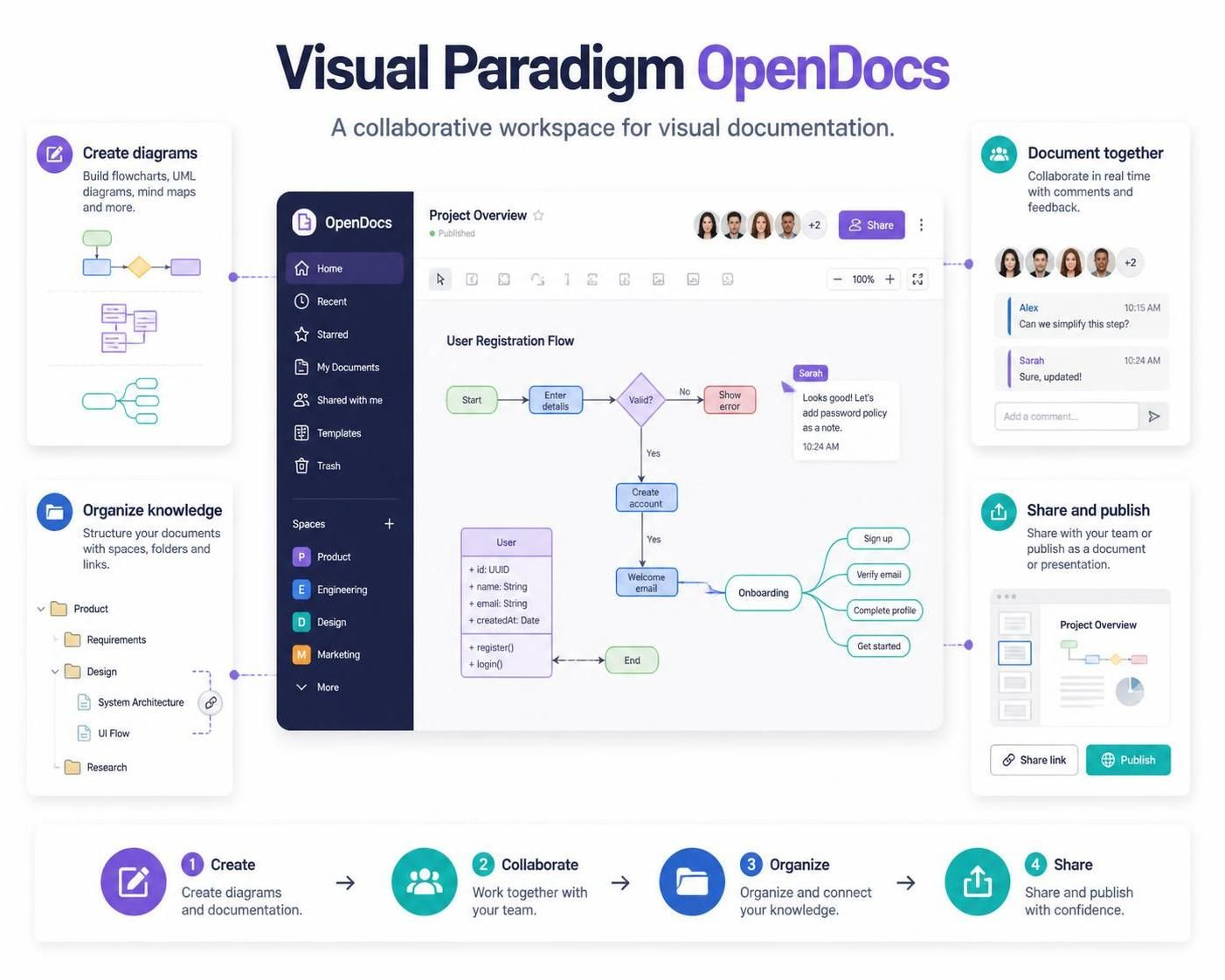
OpenDocs serves as a canvas for diverse modeling needs. Whether you are mapping a simple business flow or designing a complex UML class structure, the tool provides a unified set of drawing primitives. The image highlights the ability to build flowcharts, UML diagrams, and mind maps directly within the browser.
Crucially, this is not just a drawing tool. It supports the integration of data structures. For instance, the User Registration Flow shown in the image demonstrates a hybrid model where a process flow (diamond shapes, arrows) connects directly to an object-oriented class definition (the User entity with attributes like UUID and login()).
2. Document Together: Real-Time Collaboration
One of the most significant features is the real-time collaborative engine. Unlike traditional tools where users take turns editing or email attachments back and forth, OpenDocs allows multiple stakeholders to be present on the canvas simultaneously.
The “Document together” panel illustrates this functionality:
- Live Presence: You can see avatars of other team members (like Alex, Sarah, etc.) to know who is currently active.
- Contextual Feedback: Comments can be attached directly to specific diagram elements or regions. In the example, Sarah adds a note regarding a “password policy,” linking a discussion point directly to the logic flow.
- Instantaneous Updates: Changes made by one user are reflected instantly for all others, reducing the latency of the review process.
3. Organize Knowledge: Spaces and Folders
To prevent documentation chaos, OpenDocs employs a hierarchical file system structure. The “Organize knowledge” section reveals a robust folder management system.
The architecture supports Spaces, which act as high-level containers for different domains (e.g., Product, Engineering, Design, Marketing). Within these spaces, users can create folders for specific requirements or design phases.
This structure allows for:
- Logical Grouping: Separating System Architecture diagrams from UI Flow diagrams.
- Linking: The chain-link icon visible in the interface suggests the ability to create relationships or references between different documents, creating a web of knowledge rather than a linear stack of files.
4. Share and Publish: Seamless Integration
The final pillar is distribution. OpenDocs recognizes that documentation must be accessible to various audiences. The “Share and publish” feature allows users to:
- Share Links: Generate URLs to view specific documents with controlled permissions.
- Publish: Convert the workspace content into a formal document or presentation format for stakeholders who may not have access to the live tool.
Integration with Visual Paradigm Pipeline
While OpenDocs is a powerful standalone web environment, its true power is unlocked when integrated with the broader Visual Paradigm ecosystem. As noted in the context, Visual Paradigm’s Pipeline can connect diagrams created in the Desktop or Online versions of the tool directly to OpenDocs.
This integration eliminates the need for manual export/import cycles. A diagram created in the heavy-duty Desktop environment can be pushed to OpenDocs, where it becomes part of the collaborative, web-based knowledge base. This hybrid workflow allows engineers to use the best tool for the job (heavy modeling vs. light collaboration) while maintaining a single source of truth.
Step-by-Step: Building a Collaborative Workflow
To effectively utilize the system architecture of OpenDocs, follow this workflow:
- Initialize the Space: Create a new Space (e.g., “Engineering”) and define your folder hierarchy (e.g., “Backend API”).
- Create the Diagram: Use the “Create” tools to build your initial model. Import a class diagram or start a flowchart.
- Invite Stakeholders: Utilize the “Document together” feature to invite team members. Set permissions so that developers can edit while managers can comment.
- Iterate and Refine: Conduct a review session. Use the comment bubbles to flag issues (e.g., “Add validation logic here”).
- Finalize and Publish: Once the model is approved, use the “Share and publish” options to generate a report for the wider organization.
Conclusion
Visual Paradigm OpenDocs transforms the documentation process from a passive, administrative task into an active, collaborative component of the software development lifecycle. By treating documents as part of a maintained knowledge base and integrating seamlessly with real-time collaboration tools, teams can ensure that their visual models are always up-to-date, accurate, and accessible.