Mastering VPasCode to VP OpenDocs: Diagram-as-Code Publishing
In modern software engineering and technical documentation, the gap between creating visual models and maintaining written documentation is often bridged by manual exporting and re-uploading of images. This approach leads to “stale” documentation that quickly becomes a burden to maintain. The VPasCode–OpenDocs workflow solves this by connecting diagram creation directly with documentation publishing.
This tutorial explores the technical architecture behind this integration, demonstrating how to move from raw text syntax to a “living document” where your diagrams and code stay synchronized.
1. Understanding the Core Tools
To understand the workflow, we must first define the two distinct but interconnected environments:
- VPasCode (Diagram-as-Code Editor): This is Visual Paradigm’s browser-based editor. Instead of drawing boxes on a canvas, you write code to define your diagram. It supports industry-standard syntaxes like
PlantUML,Mermaid,Graphviz, andD2. - OpenDocs (Knowledge-Management Workspace): This is the documentation platform where your content lives. It allows for rich text formatting, version control, and structured organization of your engineering guides.
The magic of this system is that it treats the diagram source code as the “single source of truth.” When you update the code in VPasCode, that change propagates automatically to the published page in OpenDocs.
2. The 5-Step Workflow Architecture
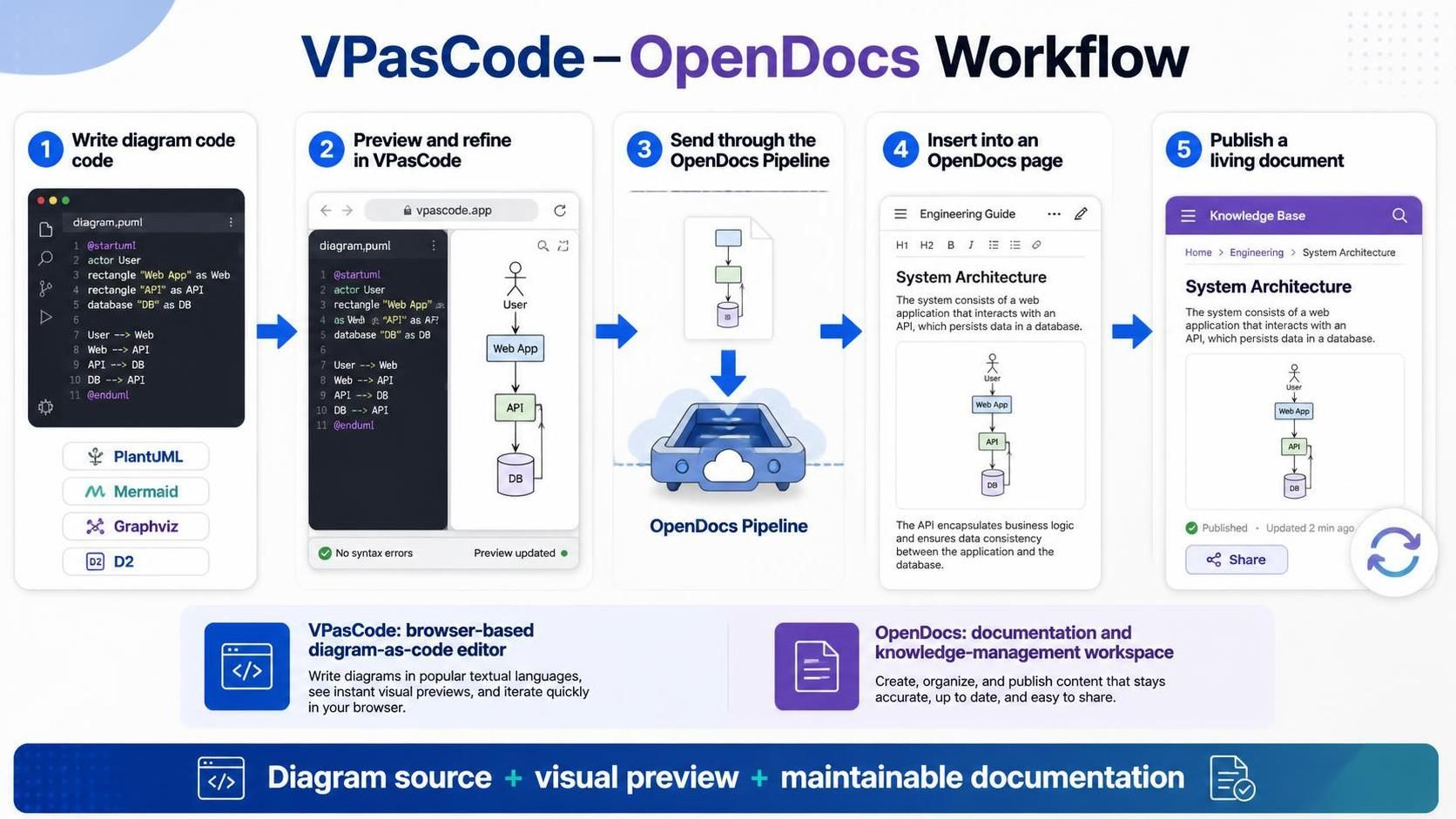
The integration follows a linear, automated pipeline. Let’s walk through each stage of the process shown in the system architecture.
Step 1: Write Diagram Code
The process begins in the VPasCode editor. You write your diagram using a specific textual language. This approach offers precision and version control capabilities that GUI-based tools often lack.
For example, to create a simple system architecture diagram in PlantUML, you write:
@startuml
actor User
rectangle "Web App" as Web
rectangle "API" as API
database "DB" as DB

User --> Web
Web --> API
API --> DB
@enduml
Step 2: Preview and Refine
Once the code is written, VPasCode’s engine parses the text and renders it instantly in the preview pane. This allows you to:
- Verify Syntax: Ensure there are no errors (indicated by green checkmarks).
- Iterate Quickly: Change a label or a connection arrow in the code and see the visual update immediately.
Step 3: Send through the OpenDocs Pipeline
This is the critical backend step. Instead of generating a static image file (like a PNG) that you have to download, the system passes the source code through the OpenDocs Pipeline. This pipeline acts as a bridge, taking the raw text and preparing it for insertion into the documentation engine.
Step 4: Insert into an OpenDocs Page
Inside the OpenDocs editor, you insert the diagram. Unlike a static image, this is a reference to the code block. You can add explanatory text around it:
“The system consists of a web application that interacts with an API, which persists data in a database.”
Step 5: Publish a Living Document
When you publish the page, the system renders the final visual for the end-user. Crucially, because the diagram is tied to the source code, it remains a “living document.” If you later update the code in VPasCode to reflect a new feature, the published page updates automatically.
3. Why This Architecture Matters
This workflow represents a shift from “Diagram as an Asset” to “Diagram as Data.”
- Maintainability: You never have to manually re-export a screenshot after a bug fix or a new feature is added.
- Consistency: The visual representation is mathematically guaranteed to match the textual description, as both derive from the same code.
- Collaboration: Developers can review diagram changes via code diffs, just like they do with software source code.
Conclusion
By leveraging the VPasCode–OpenDocs workflow, engineering teams can create documentation that is as dynamic and up-to-date as the software they describe. The transition from writing code to publishing a living document is seamless, bridging the gap between technical implementation and knowledge sharing.