Mastering Enterprise Architecture: A Strategic Guide to Visual Paradigm Desktop vs. Online
Welcome to this comprehensive tutorial on navigating the dual landscapes of enterprise modeling. As technical architects and analysts, you often face a critical decision: do you require the raw power of deep, formal engineering, or the agility of browser-based collaboration? Visual Paradigm (VP) has evolved to offer both, but understanding the distinction is vital for optimizing your workflow.
Understanding the Core Architectures
The ecosystem is divided into two primary engines, each designed for specific phases of the software development lifecycle and system architecture process. While they share the same underlying modeling engine, their deployment strategies differ significantly.
Visual Paradigm Desktop: The Heavyweight Engineer
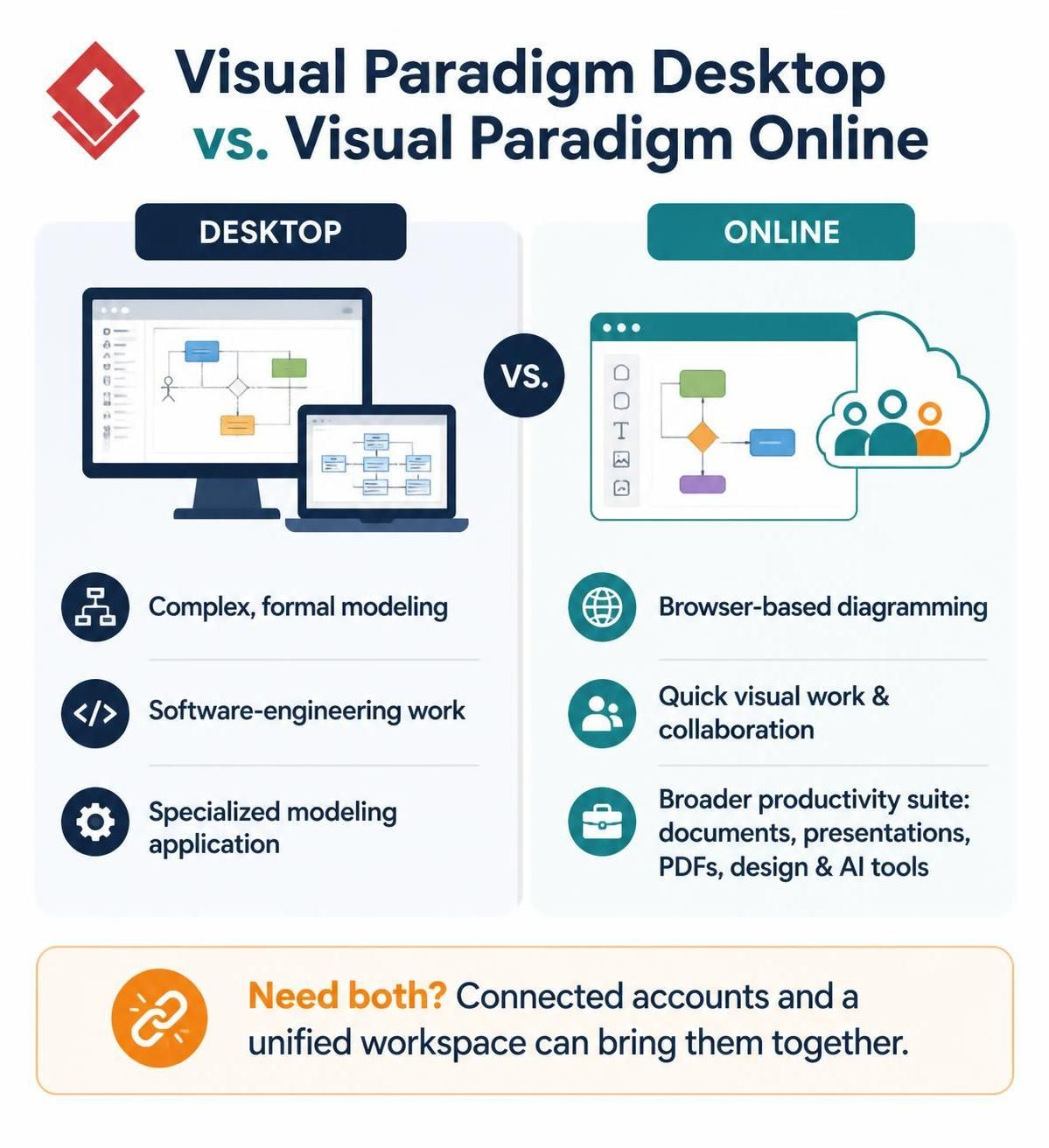
Visual Paradigm Desktop is the specialized modeling application designed for complex, formal modeling and software-engineering work. It is an installed application running natively on Windows, macOS, and Linux. This environment is best suited for:
- In-depth Modeling: Handling complex UML, BPMN, SysML, and Architecture frameworks.
- Code Engineering: Generating code from models and reverse-engineering existing codebases.
- Local Workflows: Supporting large, structured projects that may rely on comprehensive model repositories or local repositories.
The desktop version excels when you need to manage large-scale projects where the model is the source of truth. It allows for offline operation, meaning you can continue to architect and refine complex diagrams without an active internet connection.
Visual Paradigm Online: The Collaborative Suite
Visual Paradigm Online is not merely a stripped-down web version of the desktop tool; it is a broader online productivity suite. It runs entirely in a web browser, requiring no installation. This platform emphasizes:
- Browser-based Diagramming: Quick visual work and immediate access to diagrams.
- Collaboration: Built around cloud access, concurrent collaboration, and version history.
- Productivity Tools: It includes a suite of documents, presentations, PDF tools, and AI capabilities alongside standard diagramming.
This environment is ideal for teams, educators, and occasional users who value easy access and the ability to share work instantly. It is the go-to solution for creating and sharing diagrams online where the full online suite supports other visual and office-style tasks.
Strategic Integration: The Unified Workspace
A common misconception is that you must choose one or the other. The modern architecture of Visual Paradigm allows for a hybrid approach through its unified workspace and connected accounts. You can start a quick concept in the browser and hand it off to a developer to implement deep modeling logic in the desktop client, or vice versa.
When you connect accounts, the system bridges the gap between the Deep Modeling Environment of the Desktop and the Collaborative Creation of the Online suite. This ensures that your data remains consistent regardless of where the work is being performed.
Workflow Comparison: Choosing the Right Tool
To effectively utilize the VP ecosystem, it is crucial to align the tool with the specific task at hand.
When to Use Desktop
Use the Desktop application when you are a Modeler, Analyst, Architect, or Developer engaged in sustained technical work. If your task involves:
- System architecture design using SysML.
- Database modeling and requirements management.
- Code-related work and engineering tasks.
- Working in environments with restricted internet access.
When to Use Online
Use the Online suite when you are part of a team requiring real-time interaction or when you need to present findings quickly. It is perfect for:
- Concurrent collaboration on a single diagram.
- Quick visual tasks that don’t require heavy installation.
- Creating presentations or documents directly alongside diagrams.
- AI-assisted diagram generation and analysis.
Getting Started with the Ecosystem
Whether you are a team leader setting up a workspace or an individual contributor starting a new project, Visual Paradigm offers flexible entry points:
- Desktop: Requires downloading and installing the app. A 30-day trial is offered for those wishing to test the full engineering capabilities.
- Online: Start immediately in your browser. The Online site offers a “free-start” option, allowing you to explore the productivity suite without a full commitment.
By understanding the distinct strengths of each platform, you can effectively orchestrate your architecture projects, leveraging the precision of the Desktop client and the agility of the Online suite.