Mastering BPMN 2.0: The Art of Conversation Diagrams
In the complex world of Business Process Model and Notation (BPMN) 2.0, collaboration between different organizations is often visualized using choreography diagrams. However, when you need to step back and view the big picture without getting bogged down in the minutiae of message timing or sequence, you need a different tool. Enter the BPMN Conversation Diagram.
This tutorial will guide you through the architecture of conversation diagrams, explaining how they differ from other BPMN models and how to interpret the specific flow of information between parties like Suppliers, Retailers, and Consignees.
Understanding the “30,000 Foot” View
A Conversation Diagram offers a simplified view of a collaboration model. While a standard Collaboration or Choreography diagram details the exact sequence of events—showing exactly which message is sent first, then second, and so on—a Conversation Diagram operates at a higher abstraction level.
Think of it as a high-level architectural blueprint. It focuses purely on the existence of conversations between participants, rather than the execution logic. It strips away the process logic to show you only the essential communication pathways.
The Three Core Elements
To create a Conversation Diagram, you only need three specific types of elements. Unlike other BPMN views that require gateways, tasks, or events, the Conversation Model is minimalist:
- Pools: These represent the participants or roles involved in the interaction (e.g., Supplier, Retailer, Consignee).
- Conversation Nodes: These are the specific topics or types of communication that occur between the participants.
- Conversation Links: These are the double lines that connect the participants to the conversation nodes, indicating that they are involved in that specific communication.
Interpreting the Diagram Structure
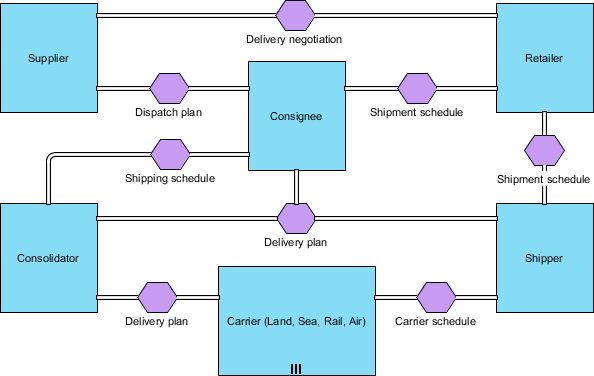
Let’s analyze the specific example provided, which illustrates a supply chain scenario involving a Supplier, Retailer, Consignee, Consolidator, Shipper, and Carrier.
1. The Participants (Pools)
The blue rectangular boxes represent the Pools. In this model, we see distinct roles:
- Supplier: The origin of goods.
- Retailer: The entity selling to the end consumer.
- Consignee: The party receiving the goods.
- Consolidator & Shipper: Logistics intermediaries.
- Carrier: The entity transporting the goods (Land, Sea, Rail, Air).
2. The Conversations (Hexagons)
The purple hexagonal shapes are the most distinct visual element of this diagram type. They represent the Conversation Nodes. Each node names a specific topic of discussion or agreement.
In the example, you will notice nodes such as:
- Delivery negotiation
- Dispatch plan
- Shipment schedule
- Delivery plan
- Carrier schedule
These nodes indicate that a specific type of conversation is taking place, but the diagram does not specify when it happens or how long it lasts.
3. The Connections (Double Lines)
The lines connecting the Pools to the Hexagons are Conversation Links. In the BPMN standard, these are drawn as double lines. This visual cue is crucial: it tells the viewer that a specific participant is “involved” in a specific conversation.
For example, the Supplier and the Retailer are both connected to the Delivery negotiation hexagon. This means both parties are involved in negotiating the delivery, but the diagram does not show who speaks first or if the negotiation is a sequential or parallel process.
Conversation vs. Choreography
It is vital to understand the distinction between a Conversation Diagram and a Choreography Diagram. Both model interactions, but they answer different questions.
A Choreography Diagram is like a script. It shows the sequence of the communications. It would tell you: “The Supplier sends a Dispatch Plan, then the Consignee acknowledges it, then the Shipper creates a schedule.”
A Conversation Diagram, however, is like a guest list. It tells you: “The Supplier, Consignee, and Shipper are all present at the ‘Dispatch Plan’ event.” It does not show the sequence of communications as seen in a Choreography model. It provides an overview of the overall communications between the parties without the constraints of time or order.
Summary
The BPMN Conversation Diagram is a powerful tool for high-level system architecture. By limiting the visual vocabulary to Pools, Conversation Nodes, and Conversation Links, it prevents the model from becoming cluttered with process logic. It allows architects and business analysts to quickly verify that all necessary parties are included in all necessary conversations, ensuring a robust collaborative framework before diving into the details of execution.