Mastering the Agile Modeling Loop: Best Practices for Modern C4 Architecture
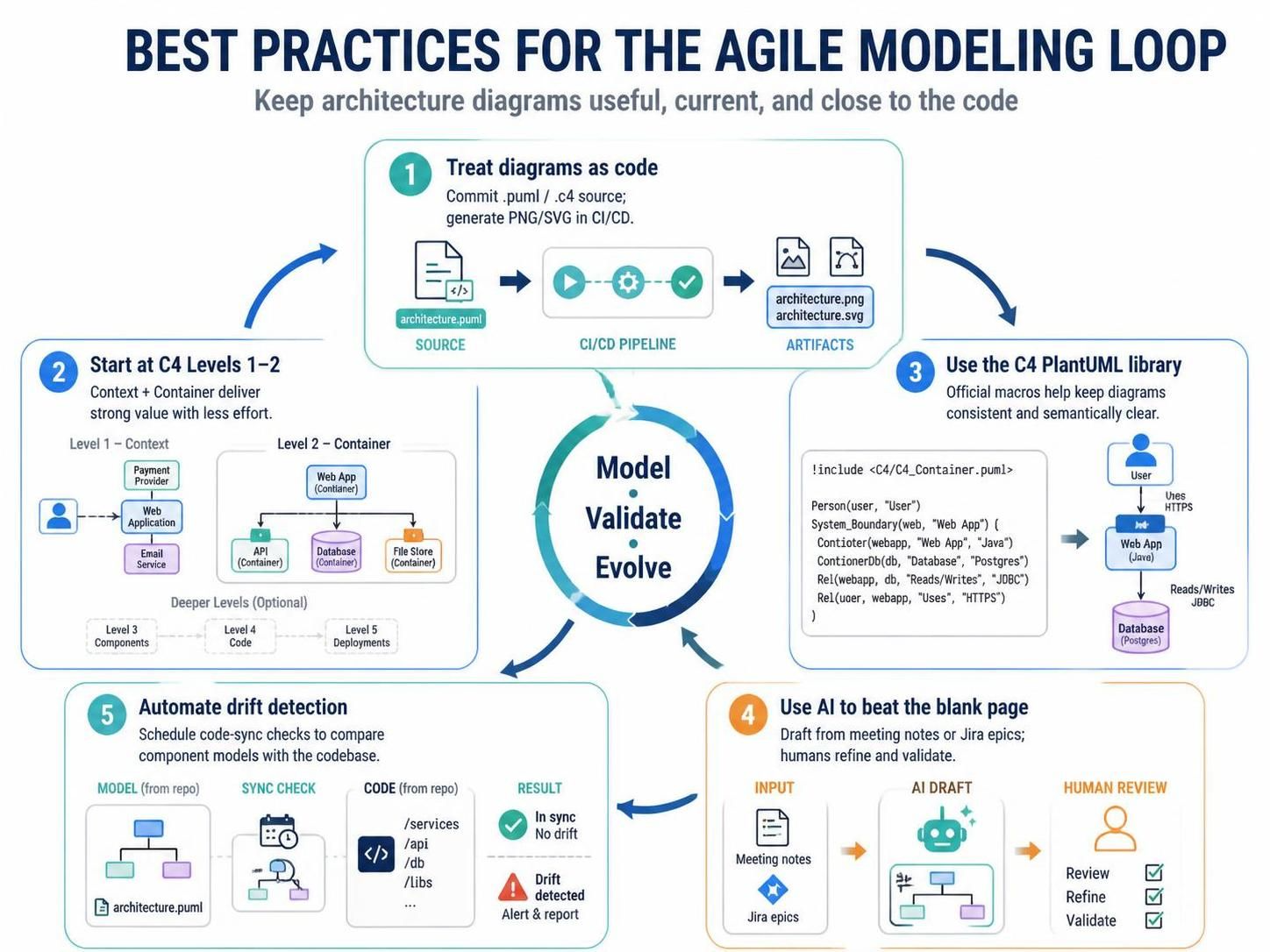
In the rapidly evolving landscape of software development, the gap between design and implementation often widens, leading to “architecture drift.” To combat this, modern engineering teams are adopting the Agile Modeling Loop. This approach transforms architecture documentation from a static, burdensome artifact into a dynamic, version-controlled, and AI-accelerated practice. By leveraging the Agile Power Trio—the C4 Model, Diagram-as-Code, and AI integration—you can ensure your architecture diagrams remain a “living map” of your software.
1. The Core Philosophy: Treat Diagrams as Code
The foundation of modern architecture documentation is the “Diagram-as-Code” approach. Just as you would never commit compiled binary files to a repository without the source, you should never save diagrams as static images (PNG/JPG) in your Git repository. Instead, the workflow should focus on the source text files.
- Source Control: Store your diagrams in text formats like
.puml(PlantUML) or.c4. This allows for diffing, versioning, and pull requests. - CI/CD Integration: Utilize your Continuous Integration pipeline to automatically compile these source files into visual artifacts (PNG or SVG) whenever changes are made.
git commit architecture.puml
  |
  v
[Build Stage] -> plantuml -tpng architecture.puml -o architecture.png
  |
  v
[Publish Stage] -> Upload architecture.png to documentation server
2. Strategic Scope: Start at C4 Levels 1–2
One of the most common pitfalls in modeling is the “blank page syndrome” where teams get bogged down in low-level details too early. The C4 Model provides a hierarchy of abstraction, and the Agile Modeling Loop suggests focusing on the two levels that provide 90% of the value for 10% of the effort.
- Level 1: Context Diagram: Defines the system boundary and how users interact with it. It answers “What does the system do?”
- Level 2: Container Diagram: Defines the major building blocks (web apps, mobile apps, microservices, databases) and their interactions. It answers “How is the system built?”
Deeper levels (Component, Code, Deployment) are optional and should only be created if there is a specific, immediate need, such as debugging a complex integration issue.
3. Standardization: Use the C4 PlantUML Library
To ensure that your diagrams look professional, consistent, and semantically correct without manual styling, you should leverage the official C4 PlantUML library. This library provides a set of macros that standardize the visual representation of people, containers, and relationships.
!include

Person(user, "User")
SystemBoundary(web, "Web App") {
    Container(webapp, "Web App", "Java", "Frontend logic")
    ContainerDb(db, "Database", "Postgres", "User data")
}

Rel(user, webapp, "Uses", "HTTPS")
Rel(webapp, db, "Reads/Writes", "JDBC")
By using these predefined macros, you eliminate the need to manually define shapes and colors, ensuring that your diagrams are readable by both humans and automated tools.
4. Acceleration: AI to Beat the Blank Page
Writing code and diagrams from scratch can be time-consuming. To accelerate the modeling process, you can utilize AI tools like Visual Paradigm’s AI ecosystem. These tools can parse meeting notes, Jira epics, or user stories to generate a first draft of your architecture.
The workflow is simple:
- Input: Feed raw requirements (e.g., “Users need to log in via Google and save data to a Postgres DB”) into the AI.
- Generation: The AI drafts the PlantUML code or diagram.
- Refinement: The human architect reviews, validates, and refines the output, correcting any hallucinations or logical errors.
5. Maintenance: Automate Drift Detection
Documentation becomes obsolete the moment the codebase changes. To keep your architecture up-to-date, you must automate the detection of “drift” between your diagrams and your actual code.
Tools equipped with code-sync features can schedule regular runs that compare your C4 Component models against the actual codebase. If a new microservice is added or a database schema changes, the system can flag a discrepancy, alerting the team to update the diagram.
Check Model vs Codebase:
IF (Codebase has new Service) AND (Model lacks Service) THEN
    Alert("Drift Detected: Update Diagram")
ELSE
    Report("System in Sync")
END IF
Conclusion: Documentation as a Byproduct
The Agile Modeling Loop shifts the mindset from “documentation as a burden” to “documentation as a byproduct of development.” By committing to these practices, you build a living, breathing map of your software architecture. This map is not only trusted by your team but is also maintained automatically, ensuring that your documentation is always current, accurate, and aligned with the code.