![Free eBooks of IT [BooksOfAll]](https://www.booksofall.com/wp-content/uploads/2022/06/booksofall-logo-2.png)
A Comprehensive Guide to Conceptual, Logical, and Physical Data Modeling
Introduction
In the complex landscape of modern software development and database architecture, data modeling serves as the critical bridge between abstract business requirements and concrete technical implementation. Organizations often struggle with miscommunication between business stakeholders and technical teams, leading to costly redesigns and inefficient database structures. The solution lies in understanding and properly implementing the three distinct levels of data modeling: conceptual, logical, and physical.
This comprehensive case study explores how these three modeling approaches work together to create robust, scalable database systems. By examining each model’s unique purpose, audience, and characteristics, we demonstrate how organizations can leverage tools like Visual Paradigm to streamline their database design process. Whether you are a business analyst gathering requirements or a database designer preparing for implementation, understanding this progression from high-level concepts to physical specifications is essential for successful project delivery.
Understanding the Three-Tier Modeling Approach
Conceptual, logical, and physical models—or Entity-Relationship Diagrams (ERD)—represent three different methodologies for modeling data within a domain. While all three contain entities and relationships, they differ significantly in their purposes and intended audiences.
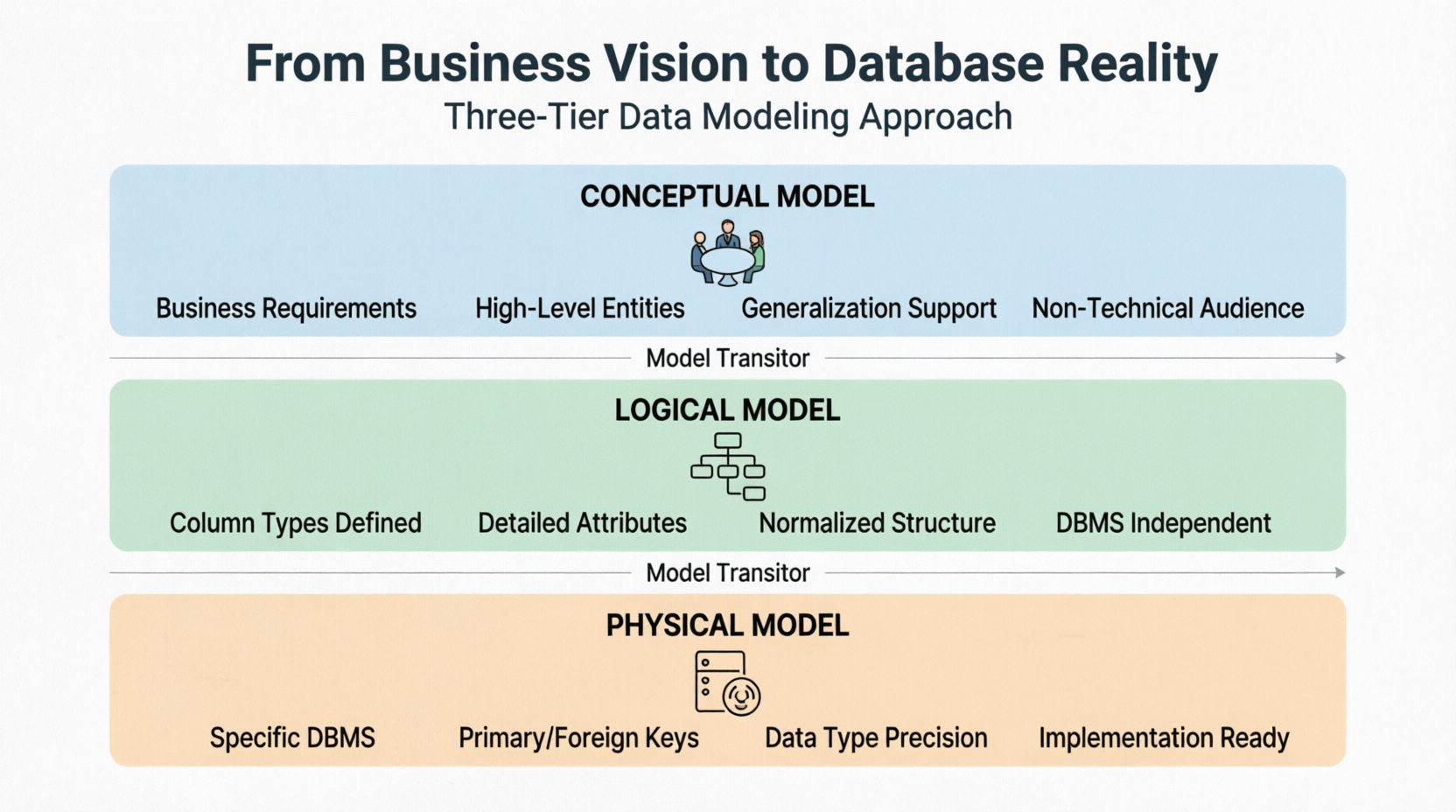
A general understanding of these three models reveals that business analysts typically use conceptual and logical models to capture the data required and produced by systems from a business perspective. In contrast, database designers refine these early designs to produce the physical model, which presents the physical database structure ready for actual database construction.
With Visual Paradigm, practitioners can draw all three types of models and progress through them seamlessly using the Model Transitor feature, ensuring consistency and traceability throughout the design process.
Conceptual Model: Capturing Business Requirements
The conceptual ERD models information gathered directly from business requirements. Entities and relationships in such ERDs are defined around the business’s needs, without considering the technical aspects of database design. The conceptual ERD represents the simplest model among the three tiers.
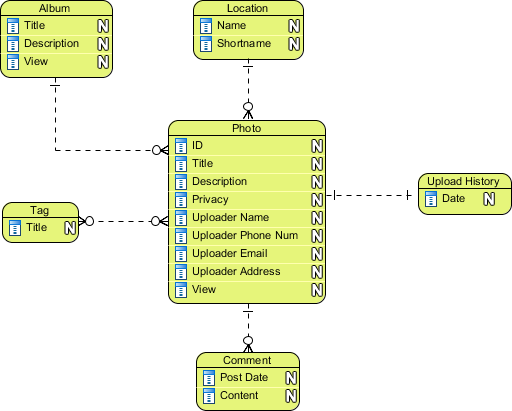
Conceptual ERD example
Important Note: Conceptual ERD supports the use of generalization in modeling the “a kind of” relationship between two entities. For instance, a Triangle is a kind of Shape. This usage mirrors generalization in UML. It is important to note that only the conceptual ERD supports generalization, making it uniquely suited for capturing hierarchical business concepts.
The conceptual model serves several critical functions:
-
Provides a high-level view understandable by non-technical stakeholders
-
Facilitates communication between business users and IT teams
-
Establishes the foundation for subsequent modeling phases
-
Identifies key business entities and their relationships without technical constraints
Logical Model: Adding Structure Without Implementation Details
The logical ERD also models information gathered from business requirements but introduces more complexity than the conceptual model. In the logical model, column types are specified, adding precision to the data structure. However, setting column types at this stage is optional and should be done primarily to aid business analysis rather than for database creation purposes.
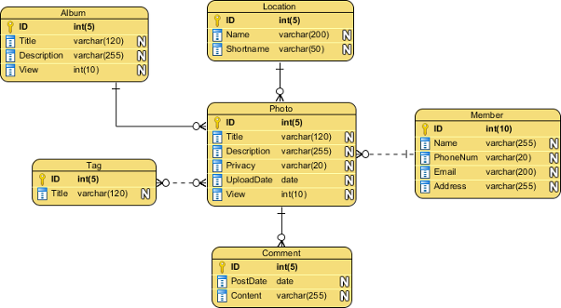
Logical ERD example
The logical model bridges the gap between abstract business concepts and technical implementation by:
-
Defining attributes for each entity with appropriate data types
-
Establishing detailed relationships between entities
-
Normalizing data structures to reduce redundancy
-
Maintaining independence from specific database management systems
At this stage, the focus remains on accurately representing business rules and data requirements without being constrained by the technical limitations of any particular DBMS.
Physical Model: The Blueprint for Database Construction
The physical ERD represents the actual design blueprint of a relational database. It illustrates how data should be structured and related within a specific Database Management System (DBMS). Consequently, it is crucial to consider the conventions and restrictions of the chosen DBMS when designing a physical ERD.
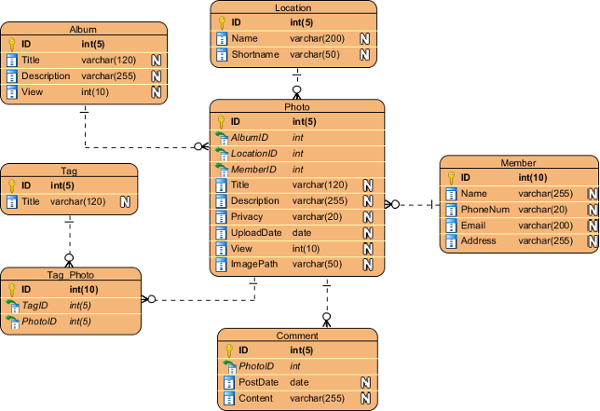
Physical ERD example
Key considerations for physical modeling include:
-
Accurate Data Types: Precise specification of data types compatible with the target DBMS
-
Naming Conventions: Avoidance of reserved words in naming entities and columns
-
Keys and Constraints: Addition of primary keys, foreign keys, and various constraints
-
Performance Optimization: Consideration of indexing strategies and storage requirements
-
DBMS-Specific Features: Leveraging unique capabilities of the chosen database system
The physical model serves as the direct precursor to database implementation, providing database administrators and developers with the exact specifications needed to build the production database.
Transitioning Between Models: Ensuring Continuity and Consistency
One of the most powerful features in modern data modeling tools is the ability to transition smoothly between different modeling levels. Model Transitor enables users to convert a logical ERD to a physical ERD while maintaining the transition relationship between models.
To perform a transition:
-
Right-click on the background of your conceptual or logical ERD
-
Select Utilities > Transit to Logical/Physical ERD… from the popup menu
-
A new ERD will be created with corresponding entities
Alternatively, users can select Transit to Logical ERD or Transit to Physical ERD from the action bar on the right side of an ERD. This allows transitioning from a conceptual ERD to logical or physical, or from a logical ERD to physical ERD.
After transitioning, designers can make modifications such as:
-
Renaming entities and columns to match technical standards
-
Adding extra entities required for implementation
-
Adjusting relationships based on DBMS constraints
-
Incorporating performance optimizations
This transition capability ensures that changes made at higher levels propagate appropriately while allowing necessary refinements at lower levels.
Best Practices for Effective Data Modeling
1. Start with Stakeholder Engagement
Begin the conceptual modeling phase by engaging extensively with business stakeholders. Ensure that all key entities and relationships are captured accurately before moving to more detailed models.
2. Maintain Traceability
Use tools that support model transitions to maintain clear traceability between conceptual, logical, and physical models. This helps in understanding why certain design decisions were made and facilitates future modifications.
3. Validate at Each Stage
Review and validate each model with appropriate stakeholders:
-
Conceptual models with business users
-
Logical models with both business analysts and technical architects
-
Physical models with database administrators and developers
4. Document Assumptions and Decisions
Maintain clear documentation of assumptions, business rules, and design decisions at each modeling level. This documentation proves invaluable during implementation and future maintenance.
5. Iterate When Necessary
Data modeling is rarely a linear process. Be prepared to iterate between levels as new requirements emerge or technical constraints are discovered.
Conclusion
The journey from business requirements to a functioning database requires careful planning and systematic progression through conceptual, logical, and physical modeling stages. Each model serves a distinct purpose and addresses the needs of different stakeholders, from business executives to database administrators.
By leveraging tools like Visual Paradigm and following best practices for model transitions, organizations can ensure that their database designs accurately reflect business needs while remaining technically sound and implementable. The ability to move seamlessly between abstraction levels while maintaining consistency is crucial for delivering successful database projects.
Understanding and properly implementing these three modeling approaches not only improves communication between business and technical teams but also reduces the risk of costly redesigns and ensures that the final database structure aligns with both current requirements and future scalability needs. As data continues to grow in strategic importance, mastering these modeling techniques becomes increasingly essential for organizations seeking to leverage their data assets effectively.
References
-
FREE Online Training – Database Design and Management: Comprehensive training resources covering database design principles and management best practices
-
Visual Paradigm on YouTube: Video tutorials and demonstrations showcasing Visual Paradigm features and data modeling techniques
-
Visual Paradigm Know-How – Tips and tricks, Q&A, solutions to users’ problems: Knowledge base containing practical tips, frequently asked questions, and solutions to common user challenges
-
Contact us if you need any help or have any suggestion: Support portal for accessing technical assistance and providing feedback on Visual Paradigm products




Comments (0)