![Free eBooks of IT [BooksOfAll]](https://www.booksofall.com/wp-content/uploads/2022/06/booksofall-logo-2.png)
A Beginner’s Guide to Conceptual, Logical, and Physical Database Design
Introduction
Imagine you’re building a house. You wouldn’t start by picking up a hammer and nails—you’d begin with conversations about what kind of home you want, then create sketches, develop detailed blueprints, and finally get to the actual construction. Data modeling follows the exact same principle, yet many software projects fail because teams jump straight into coding without proper planning.
In today’s data-driven world, databases power everything from your favorite mobile app to global financial systems. But how do we transform vague business requirements like “We need to track customer orders” into a fully functional database that can handle millions of transactions? The answer lies in a systematic three-tier approach to data modeling.
This case study walks you through the journey from abstract business concepts to concrete database implementation. Whether you’re a business analyst trying to communicate requirements, a junior developer preparing for your first database project, or a project manager overseeing a data initiative, understanding these modeling levels will transform how you approach data-driven projects.
The Three-Tier Modeling Approach: A Bird’s Eye View
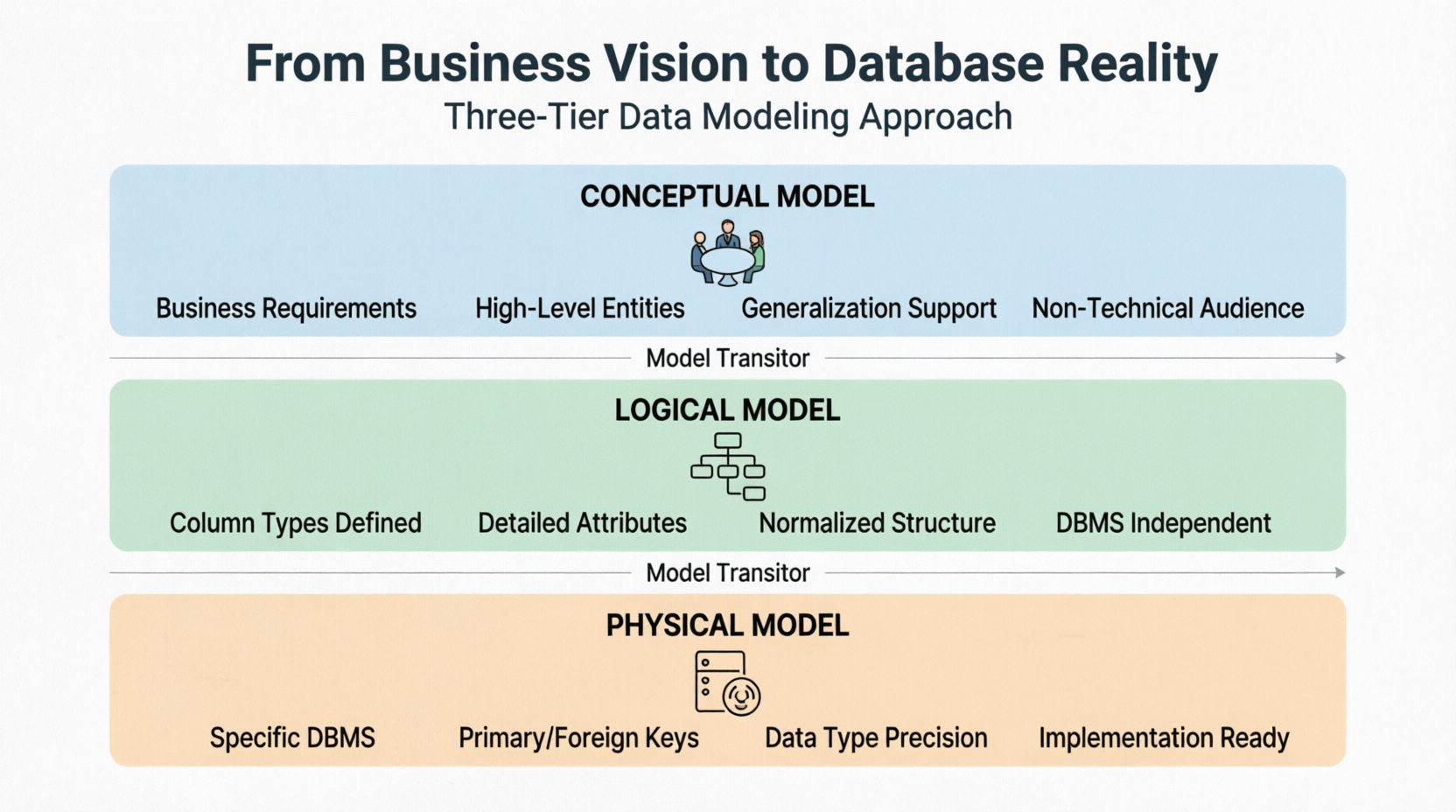
Before diving into details, let’s understand the big picture. Conceptual, logical, and physical models—often represented as Entity-Relationship Diagrams (ERD)—represent three distinct ways of looking at data within a domain. Think of them as different lenses through which we view the same information, each serving a unique purpose and audience.
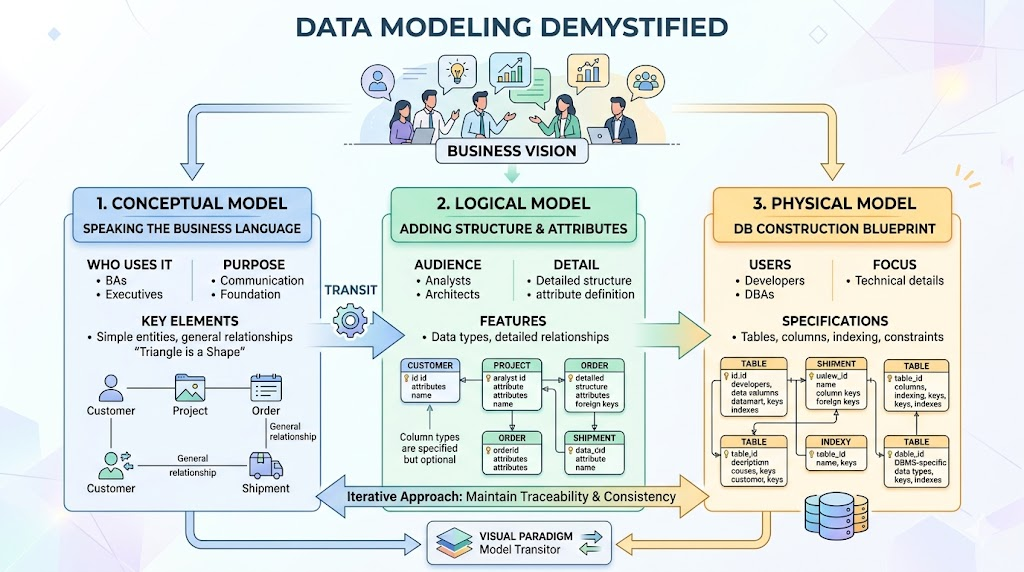
The three-tier modeling approach provides different perspectives for different stakeholders
Who Uses Each Model?
-
Business analysts typically work with conceptual and logical models to capture the data required and produced by systems from a business perspective
-
Database designers refine these early designs to produce the physical model, presenting the physical database structure ready for actual database construction
-
Developers and DBAs implement the physical model to create the actual database
Key Insight: The beauty of this approach is that it allows different stakeholders to work at their appropriate level of abstraction while maintaining consistency across all phases. Business stakeholders don’t need to understand foreign keys and indexes, and database administrators don’t need to worry about business jargon.
With tools like Visual Paradigm, practitioners can draw all three types of models and progress through them seamlessly using the Model Transitor feature, ensuring consistency and traceability throughout the design process.
Level 1: Conceptual Model – Speaking the Business Language
What It Is
The conceptual ERD models information gathered directly from business requirements. Entities and relationships are defined around the business’s needs, without considering the technical aspects of database design. This represents the simplest model among the three tiers and serves as the foundation for everything that follows.
Key Characteristics
| Feature | Description |
|---|---|
| Audience | Business stakeholders, executives, project managers |
| Focus | What data is needed, not how it will be stored |
| Complexity | Simple, non-technical language |
| Elements | Main entities and their relationships |
| Special Feature | Supports generalization (e.g., “Triangle is a kind of Shape”) |
Visual Example
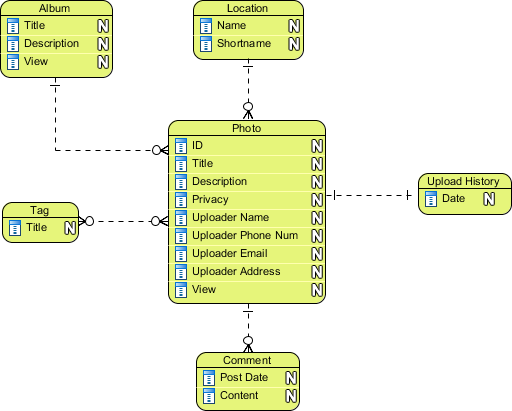
Conceptual ERD example
Critical Functions
The conceptual model serves several vital purposes:
-
Provides a high-level view understandable by non-technical stakeholders
-
Facilitates communication between business users and IT teams
-
Establishes the foundation for subsequent modeling phases
-
Identifies key business entities and their relationships without technical constraints
Important Note on Generalization
Conceptual ERD uniquely supports the use of generalization in modeling the “a kind of” relationship between two entities. For instance, a Triangle is a kind of Shape. This usage mirrors generalization in UML. It is important to note that only the conceptual ERD supports generalization, making it uniquely suited for capturing hierarchical business concepts.
Tips & Tricks for Conceptual Modeling
-
Start with nouns and verbs: In requirements documents, entities are usually nouns (Customer, Order, Product), and relationships are verbs (places, contains, ships)
-
Don’t get technical: Resist the temptation to think about primary keys, foreign keys, or data types at this stage—focus on what the business needs to track
-
Validate with stakeholders: Before moving forward, review the conceptual model with business users to ensure nothing is missing
-
Keep it simple: A good conceptual model should fit on a single page and be understood by anyone in the organization
Level 2: Logical Model – Adding Structure Without Implementation Details
What It Is
The logical ERD also models information gathered from business requirements but introduces more complexity than the conceptual model. Think of it as the bridge between business needs and technical reality.
Key Characteristics
| Feature | Description |
|---|---|
| Audience | Business analysts, data architects, technical leads |
| Focus | Detailed data structure, independent of any DBMS |
| Complexity | Moderate, includes attributes and data types |
| Elements | Entities, attributes with types, detailed relationships |
| Optional Feature | Column types can be specified to aid analysis |
Visual Example
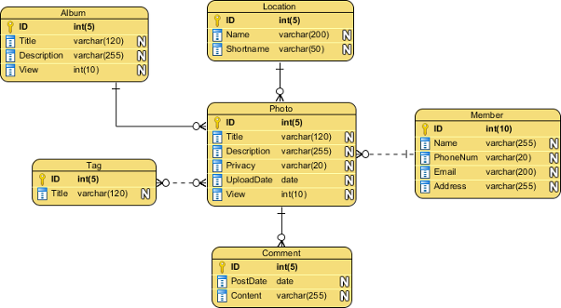
Logical ERD example
Key Features of Logical Modeling
In the logical model, column types are specified, adding precision to the data structure. However, setting column types at this stage is optional and should be done primarily to aid business analysis rather than for database creation purposes.
The logical model bridges the gap between abstract business concepts and technical implementation by:
-
Defining attributes for each entity with appropriate data types
-
Establishing detailed relationships between entities
-
Normalizing data structures to reduce redundancy
-
Maintaining independence from specific database management systems
Tips & Tricks for Logical Modeling
-
Know your business rules: This is where you capture cardinality (one-to-one, one-to-many, many-to-many) and optionality (whether a relationship is required)
-
Normalize without over-normalizing: Aim for Third Normal Form (3NF) but remember that sometimes denormalization is acceptable for certain business scenarios
-
Use meaningful attribute names: Names should be descriptive enough for business users to understand
-
Think about data integrity: Consider what constitutes valid data—for example, an order date should always be in the past
Level 3: Physical Model – The Blueprint for Database Construction
What It Is
The physical ERD represents the actual design blueprint of a relational database. It illustrates how data should be structured and related within a specific Database Management System (DBMS). This is where theory meets reality.
Key Characteristics
| Feature | Description |
|---|---|
| Audience | Database administrators, developers |
| Focus | Technical implementation details |
| Complexity | High, includes technical specifications |
| Elements | Tables, columns with specific data types, constraints |
| Critical | Must follow DBMS conventions and restrictions |
Visual Example
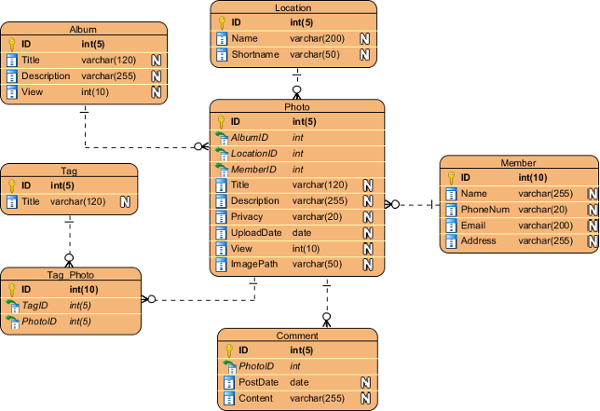
Physical ERD example
Key Considerations for Physical Modeling
1. Accurate Data Types
Precise specification of data types compatible with the target DBMS is essential. For example, MySQL’s VARCHAR(255) vs. PostgreSQL’s TEXT, or DATE vs. TIMESTAMP considerations.
2. Naming Conventions
Avoid reserved words in naming entities and columns. Be consistent with naming patterns (camelCase, snake_case, etc.) and ensure names are clear and descriptive.
3. Keys and Constraints
-
Primary Keys: Uniquely identify each record
-
Foreign Keys: Maintain referential integrity between tables
-
Unique Constraints: Prevent duplicate values
-
Check Constraints: Validate data against business rules
-
Default Values: Provide sensible defaults where appropriate
4. Performance Optimization
-
Indexing Strategies: Determine which columns need indexes for query performance
-
Storage Requirements: Consider data types that optimize storage
-
Partitioning: Plan for large tables that may need to be split
-
Caching: Consider strategies for frequently accessed data
5. DBMS-Specific Features
Leverage unique capabilities of the chosen database system:
-
MySQL: InnoDB storage engine features
-
PostgreSQL: Advanced indexing and JSON support
-
SQL Server: Full-text search capabilities
-
Oracle: Advanced partitioning options
Tips & Tricks for Physical Modeling
-
Know your DBMS: Each database system has quirks and optimizations—learn them before designing
-
Think about growth: Consider not just current requirements but future data volume
-
Index wisely: Too many indexes slow down writes, too few slow down reads
-
Document your decisions: Why did you choose a particular data type or indexing strategy?
-
Test with realistic data: If possible, simulate real-world data volumes to test performance
Transitioning Between Models: Ensuring Continuity and Consistency
Why Transitions Matter
One of the most powerful features in modern data modeling tools is the ability to transition smoothly between different modeling levels. This ensures that changes made at higher levels propagate appropriately while allowing necessary refinements at lower levels.
How to Perform a Transition
Method 1: Using the Context Menu
-
Right-click on the background of your conceptual or logical ERD
-
Select Utilities > Transit to Logical/Physical ERD… from the popup menu
-
A new ERD will be created with corresponding entities
Method 2: Using the Action Bar
-
Select Transit to Logical ERD or Transit to Physical ERD from the action bar on the right side of an ERD
-
This allows transitioning from a conceptual ERD to logical or physical, or from a logical ERD to physical ERD
What Happens During Transition
The Model Transitor enables users to convert a logical ERD to a physical ERD while maintaining the transition relationship between models. After transitioning, designers can make modifications such as:
-
Renaming entities and columns to match technical standards
-
Adding extra entities required for implementation
-
Adjusting relationships based on DBMS constraints
-
Incorporating performance optimizations
Tips & Tricks for Model Transitions
-
Don’t assume automation is perfect: While tools can help, always review the results of any transition
-
Add value at each level: Don’t just replicate the previous model—add details appropriate to each level
-
Maintain traceability: Document why certain decisions were made at each level
-
Be prepared to iterate: You might need to go back to a higher level if technical constraints require significant changes
Best Practices for Effective Data Modeling
1. Start with Stakeholder Engagement
Begin the conceptual modeling phase by engaging extensively with business stakeholders. Ensure that all key entities and relationships are captured accurately before moving to more detailed models.
Pro Tip: Conduct workshops with both business and technical stakeholders together. This creates shared understanding and reduces communication gaps early.
2. Maintain Traceability
Use tools that support model transitions to maintain clear traceability between conceptual, logical, and physical models. This helps in understanding why certain design decisions were made and facilitates future modifications.
Pro Tip: Create a decision log that captures the reasoning behind key design choices at each level.
3. Validate at Each Stage
Review and validate each model with appropriate stakeholders:
-
Conceptual models with business users
-
Logical models with both business analysts and technical architects
-
Physical models with database administrators and developers
Pro Tip: Create validation checklists for each level to ensure completeness and consistency.
4. Document Assumptions and Decisions
Maintain clear documentation of assumptions, business rules, and design decisions at each modeling level. This documentation proves invaluable during implementation and future maintenance.
Pro Tip: Use a collaborative documentation tool that allows team members to contribute and review decisions.
5. Iterate When Necessary
Data modeling is rarely a linear process. Be prepared to iterate between levels as new requirements emerge or technical constraints are discovered.
Pro Tip: Schedule regular review sessions to ensure the model remains aligned with evolving business needs.
6. Consider the Bigger Picture
Think beyond just storing data:
-
How will data be retrieved and analyzed?
-
What security and privacy requirements exist?
-
How will the database evolve over time?
-
What integration points exist with other systems?
7. Use the Right Tools
Modern data modeling tools offer powerful features for creating, transitioning, and maintaining models. Invest time in learning your tool’s capabilities.
Pro Tip: Many tools offer free trials or educational licenses—take advantage of these to find what works best for your team.
Common Mistakes to Avoid
1. Skipping Levels
The Mistake: Jumping directly from business requirements to physical design without creating conceptual and logical models.
Why It’s a Problem: Important business rules may be missed, and the resulting design may not properly reflect business needs.
The Solution: Dedicate time to each modeling level, even if you think you know what the final design should look like.
2. Overcomplicating Early Models
The Mistake: Including too much detail in conceptual models, confusing business stakeholders with technical terms.
Why It’s a Problem: Business users can’t validate what they don’t understand, leading to misaligned expectations.
The Solution: Keep conceptual models simple and focused on business concepts.
3. Ignoring Performance at the Physical Level
The Mistake: Creating a physical model that works but performs poorly under realistic loads.
Why It’s a Problem: Database performance issues can cripple an otherwise well-designed system.
The Solution: Consider indexing, partitioning, and other performance optimizations during physical modeling.
4. Treating Models as Static
The Mistake: Assuming that once models are created, they never need to change.
Why It’s a Problem: Business requirements evolve, and the model must evolve with them.
The Solution: Treat data models as living documents that are regularly reviewed and updated.
5. Neglecting Data Governance
The Mistake: Not considering who owns data, who can access it, and how it should be protected.
Why It’s a Problem: Data breaches, compliance violations, and data quality issues can result.
The Solution: Incorporate data governance considerations into all modeling levels.
Real-World Case Study: E-Commerce Platform Transformation
Background: A fast-growing e-commerce company was struggling with their monolithic database architecture. Customer data was scattered across multiple tables, order processing was slow, and reporting was nearly impossible.
Challenge: The company needed to redesign their database to support:
-
10x expected growth in users
-
Real-time inventory management
-
Advanced analytics and reporting
-
Integration with third-party systems
Solution Implementation:
Conceptual Phase:
-
Stakeholder workshops identified key business entities: Customers, Orders, Products, Suppliers, and Inventory
-
Relationships were defined based on business rules: Customers place Orders containing Products
-
Generalization was used for Products (Physical Products vs. Digital Products)
Logical Phase:
-
Each entity was detailed with attributes (Customer: name, email, shipping_address, etc.)
-
Data types were assigned (Email as VARCHAR(255), Order_Date as DATE)
-
Relationships were normalized to Third Normal Form
-
Business rules were captured (Orders must have at least one Product)
Physical Phase:
-
MySQL was selected as the target DBMS
-
Tables were created with appropriate data types and constraints
-
Indexing strategies were developed for frequently queried columns
-
Partitioning was implemented for the Orders table (by date)
Transition Process:
The team used Visual Paradigm’s Model Transitor to move from conceptual to logical to physical models, ensuring consistency and saving significant development time.
Results:
-
Database query times reduced by 70%
-
New features could be developed in weeks instead of months
-
Reporting became instantaneous rather than overnight batch jobs
-
The company successfully scaled to 5x their original user base
Key Lessons:
-
Each modeling level served a unique and necessary purpose
-
Early stakeholder engagement prevented costly rework
-
Performance considerations during physical modeling were critical
-
The transition tools maintained consistency across all levels
Conclusion
The journey from business requirements to a functioning database requires careful planning and systematic progression through conceptual, logical, and physical modeling stages. Each model serves a distinct purpose and addresses the needs of different stakeholders, from business executives to database administrators.
Key Takeaways:
-
Don’t skip levels – Each modeling tier builds upon the previous one and serves a unique purpose
-
Know your audience – Conceptual models for business users, logical for architects, physical for developers and DBAs
-
Use the right tools – Modern modeling tools can significantly streamline the process
-
Stay flexible – Models should evolve as requirements and technology change
-
Think beyond implementation – Consider performance, security, and maintainability at every level
By leveraging tools like Visual Paradigm and following best practices for model transitions, organizations can ensure that their database designs accurately reflect business needs while remaining technically sound and implementable. The ability to move seamlessly between abstraction levels while maintaining consistency is crucial for delivering successful database projects.
Understanding and properly implementing these three modeling approaches not only improves communication between business and technical teams but also reduces the risk of costly redesigns and ensures that the final database structure aligns with both current requirements and future scalability needs. As data continues to grow in strategic importance, mastering these modeling techniques becomes increasingly essential for organizations seeking to leverage their data assets effectively.
Remember: A well-designed database is like a well-designed building—invisible when it works perfectly, but absolutely critical to the structure’s success. Take the time to plan properly, and your data will support your business for years to come.
References
- FREE Online Training – Database Design and Management: Comprehensive training resources covering database design principles and management best practices for beginners and experienced professionals alike
- Visual Paradigm on YouTube: Video tutorials and demonstrations showcasing Visual Paradigm features and data modeling techniques, perfect for visual learners seeking practical guidance
- Visual Paradigm Know-How – Tips and tricks, Q&A, solutions to users’ problems: Knowledge base containing practical tips, frequently asked questions, and solutions to common user challenges encountered during data modeling projects
- Contact us if you need any help or have any suggestion: Support portal for accessing technical assistance and providing feedback on Visual Paradigm products, ensuring you have help when you need it most



Comments (0)