![Free eBooks of IT [BooksOfAll]](https://www.booksofall.com/wp-content/uploads/2022/06/booksofall-logo-2.png)
Mastering BPMN Loop Markers: Automating Repetitive Tasks with Visual Paradigm
In the realm of Business Process Model and Notation (BPMN), efficiency and precision are paramount. One of the most powerful features for handling repetitive logic without cluttering your diagram is the Loop Marker. This tutorial will guide you through the architecture of looped tasks, the logic behind them, and how to implement them effectively using Visual Paradigm.
What is a Loop Marker?
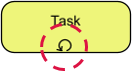
A Loop Marker is a specific type of Task Marker used within a BPMN diagram to indicate that an activity or a sub-process is designed to execute multiple times. Visually, it appears as a circular arrow located at the bottom-center of the task rectangle.
Without this marker, a task executes exactly once. With the loop marker, the task becomes an iterative engine, running until a specific logical condition determines that the repetition is no longer necessary.
Understanding the Mechanics of Repetition
When you apply a loop marker to a task, you are fundamentally changing the flow control of the process. The system does not simply move to the next step; it enters a cycle. This cycle is governed by a boolean condition (a statement that evaluates to true or false).
There are two primary ways to evaluate this condition, determining when the loop stops:
- While Loop (Pre-Check): The condition is validated before the activity starts. If the condition is false, the task never executes. If true, it runs, and then re-evaluates the condition.
- Do-While Loop (Post-Check): The activity executes at least once before the condition is checked. This is essential for scenarios where an action must happen immediately, followed by a check to see if it needs to happen again.
The loop persists strictly until the defined exit condition becomes true. Once the condition is met, the loop terminates, and the process flow continues to the subsequent task.
Real-World Scenario: Vendor Invoice Follow-up
To visualize this, imagine an automated procurement system managing vendor invoices. The workflow is as follows:
- The system sends a reminder email to a vendor.
- A Loop Marker is attached to this email task.
- The loop condition checks: “Has the invoice been uploaded?”
- Scenario A (Invoice Missing): The system finds the invoice is not uploaded. The condition to stop is false. The system loops back and sends another reminder after 24 hours.
- Scenario B (Invoice Received): The system finds the invoice is uploaded. The condition to stop becomes true. The loop breaks, and the process moves to the “Record Payment” step.
Implementation in Visual Paradigm
Visual Paradigm is a robust BPMN tool that simplifies the implementation of complex logic. You do not need to write raw code to create a loop; instead, you utilize the visual interface and the property editor.
Step-by-Step Configuration
- Add a Task: Drag a standard Task shape onto your diagram.
- Apply the Loop Marker: Right-click on the Task element. Navigate to the menu options: Markers > Loop. You will immediately see the circular arrow appear on the task.
- Define the Condition: With the task still selected, open the Properties pane (usually found on the right-hand side of the interface). Look for the section labeled “Loop Condition”.
- Set the Logic: Click the button to open the expression editor. Here, you can define your boolean logic using your process data variables. For example, you might set the condition to
invoiceStatus == 'Received'.
Why Use Loop Markers?
Using a Loop Marker is superior to drawing manual “back-paths” (arrows connecting a task back to its own start) for several reasons:
- Readability: The circular arrow is a standard symbol. It allows stakeholders to instantly recognize repetition logic without tracing complex lines across the canvas.
- Maintainability: Changing the logic requires only editing the property expression, rather than redrawing arrows and connectors.
- Standard Compliance: It adheres strictly to BPMN 2.0 specifications, ensuring that the diagram is valid for automated execution engines.
By mastering the Loop Marker, you transform static diagrams into dynamic, executable models that handle real-world complexity with grace.