![Free eBooks of IT [BooksOfAll]](https://www.booksofall.com/wp-content/uploads/2022/06/booksofall-logo-2.png)
Defining Business Process Challenges: A Step-by-Step Guide with Visual Paradigm
Struggling to articulate the core issue your team faces? A clear problem statement is the foundation of any successful project, yet crafting one that’s both concise and comprehensive can be surprisingly difficult. That’s where Visual Paradigm‘s AI-Powered Problem Description Generator comes in. This online tool simplifies the process, guiding you through a structured workflow to create a professional problem statement for your business process analysis. It’s an excellent solution for project managers, business analysts, and consultants who need to quickly define a challenge and align stakeholders. The tool leverages templates and AI to ensure your description is clear, focused, and free of ambiguity. In this guide, we’ll walk you through the entire process, from selecting the right template to receiving AI-powered feedback, using the Visual Paradigm platform.
Quick summary
-
Visual Paradigm’s AI-Powered Problem Description Generator helps users create clear, structured problem statements.
-
It uses a template-driven approach to guide users through the process.
-
Users can customize templates with specific variables and see a live preview.
-
An AI review feature provides instant feedback on clarity and completeness.
-
The tool is designed for professionals like project managers and business analysts.
Step 1: Choose the Right Template
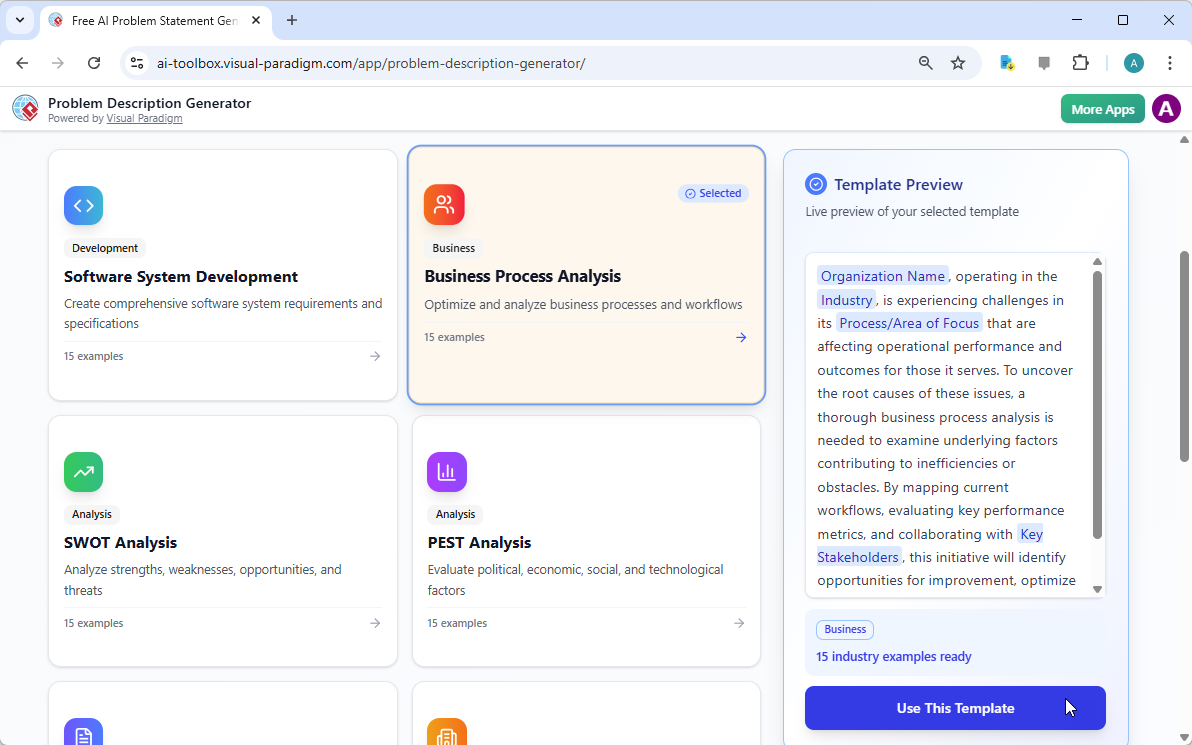
Every great project starts with a clear understanding of the problem. The first step in the Visual Paradigm tool is to select a template that matches your project’s focus. This isn’t a one-size-fits-all approach; different challenges require different frameworks. The tool offers a variety of templates, such as “Software System Development,” “SWOT Analysis,” and “PEST Analysis.” For a project focused on improving internal operations, the “Business Process Analysis” template is the ideal choice. This template is specifically designed to help you articulate challenges related to workflows, inefficiencies, and stakeholder impacts. By selecting the correct template, you ensure your problem statement is structured correctly from the outset. The tool’s interface makes this selection intuitive, presenting each template with a clear description and a preview of its structure. Choosing the right template is the first critical step in ensuring your problem description is relevant and effective.
Step 2: Fill in Your Project Details
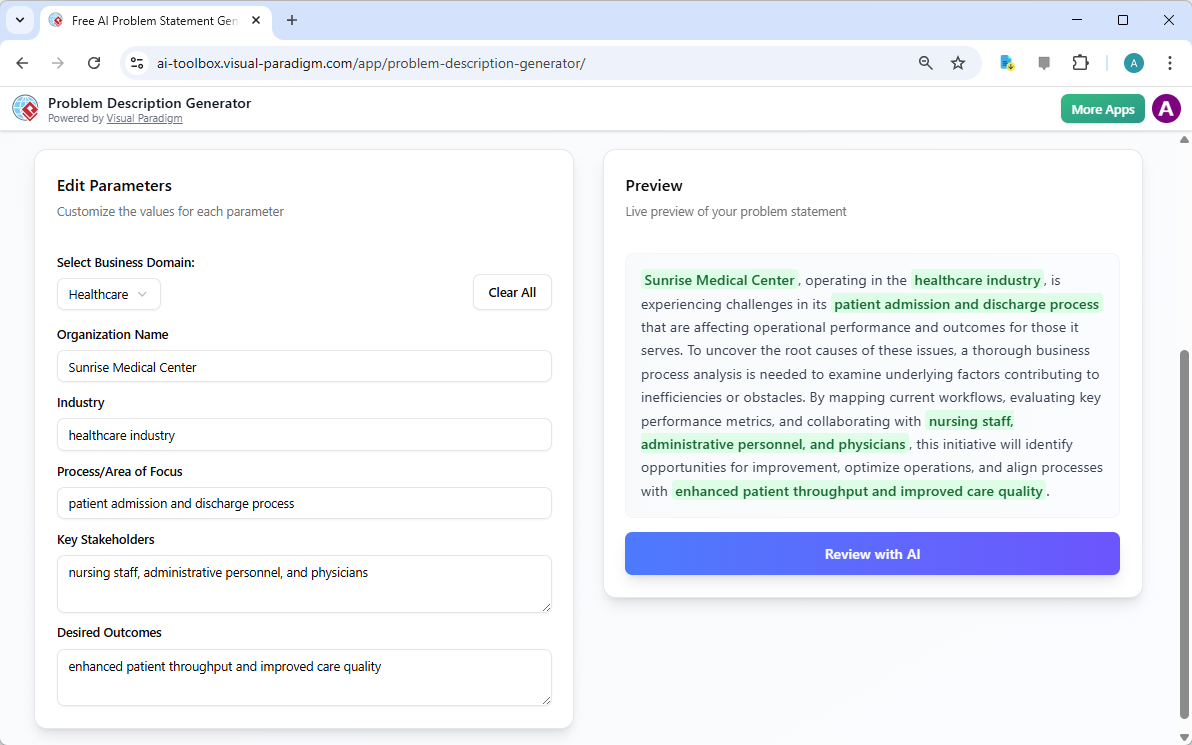
After selecting your template, you move to the core of the process: filling in the variables. The “Edit Parameters” section is where you input the specific details of your project. This is where your unique context comes into play. For example, if you’re using the “Business Process Analysis” template for a healthcare organization, you would enter your organization’s name, the industry, the specific process you’re analyzing, the key stakeholders involved, and your desired outcomes. The tool is designed for ease of use; as you type, a live preview on the right side of the screen updates in real-time. This instant feedback is incredibly powerful, allowing you to see how your inputs are shaping the final narrative. You can see the variables highlighted in green within the preview, making it easy to track what information is being used. This real-time visualization helps you refine your inputs for maximum impact. The ability to see your problem statement evolve as you type is a game-changer for clarity and focus.
Step 3: Get AI-Powered Feedback
Once you’ve crafted your problem statement, the final and most valuable step is to get it reviewed by AI. Clicking the “Review with AI” button triggers a powerful analysis. The AI doesn’t just check for grammar; it evaluates the statement for clarity, completeness, logical flow, and adherence to best practices. The feedback is presented in a clear, user-friendly modal. It provides a status update, such as “OK,” indicating the statement is strong. The AI Analysis section offers specific, constructive feedback. For instance, it might note that the statement is clear and maintains a professional tone, or it might suggest minor stylistic refinements for conciseness. Most importantly, the tool provides an “Optimized Statement” version, which incorporates the AI’s suggestions. This gives you a polished, professional version of your problem description ready for use. This AI review acts as a virtual expert editor, helping you catch blind spots and ensure your message is powerful and impactful. Getting AI feedback is like having a seasoned consultant review your work, ensuring it meets the highest standards.

Why This Tool Matters
Defining a problem is often the most challenging part of any initiative. A vague or poorly defined problem leads to misaligned efforts and failed projects. This tool directly addresses that challenge by providing a structured, guided approach. It reduces ambiguity by forcing you to consider all critical aspects of the problem: the organization, the process, the stakeholders, and the desired outcomes. The AI review adds an extra layer of quality assurance, ensuring your problem statement is not just complete, but also clear and effective. This process saves time, improves communication, and increases the chances of project success. Whether you’re a seasoned project manager or a student learning the ropes, this AI-powered tool makes it easier to start any project on the right foot.
Start Defining Your Project’s Core Challenge Today
Don’t let a poorly defined problem hold your project back. The Visual Paradigm AI-Powered Problem Description Generator is a powerful tool to help you articulate the core challenge with clarity and confidence. By following a simple, guided process, you can create a professional problem statement that aligns your team and sets the stage for success. The tool’s template-driven approach, live preview, and AI review features make it an essential resource for anyone involved in project management, business analysis, or process improvement. Ready to transform your project planning? Try the AI-Powered Problem Description Generator now. Click here to try it now.
Related Links
-
AI Problem Description Generator – Visual Paradigm: Crafting a precise and professional problem description is the first critical step in any successful project. The AI-Powered Problem Description Generator in Visual Paradigm empowers you to articulate your project’s challenges and objectives with unparalleled clarity and efficiency.
-
Free AI-Powered Problem Description Generator – Visual Paradigm …: Why Our AI Problem Description Generator is Your Secret Weapon. Eliminate Writer’s Block. Get a head start with pre-filled templates tailored to your project type and business domain, so you never have to start from scratch.
-
What is an AI-Powered Problem Description Generator and How Can…: s the AI-Powered Problem Description Generator easy to use for beginners? How does this tool fit into the broader Visual Paradigm ecosystem? Ready to Try Problem Description Generator?…
-
Comprehensive Tutorial: Crafting Perfect Problem Descriptions with the …: Introduction A well-defined problem description is the cornerstone of any successful project or solution. However, articulating problems clearly and concisely can be challenging. …
-
Free AI Problem Description Generator with AI Review – Visual Paradigm …: Meta Description : Craft clear, concise, and impactful problem descriptions with our free AI tool. Select templates, fill variables, and get AI-driven feedback for perfect problem statements.
-
Crafting Project Problem Descriptions with Ease – Visual Paradigm Guides: The Problem Description Generator is a powerful tool that helps you create professional, tailored problem descriptions for your projects, whether in software development, business analysis, or enterprise architecture.
-
AI Problem Description Generator Examples – Sample AI Challenge …: Explore examples generated by the AI Problem Description Generator to better understand how to define and communicate AI challenges effectively.



Comments (0)