Mastering AI-Driven Gantt Charts: Diagram as Code Architecture with VPasCode
In the evolving landscape of project management, the friction between creative planning and rigid scheduling has long been a challenge. Traditionally, Gantt charts were static visual artifacts—difficult to update without manual drag-and-drop actions. However, a paradigm shift is occurring through the integration of Diagram-as-Code and Artificial Intelligence. This tutorial explores the system architecture behind Visual Paradigm’s VPasCode engine, demonstrating how it transforms natural language inputs into robust, version-controlled project plans.
The Core Architecture: From Chat to Code
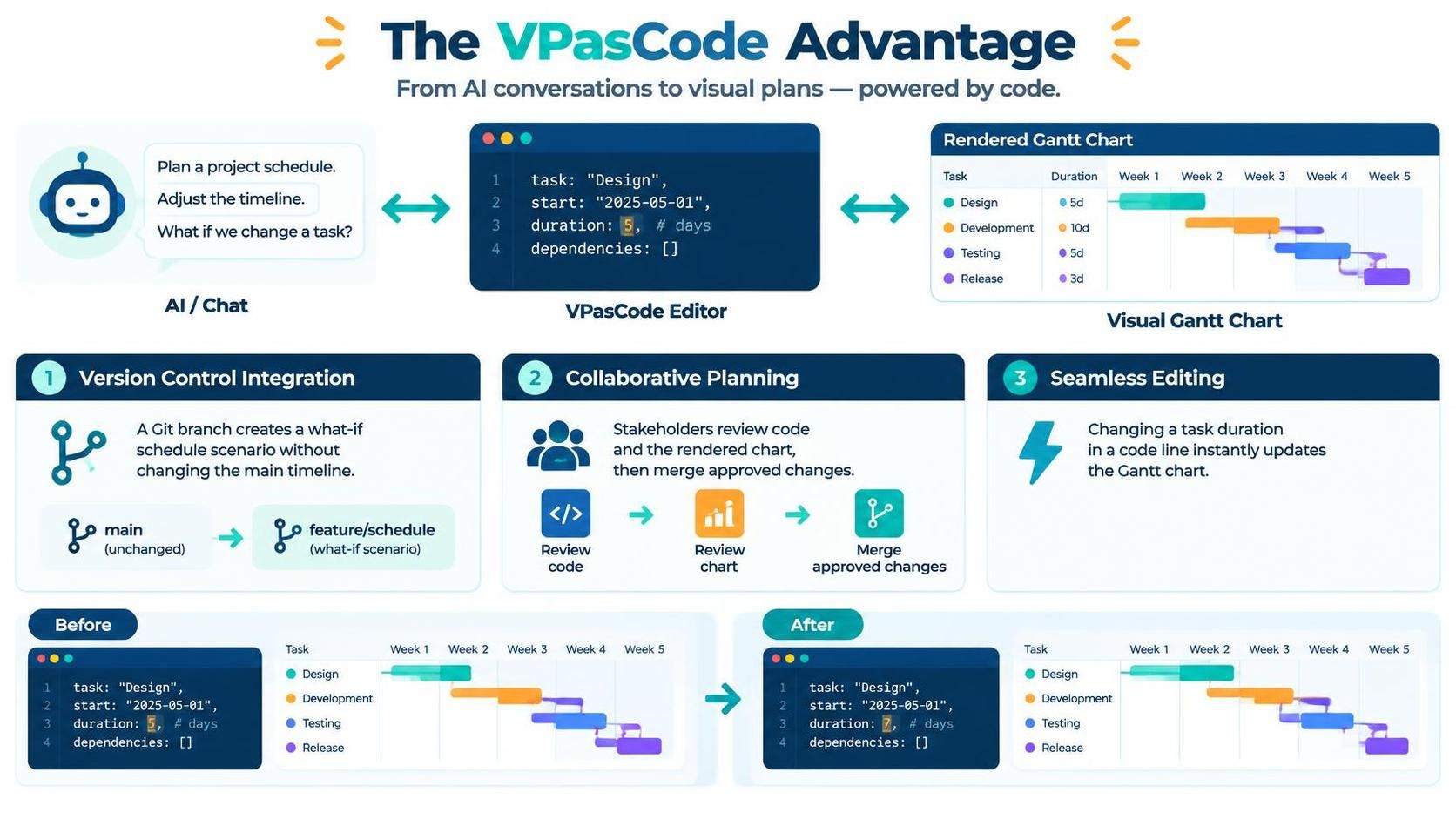
The foundation of this modern workflow is the VPasCode engine. It acts as a critical bridge, allowing AI to “speak” the language of diagrams. Instead of relying on proprietary binary formats that are hard to diff or version, the system treats project plans as text files. This enables the convergence of natural language interfaces and rigorous engineering principles.
The architecture follows a distinct three-stage pipeline:
- AI/Chat Interface: The user initiates the process by conversing with an AI Chatbot. The user provides high-level instructions, such as “Plan a project schedule” or “Adjust the timeline.”
- VPasCode Editor: The AI translates these natural language commands into executable code. This code is not just a representation but the source of truth for the project data.
- Visual Gantt Chart: The VPasCode engine renders the code into a visual, interactive Gantt chart, displaying weeks, durations, and task dependencies.
Understanding the Modeling Syntax
To leverage this system effectively, one must understand the underlying modeling syntax. While the user interacts with an AI, the system operates on a structure similar to PlantUML or Mermaid. The code defines the lifecycle of a project through specific attributes: task, start, duration, and dependencies.
Consider the following example of how a project plan is structured within the VPasCode Editor:
task: "Design",
start: "2025-05-01",
duration: 5, # days
dependencies: []
In this snippet, we see a declarative approach to project management. The task field identifies the work, while duration defines the scope in days. The dependencies array allows for complex linking of tasks, ensuring logical flow without manual connector drawing.
Key Benefits: Version Control and Collaboration
The true power of this architecture is revealed when moving beyond simple rendering into the realm of engineering practices. By treating the Gantt chart as code, Visual Paradigm unlocks capabilities standard in software development but rare in project planning.
1. Version Control Integration (Git)
Because the project plan is text-based, teams can utilize Git to manage project plans. This allows for a “what-if” scenario analysis. A team member can branch off a plan to test a new schedule without affecting the main timeline. If the scenario fails, the change is discarded; if successful, it can be merged back to the main branch.
git checkout -b feature/schedule-update
git commit -m "Updated design phase duration"
git push origin feature/schedule-update
2. Collaborative Planning
Traditional project management often suffers from “version hell” where multiple stakeholders edit the same file, leading to conflicts. In the VPasCode environment, multiple stakeholders can review the code or the rendered chart simultaneously. Changes are merged and reviewed, fostering a transparent planning environment where every modification is tracked and auditable.
Seamless Editing and Real-Time Updates
One of the most significant usability improvements offered by the VPasCode Advantage is the elimination of manual canvas manipulation. In traditional tools, changing a task duration requires finding the correct bar, dragging the edge, and hoping the dependent tasks align correctly. With VPasCode, if you want to change the duration of a task, you simply edit the code line, and the entire chart updates instantly.
Conclusion
Gantt Chat represents a convergence of natural language interfaces and rigorous engineering principles. By leveraging the power of Diagram-as-Code, Visual Paradigm has created a tool that is not only fast but also robust, versionable, and collaborative. Whether you are managing a simple website launch or a complex enterprise rollout, this modern, AI-driven pathway offers a new standard for project success.