Demystifying Software Architecture: Mermaid, VPasCode, and AI Diagrams
In the realm of modern software engineering and product management, the ability to visualize complex systems is a critical skill. Whether you are architecting a distributed system, defining a user journey, or planning a release schedule, your diagrams serve as the universal language that bridges the gap between technical constraints and business goals.
However, the traditional methods of diagramming often present a significant bottleneck. Drag-and-drop tools, while intuitive for novices, can become cumbersome for complex architectures. They are often rigid, difficult to modify quickly, and notoriously hard to integrate into version control systems like Git. This is where the paradigm of “Diagram as Code” comes into play, specifically utilizing tools like Mermaid, and how platforms like Visual Paradigm VPasCode are revolutionizing this workflow with AI assistance.
The Power of Text-Based Diagramming
At the core of this workflow is Mermaid, a JavaScript-based tool that allows you to create diagrams and charts using Markdown-inspired text definitions. Instead of manually drawing boxes and arrows, you write a simple text script that describes the relationships and flow of your system.
This approach offers three distinct advantages over traditional graphical tools:
- Speed and Efficiency: Writing text is significantly faster than dragging and dropping nodes, especially for complex structures.
- Flexibility: Changing a relationship or updating a label is as simple as editing a line of text.
- Version Control: Since the diagram is plain text, it plays nicely with Git, allowing for meaningful diffs, branch management, and collaboration without binary file conflicts.
Understanding the Syntax and Architecture
To understand how VPasCode and AI generation work, we must first grasp the underlying syntax. Mermaid supports several types of diagrams, including flowcharts, sequence diagrams, and Gantt charts. Let’s break down the logic behind a few common architectural patterns.
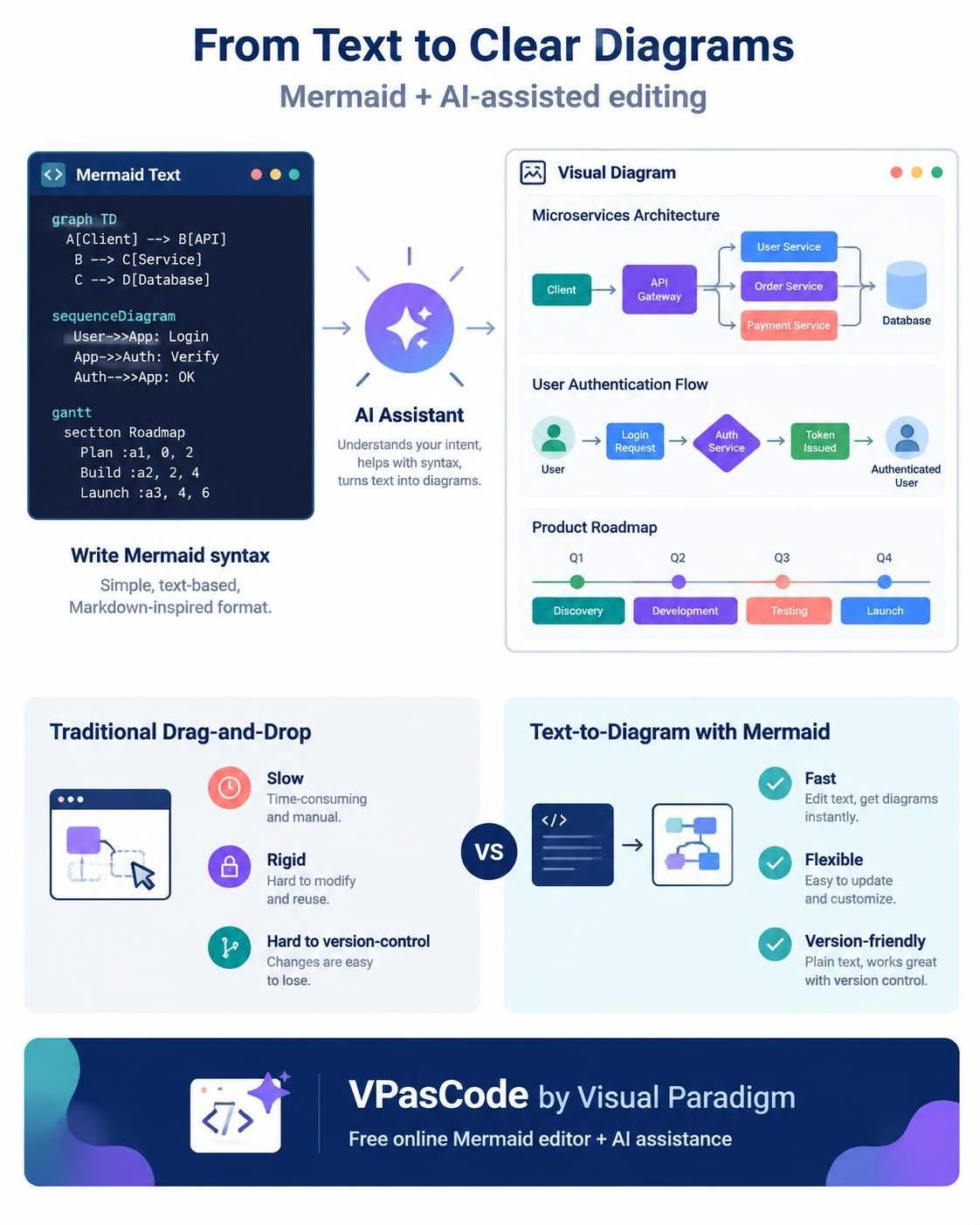
1. Microservices Architecture (Flowchart)
When designing a backend architecture, clarity is key. A typical flowchart in Mermaid uses nodes to represent services and edges to represent data flow.
graph TD
    A[Client] --> B[API Gateway]
    B --> C[User Service]
    B --> D[Order Service]
    B --> E[Payment Service]
    C --> F[(Database)]
    D --> F
    E --> F
In this snippet, graph TD defines a top-down graph. The nodes (e.g., A[Client]) are defined with a unique identifier and a label. The arrows (-->) define the direction of the flow. In a complex system, you might use subgraphs to group related services, visually separating the “User Domain” from the “Order Domain.”
2. User Authentication Flow (Sequence Diagram)
While flowcharts show static architecture, sequence diagrams illustrate dynamic behavior over time. This is crucial for understanding authentication protocols like OAuth or JWT.
sequenceDiagram
    participant User
    participant App
    participant Auth

    User->>App: Login Request
    App->>Auth: Verify Credentials
    Auth-->>App: Authentication OK
    App-->>User: Token Issued
Here, the vertical lines represent the “lifelines” of the participants (User, App, Auth). The horizontal arrows indicate the messages being passed. Solid arrows typically represent synchronous calls, while dashed arrows often represent asynchronous responses.
3. Product Roadmap (Gantt Chart)
For product managers, Mermaid is not just for developers. Gantt charts allow you to visualize timelines and dependencies.
gantt
    title Product Roadmap
    dateFormat  YYYY-MM-DD
    section Discovery
    Research      :a1, 2023-01-01, 30d
    section Build
    Development   :a2, after a1, 60d
    Testing       :a3, after a2, 30d
This syntax allows you to define sections and tasks with start dates and durations, automatically calculating dependencies.
The AI Revolution: From Intent to Diagram
While the text-based approach is powerful, writing the syntax from scratch can have a steep learning curve. This is where the integration of AI, as seen in Visual Paradigm VPasCode, transforms the experience. The AI acts as a bridge between your natural language intent and the precise syntax required by Mermaid.
Instead of memorizing syntax rules, you can simply describe the architecture you need. For example, you might prompt the AI: “Create a microservices architecture diagram with a client, an API gateway, and three backend services connecting to a database.”
The AI then generates the clean, syntactically correct Mermaid code, which is immediately rendered into a professional-grade visual diagram. This eliminates the friction of syntax errors and allows you to focus entirely on the system logic and design.
Comparing Workflows: Traditional vs. AI-Assisted
The shift to AI-assisted text-based modeling represents a fundamental change in how we approach documentation.
The Traditional Struggle: In a standard drag-and-drop environment, creating a complex diagram is a manual, time-consuming process. Moving a single node often requires manually redrawing multiple connection lines. Furthermore, these diagrams are often “locked” within the tool, making them difficult to track changes over time in a version control system.
The VPasCode Advantage: By utilizing VPasCode, you gain the speed of text editing with the power of instant rendering. The “Text-to-Diagram” workflow ensures that your diagrams are:
- Fast: Edit the text, and the diagram updates instantly.
- Flexible: Easy to customize colors, shapes, and layouts via simple text commands.
- Version-Friendly: Your diagrams become part of your codebase, enabling collaboration and historical tracking.
Conclusion
As software systems grow in complexity, the tools we use to design them must evolve. The combination of text-based modeling and AI assistance offers a future where documentation is as dynamic, versioned, and integrated as the code itself. By leveraging tools like VPasCode, teams can supercharge their workflow, ensuring that their architectural vision is clearly communicated and easily maintained.