From Idea to Maintained Documentation: Mastering the Visual Paradigm Desktop Ecosystem
In the modern software engineering landscape, documentation is often an afterthought, yet it serves as the critical bridge between abstract ideas and implemented systems. Visual Paradigm Desktop has evolved from a simple diagramming tool into a comprehensive engineering workbench. By integrating AI-assisted drafting, Diagram-as-Code (VPasCode) workflows, and OpenDocs for publishing, it creates a robust lifecycle for your architectural models.
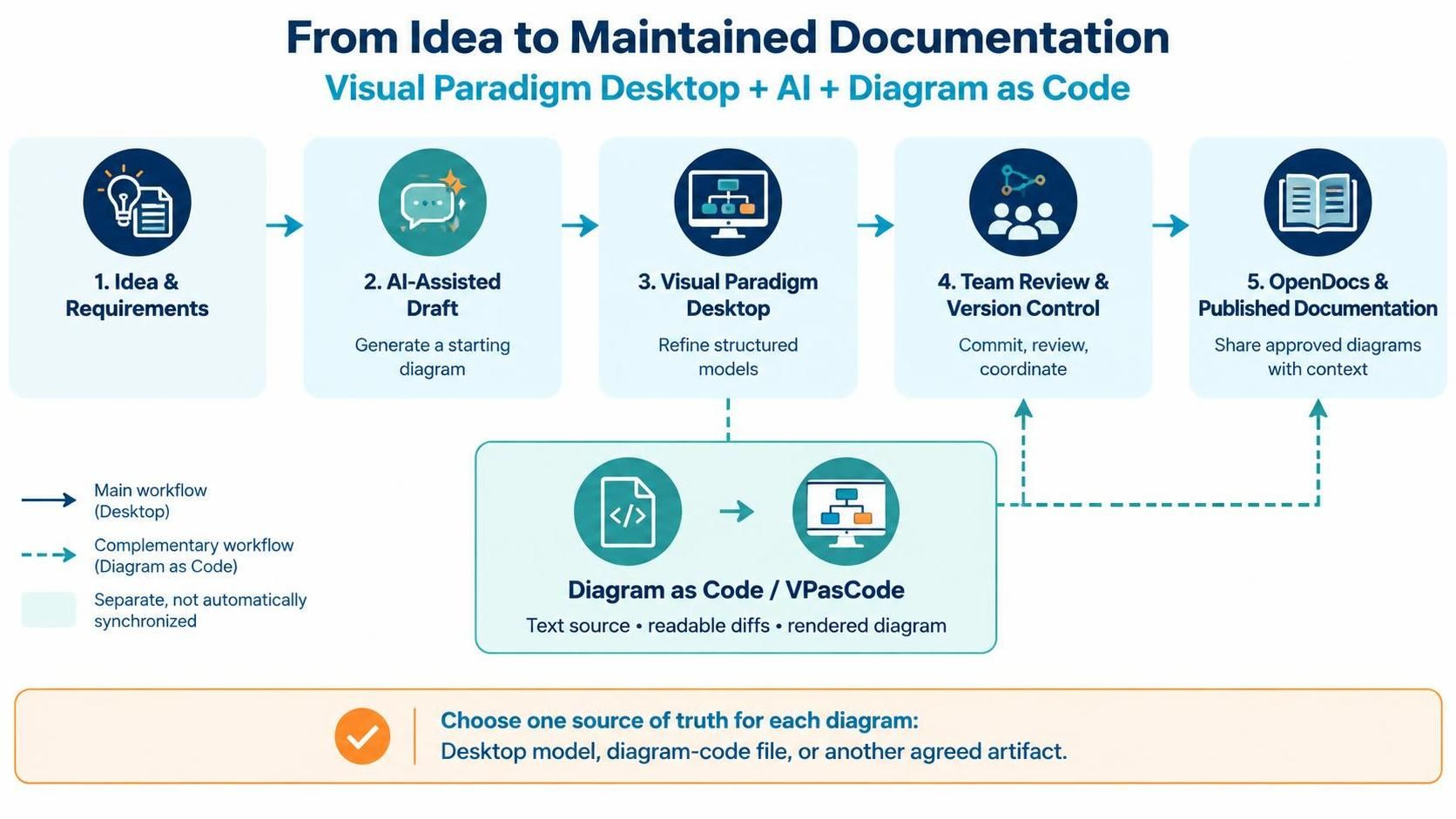
This tutorial explores the system architecture of this ecosystem. We will walk through the five stages of the “Idea to Documentation” workflow, analyzing how the “Main workflow” (Desktop) and “Complementary workflow” (Diagram as Code) interact to create maintainable, version-controlled, and AI-enhanced models.
The Core Philosophy: Complementary, Not Synchronized
The most critical concept to grasp in this ecosystem is the relationship between the Visual Paradigm Desktop project files and the text-based Diagram-as-Code files. Unlike some unified platforms that attempt to merge these worlds into a single, auto-syncing entity, Visual Paradigm treats them as complementary artifacts.
As the diagram illustrates, these workflows are separate. The system does not automatically overwrite one with the other. Instead, it empowers the engineer to decide the Source of Truth for every specific diagram. This approach ensures data integrity and prevents the “ghost update” problem where a visual change in the GUI corrupts a text file, or a text edit breaks the visual rendering.
- The Desktop Model: Best for heavy lifting, complex property management, and visual layout refinement.
- The Diagram-as-Code File: Best for version control diffs, lightweight editing, and CI/CD integration.
Step 1: Idea & Requirements
The lifecycle begins with the raw material of engineering: ideas and requirements. This phase is about capturing the “What” and “Why” before the “How.” In a chaotic environment, these requirements often exist as scattered emails, sticky notes, or meeting transcripts. Visual Paradigm Desktop acts as the initial repository to structure this chaos into a coherent requirement set, ready for visualization.
Step 2: AI-Assisted Drafting
Once requirements are captured, the barrier to entry is often the blank canvas. Visual Paradigm’s AI Ecosystem addresses this by generating a starting diagram directly from your text inputs. This “AI-Assisted Draft” transforms abstract requirements into concrete UML or architecture diagrams instantly.
This stage is crucial for:
- Rapid Prototyping: Visualizing a concept in seconds to validate it with stakeholders.
- Standardization: Ensuring the initial diagram adheres to enterprise modeling standards.
- Completeness: Identifying missing elements or actors that the AI might infer from context.
Step 3: Visual Paradigm Desktop (Refinement)
The output of the AI draft is a rough draft, not a final artifact. The “Main Workflow” now engages the Visual Paradigm Desktop engine. This is where structured models are refined. The AI provides the skeleton, but the engineer provides the muscle.
In this phase, you utilize the rich feature set of the Desktop environment to:
- Refine Logic: Ensure sequence diagrams have correct timing and interaction flows.
- Style & Polish: Apply consistent themes, colors, and layout algorithms.
- Deep Dive: Link diagrams to specific code snippets or database schemas if required.
The Complementary Path: Diagram as Code / VPasCode
While the Desktop environment is powerful, the “Complementary Workflow” represented by VPasCode (Diagram as Code) offers a different set of superpowers. This workflow treats diagrams as text files, similar to source code.
The diagram explicitly shows a dashed arrow connecting this workflow to the Desktop model, emphasizing that these are two distinct paths that can converge. VPasCode allows you to:
- Use Text Editors: Edit your diagrams in VS Code, Vim, or any text environment.
- Readable Diffs: When reviewing a Pull Request, seeing a change in a JSON/XML file is messy. Seeing a change in a text-based diagram script is clean and readable.
- Version Control: Because it is text, it integrates seamlessly with Git, allowing for precise branching and merging of architectural changes.
Step 4: Team Review & Version Control
Once the model is refined (either in Desktop or via Code), it enters the review phase. This is where the “Source of Truth” decision becomes vital. The team must agree on where the authoritative version of the diagram lives.
The system supports a collaborative review process where:
- Commit: Changes are committed to the repository.
- Review: Peers inspect the model for logical errors.
- Coordinate: Dependencies between different teams are managed.
If you are using VPasCode, the review process is identical to code review—familiar tools, familiar workflows. If using Desktop, the visual nature of the review allows architects to spot layout issues or logical gaps that might be missed in a text diff.
Step 5: OpenDocs & Published Documentation
The final stage is publication. A diagram sitting in a project file is only useful to the team working on that project. OpenDocs transforms these diagrams into public-facing, searchable, and interactive documentation.
This step ensures that the “Idea” has successfully traveled through the “Design” and “Review” phases to become “Maintained Documentation.” It allows stakeholders who are not directly in the development cycle to access the “Current State” of the system.
Conclusion: The Hybrid Advantage
By combining the speed of AI drafting, the depth of the Desktop modeling engine, and the precision of Diagram-as-Code, Visual Paradigm Desktop offers a complete workflow. The key to success is not trying to force one tool to do everything, but rather understanding the distinct strengths of each component.
Remember the golden rule displayed in the diagram: Choose one source of truth for each diagram. Whether that is a Desktop project file, a text-based diagram file, or another agreed-upon artifact, defining this authority upfront prevents conflicts and ensures your documentation remains accurate from the initial idea to the final published documentation.