Mastering C4 Modeling with Visual Paradigm: Building a ShopSwift System Context
In modern software architecture, the ability to communicate complex system interactions clearly is just as critical as the code itself. This tutorial walks you through the creation of a System Context Diagram (Level 1) for a fictional e-commerce service named ShopSwift. We will leverage the power of C4-PlantUML within the Visual Paradigm environment to model the boundaries of our system, the people who use it, and the external technologies it relies upon.
Why Start with a System Context Diagram?
Before diving into microservice internals or database schemas, architects must define the “big picture.” A System Context Diagram serves as the map for this journey. It answers three fundamental questions:
- Who are the users? (The Actors)
- What is the system? (The central focus)
- How does it connect to the world? (External Systems and Interfaces)
In this scenario, we are designing ShopSwift Checkout, a microservice responsible for managing carts, processing payments, and creating orders. This diagram isolates that service from the rest of the ecosystem, providing a clear boundary for developers and stakeholders.
Step 1: Defining the Actors and Systems
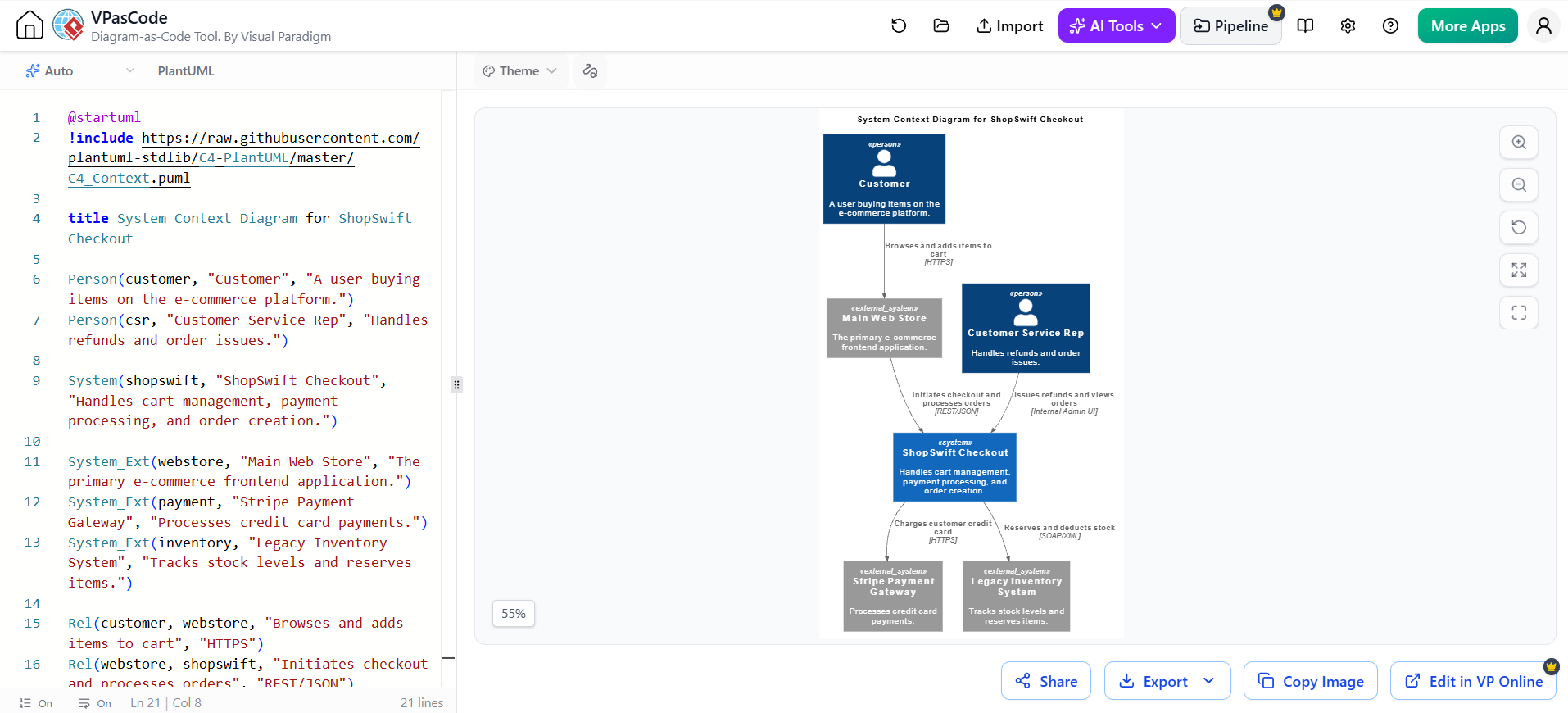
The first step in C4 modeling is identifying the Person elements. These represent the human users interacting with the system. In our ShopSwift architecture, we have two distinct personas:
- Customer: The primary user browsing the store and adding items to their cart.
- Customer Service Rep (CSR): An internal role tasked with handling refunds and resolving order issues.
Next, we define the System elements. This includes the system we are building (ShopSwift Checkout) and the External Systems it communicates with:
- Main Web Store: The frontend application where the customer browses.
- Stripe Payment Gateway: An external third-party service to handle credit card processing securely.
- Legacy Inventory System: An older backend system used to track stock levels.
Step 2: Modeling Relationships and Protocols
Once the boxes are drawn, we connect them with Relationships (Rel). This is where the architecture comes to life. We must specify not just who talks to whom, but how they talk.
In the ShopSwift context, we observe different communication patterns:
- REST/JSON: The interaction between the Main Web Store and ShopSwift is modern and lightweight, using standard web APIs.
- HTTPS: Security is paramount. Both the Customer (browsing) and the communication with Stripe are secured via HTTPS.
- SOAP/XML: Interestingly, the connection to the Inventory System uses the older SOAP protocol over XML, indicating a legacy integration point that requires careful handling.
- Internal Admin UI: The CSR accesses ShopSwift via a specific internal interface, distinct from the public-facing web store.
Step 3: Implementing with Visual Paradigm and AI
Visual Paradigm streamlines this process using its AI Assistant. Instead of manually typing code, you can prompt the AI to generate the structure. For example, you might ask: “Generate a C4 Context PlantUML script for an e-commerce checkout system.”
Below is the exact PlantUML code generated by Visual Paradigm AI, which renders the diagram shown in the interface. This code uses the C4-PlantUML library to define the visual hierarchy and semantic meaning of the diagram.
@startuml
!include https://raw.githubusercontent.com/plantuml-stdlib/C4-PlantUML/master/C4_Context.puml

title System Context Diagram for ShopSwift Checkout

Person(customer, "Customer", "A user buying items on the e-commerce platform.")
Person(csr, "Customer Service Rep", "Handles refunds and order issues.")

System(shopswift, "ShopSwift Checkout", "Handles cart management, payment processing, and order creation.")
System_Ext(webstore, "Main Web Store", "The primary e-commerce frontend application.")
System_Ext(payment, "Stripe Payment Gateway", "Processes credit card payments.")
System_Ext(inventory, "Legacy Inventory System", "Tracks stock levels and reserves items.")

Rel(customer, webstore, "Browses and adds items to cart", "HTTPS")
Rel(webstore, shopswift, "Initiates checkout and processes orders", "REST/JSON")
Rel(shopswift, payment, "Charges customer credit card", "HTTPS")
Rel(shopswift, inventory, "Reserves and deducts stock", "SOAP/XML")
Rel(csr, shopswift, "Issues refunds and views orders", "Internal Admin UI")

@endumlConclusion: From Context to Container
This System Context Diagram is the foundation of your architectural documentation. It sets the stage for the next level of detail: the Container Diagram, where we will zoom into the ShopSwift Checkout system to see the specific microservices, databases, and technologies that make up the box. By mastering this first step, you ensure that your architecture remains scalable and understandable as the system grows.