Mastering BPMN Architectures in Visual Paradigm: From Desktop Precision to AI-Driven Drafts
Visual Paradigm (VP) is a comprehensive enterprise architecture tool that supports Business Process Model and Notation (BPMN) across distinct environments. Understanding the architectural differences between its Desktop and Online platforms is crucial for building robust, deployable business processes. This tutorial breaks down the three primary modeling paradigms presented in the Visual Paradigm ecosystem.
1. The Architecture of Desktop Modeling
At the core of Visual Paradigm lies the Desktop Modeling environment. This is the heavyweight champion of the suite, designed for detailed, complex project work. The architecture here relies on a local project file structure that allows for deep integration between different model types (such as UML and BPMN).
Key Architectural Features
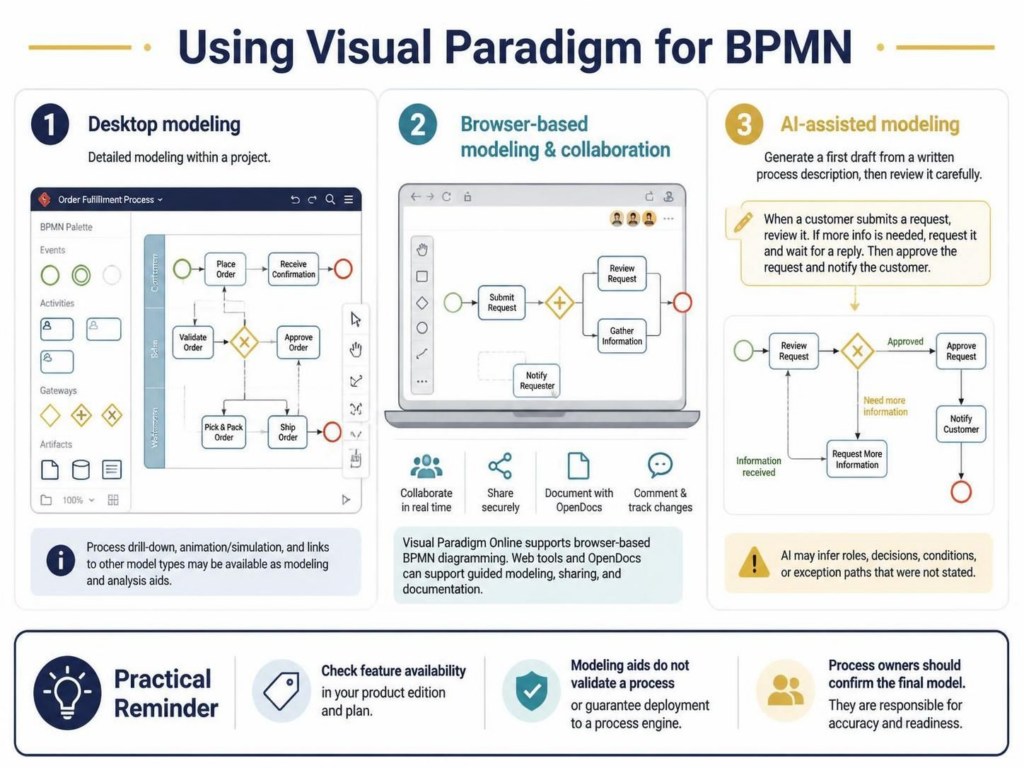
- The BPMN Palette: The desktop interface exposes a granular palette containing Events (circles), Activities (rounded rectangles), and Gateways (diamonds). This allows for the construction of “Swimlanes” (Pools), which are essential for defining process boundaries and actor responsibilities.
- Process Drill-Down: A critical feature of the desktop architecture is the ability to create “Sub-processes.” You can collapse a complex activity into a separate diagram, creating a hierarchical model that keeps high-level overviews clean while maintaining detailed logic at lower levels.
- Analysis Aids: The desktop environment supports animation and simulation. While this is an analytical tool, it is not a deployment engine. It visualizes the flow but does not guarantee the diagram can be directly executed by an external process engine without further validation.
2. Browser-Based Modeling & Collaboration
Visual Paradigm Online (VPO) shifts the architecture from a local file-based model to a cloud-native, collaborative environment. This model is optimized for speed, sharing, and real-time teamwork.
Collaborative Workflow
In the browser-based architecture, the primary unit of work is the diagram, often shared via a URL. The workflow emphasizes:
- Drag-and-Drop Creation: Users can rapidly sketch processes without navigating complex menus.
- OpenDocs Integration: VP Online integrates with OpenDocs, a document management system, allowing BPMN diagrams to be embedded directly into technical documentation.
- Real-Time Sync: Multiple stakeholders can view and comment on the process flow simultaneously.
3. AI-Assisted Modeling: The Generative Workflow
The newest addition to the architecture is AI-Assisted Modeling. This feature introduces a Generative AI layer that bridges the gap between natural language and structured BPMN logic.
The “Human-in-the-Loop” Verification Process
The AI workflow described in the system architecture follows a specific verification loop:
- Input: The user provides a text description (e.g., “When a customer submits a request…”).
- Generation: The AI parses this text and generates a preliminary BPMN draft with tasks, gateways, and flows.
- Human Review: The user must meticulously review the diagram. The AI may infer roles, decisions, or exception paths that were not explicitly stated in the text.
Sample Logic Translation
Consider the specific logic of the “Request More Information” flow. The AI translates a text description into a sequence of gateways and flows. Here is how that logic is structured in the BPMN model:
// Logical Structure of the AI-Generated Workflow
1. Start Event: "Customer Submits Request"
2. Task: "Review Request"
3. Gateway (XOR): Decision Point
   - Branch A (Approved): -> Task "Approve Request" -> End Event
   - Branch B (Needs Info): -> Task "Request More Information"
     - Loop Back: -> (Arrow) -> Task "Review Request" (Wait for Reply)
Practical Reminders for Architecture Validation
Regardless of the platform used (Desktop, Online, or AI-Assisted), the following architectural truths must be respected:
- Feature Availability: Always check the specific product edition. Advanced features like process simulation or specific OpenDocs integrations may be locked behind premium plans.
- Validation vs. Deployment: A diagram is a model, not a program. Modeling aids (like simulation) help visualize logic, but they do not automatically guarantee that the process engine can deploy the logic.
- Owner Responsibility: The “Practical Reminder” in the architecture dictates that Process Owners must confirm the final model. They are the ultimate validators of accuracy and readiness.
By leveraging the precision of Desktop modeling, the agility of Browser-based collaboration, and the speed of AI-assisted drafting, you can construct a BPMN architecture that is both visually accurate and logically sound.