![Free eBooks of IT [BooksOfAll]](https://www.booksofall.com/wp-content/uploads/2022/06/booksofall-logo-2.png)
Unleashing AI‑Powered Sequence Diagrams with Visual Paradigm
Design faster, collaborate smarter, and turn words into visuals in seconds.
— Visual Paradigm AI
In the age of AI‑augmented modeling, Visual Paradigm has become the go‑to platform for architects, developers, and product managers who want instant, standards‑compliant UML diagrams. Whether you’re a seasoned engineer or a newcomer to UML, the tools below let you transform natural‑language descriptions into polished sequence diagrams—ready for code generation, documentation, or stakeholder demos.
1️⃣ Desktop AI Diagram Generation
🧩 Why Desktop?
-
Full‑featured, offline – No internet bandwidth worries.
-
Enterprise‑grade – Tight integration with class, use‑case & SysML diagrams.
-
Powerful refinement – Turn a simple flow into MVC, micro‑service or domain‑driven layers.
🔧 Step‑by‑Step
-
Launch Visual Paradigm Desktop →
File > New Project. -
Navigate
Tools > AI Diagram Generation. -
Choose Sequence Diagram →
Generate. -
Prompt:
“A customer places an online order: browser sends request to web server, server validates payment via gateway, updates inventory in database, and confirms to user.”
-
Review the auto‑generated diagram.
-
Refine with the AI Sequence Diagram Refinement Tool (
Tools > Apps). -
Export → PDF, PNG, or embed in code (Java, C#, etc.).
Pro tip: Use stereotypes (
<<controller>>,<<view>>) to annotate lifelines for clearer architecture.
2️⃣ VP Online + OpenDocs
🌐 What’s OpenDocs?
Think of it as a living, collaborative Notion for UML. Diagrams live inside documents, get versioned, and can be shared instantly with teammates.
🚀 Workflow
-
Log in to VP Online.
-
Open OpenDocs →
New Page. -
Insert a diagram (
Diagram > Sequence Diagram) or click AI. -
Paste prompt:
“Password reset flow: user requests reset → system emails token → user verifies & sets new password.”
-
AI builds → embed in the page.
-
Add comments, share a link, or export.
Collaboration boost: Team members can comment directly on the diagram, suggesting edits in real time.
3️⃣ AI Web Apps – Step‑Guided Prototyping
🧪 Ideal Use‑Case
-
Rapid prototyping without setting up a full project.
-
Focused refinements (e.g., MVC layering, micro‑service decomposition).
🔄 The Process
| Step | Action | Tool |
|---|---|---|
| 1 | Enter initial description or PlantUML code | ai.visual-paradigm.com |
| 2 | Generate basic sequence | PlantUML Sequence Builder |
| 3 | Refine via prompts (“Add alt fragment for payment failure”) | Sequence Diagram Refinement Tool |
| 4 | Export → VP Desktop/Online for heavy lifting | Export options |
Tip: The PlantUML markup is always accessible—hand‑edit if you prefer code‑first modeling.
4️⃣ Visual Paradigm AI Chatbot
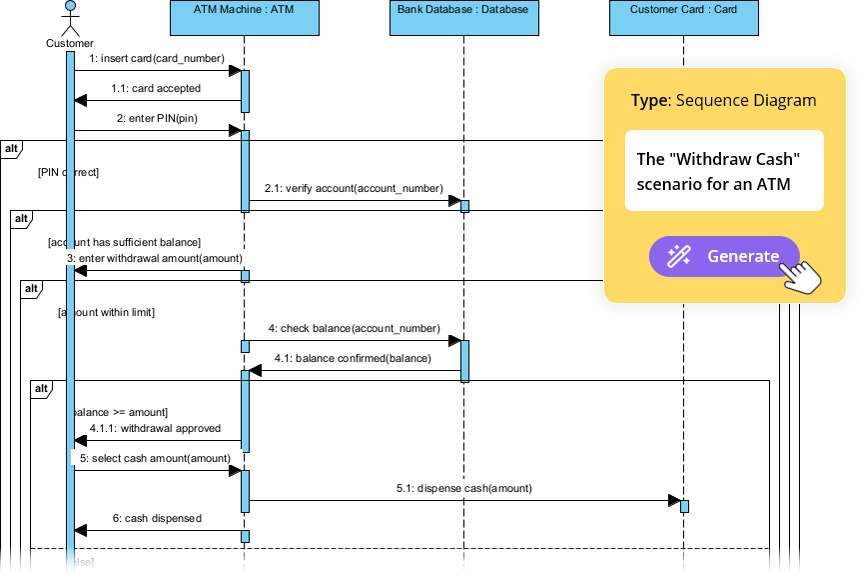
🤖 Conversational Modeling
-
Chat‑based interface (
chat.visual-paradigm.com). -
Instant feedback: Add loops, errors, or alternate flows on the fly.
-
Learning aid: The bot explains UML concepts as you go.
✨ Example Dialogue
| User | Bot |
|---|---|
| “Generate a UML sequence diagram for e‑commerce checkout.” | (Diagram appears) |
| “Add an alt fragment for payment failure and retry.” | (Updated diagram) |
| “Explain the activation bars.” | Short explanation + diagram tweak |
Best for: brainstorming, quick iterations, and newcomers learning UML syntax.
5️⃣ Quick Decision Matrix
| Need | Tool | When to Pick |
|---|---|---|
| Offline, enterprise‑scale | Desktop AI Generator | Large teams, regulated environments |
| Docs‑centric, remote | VP Online + OpenDocs | Agile teams, knowledge bases |
| Rapid prototype | AI Web Apps | MVPs, concept sketches |
| Conversational, learning | AI Chatbot | Beginners, quick demos |
6️⃣ Getting Started in Minutes
-
Choose your platform (Desktop vs Online).
-
Write a clear prompt – the more detail, the richer the diagram.
-
Leverage the refinement tools to add architecture layers.
-
Export or embed – share with stakeholders instantly.
Quick Starter Prompt
“Generate a sequence diagram for a user logging into a banking app with 2FA.”
7️⃣ Beyond Sequence Diagrams
Visual Paradigm’s AI ecosystem isn’t limited to sequences:
-
Class & Object Diagrams – “Generate class diagram for a library system.”
-
Use‑Case Diagrams – “Show actors for an online ticket booking.”
-
State Machines – “State diagram for a traffic light controller.”
Each AI tool follows the same pattern: prompt → generate → refine → export. Experiment across diagrams to fully unlock your modeling workflow.
🎉 Takeaway
With Visual Paradigm’s AI suite, turning ideas into visuals has never been easier. Pick the method that aligns with your workflow, iterate quickly, and let the AI handle the heavy lifting while you focus on design decisions and stakeholder communication.
Ready to design faster? Dive in today, and let AI bring your narratives to life! 🚀



Comments (0)