![Free eBooks of IT [BooksOfAll]](https://www.booksofall.com/wp-content/uploads/2022/06/booksofall-logo-2.png)
Why Every Solution Architect Should Start with the C4 Model
Designing complex software systems requires more than just technical expertise. It demands a shared language between developers, stakeholders, and business leaders. Without a standardized approach to visualization, architectural decisions often become isolated within individual minds. This is where the C4 Model provides a structured framework for understanding and communicating system design. By adopting this method, solution architects can ensure clarity, maintainability, and alignment across the entire organization.
Understanding the Core Challenge 🧩
Software architecture is frequently misunderstood as a purely technical exercise. In reality, it is a communication exercise. When architects create diagrams that are too abstract, stakeholders lose interest. When diagrams are too detailed, developers get lost in the weeds. The C4 Model addresses this spectrum by offering a hierarchy of abstraction. It allows architects to zoom in and out of the system without losing context.
Traditional diagramming methods often rely on UML, which can be overly rigid and verbose. UML diagrams like sequence or class diagrams are excellent for specific interactions but fail to provide a high-level overview of the entire ecosystem. The C4 Model prioritizes context over syntax. It focuses on what the system does rather than how it is implemented at a granular level.
What is the C4 Model? 📐
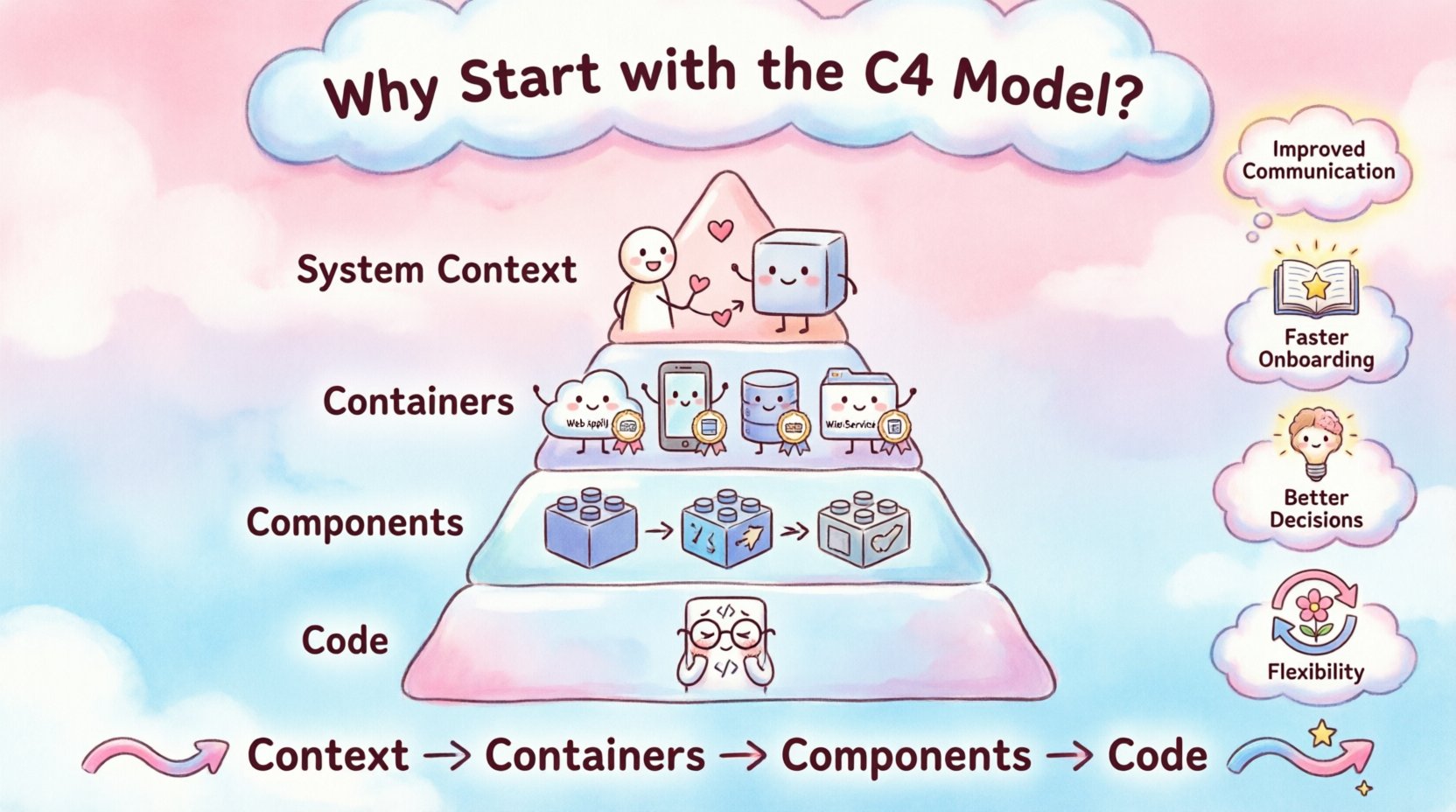
The C4 Model stands for Context, Containers, Components, and Code. It is a hierarchical approach to software architecture documentation. Each level represents a different level of abstraction. This structure ensures that everyone involved in the project can find the information relevant to their role.
Level 1: System Context 🌍
This is the highest level of abstraction. It shows the system being designed and its relationship with users and other systems. It answers the question: “What is this system, and who interacts with it?”
- People: Represented as stick figures, these are the users interacting with the system.
- Systems: External systems that the new system communicates with.
- Relationships: Arrows indicating data flow or interaction between entities.
This diagram is crucial for business stakeholders. It provides a clear view of the system’s boundaries without overwhelming them with technical details. It sets the stage for understanding the scope of the project.
Level 2: Containers 📦
The Container level breaks down the system into distinct executable units. A container could be a web application, a mobile app, a database, or a microservice. This level answers: “How is the system built?”
- Technology Stack: Identifies the tools used (e.g., Java, Python, SQL).
- Responsibilities: Explains the primary function of each container.
- Connections: Shows how containers communicate (HTTP, gRPC, TCP).
This view is essential for developers and DevOps engineers. It clarifies the deployment architecture and helps identify potential bottlenecks or security concerns between different parts of the infrastructure.
Level 3: Components 🧱
Inside a container, the system is decomposed into components. A component is a logical grouping of functionality, such as a service layer, a repository, or a controller. This level answers: “How does the container achieve its goals?”
- Functionality: Groups related features together.
- Interfaces: Defines how components interact with each other.
- Technology: Can specify programming languages or frameworks.
This level is ideal for developers working within a specific container. It helps them understand where their code fits into the larger picture and how it interacts with other modules.
Level 4: Code 💻
The final level represents individual classes, functions, or methods. This is rarely documented in the C4 Model because it changes too frequently. It is better left to code comments and IDE features. However, it exists to show the ultimate granularity if needed.
The Problem with Traditional Diagramming 📉
Before the C4 Model, many teams relied on ad-hoc whiteboard sessions or complex UML diagrams. These methods often led to documentation that was outdated the moment it was created. The lack of a standard structure meant that every architect drew diagrams differently. This inconsistency made onboarding new team members difficult.
Furthermore, traditional methods often focused too much on the internal mechanics. They ignored the external context. A solution architect needs to understand the business problem first, not just the code structure. The C4 Model flips this priority, starting with the business context.
Comparison of Diagramming Approaches
| Feature | Traditional UML | C4 Model |
|---|---|---|
| Focus | Implementation details | System context and structure |
| Audience | Developers only | Stakeholders, Architects, Developers |
| Maintenance | High effort | Low effort |
| Clarity | Variable | Consistent |
Why Start with C4? The Strategic Benefits 🚀
Adopting a structured model like C4 brings tangible benefits to the solution architecture process. It reduces ambiguity and increases the speed of decision-making. Here are the primary reasons why architects should prioritize this framework.
1. Improved Communication 🗣️
When everyone uses the same notation, misunderstandings decrease. A business stakeholder looking at a System Context diagram understands the scope. A developer looking at a Component diagram understands the logic. The common language reduces the need for lengthy explanations.
2. Faster Onboarding 📚
New team members often struggle to understand the existing system. With a clear C4 hierarchy, they can start with the System Context diagram to get the big picture. Then, they can drill down into containers and components as needed. This reduces the time spent asking questions and increases productivity.
3. Better Decision Making 🧠
Architecture decisions are easier to justify when visualized. If a decision impacts a container, the impact is visible in the Container diagram. This helps in risk assessment. Architects can see where changes will ripple through the system before they implement them.
4. Flexibility and Adaptability 🔄
Technology changes rapidly. The C4 Model is technology-agnostic. It does not force you to use specific tools. Whether you switch from a monolith to microservices or change databases, the C4 diagrams remain valid. The structure focuses on logical relationships, not physical implementation.
How to Implement the C4 Model 🛠️
Introducing a new documentation standard requires a plan. It is not enough to just start drawing. There are steps to ensure successful adoption across the team.
Step 1: Define the Scope
Identify which systems need documentation. Not every small script requires a C4 diagram. Focus on core business systems that have multiple stakeholders. This prevents documentation fatigue.
Step 2: Train the Team
Ensure all architects and senior developers understand the model. Conduct workshops or share resources. Everyone should know the difference between a container and a component.
Step 3: Choose a Tool
Select a diagramming tool that supports the C4 syntax. Many tools allow for automated generation from code. This reduces the maintenance burden. Ensure the tool exports images or HTML that can be shared with stakeholders.
Step 4: Integrate into Workflow
Make diagramming part of the development process. Update diagrams during sprint planning or code reviews. If the diagram does not match the code, it is considered technical debt.
Step 5: Review and Iterate
Regularly review the diagrams. Are they still accurate? Do they still serve the purpose? Remove outdated diagrams. Keep the documentation repository clean.
Common Pitfalls to Avoid ⚠️
Even with a good model, teams can make mistakes. Being aware of these pitfalls helps in avoiding them.
- Over-documenting: Creating diagrams for every single component. This is unnecessary. Stick to the levels that provide value.
- Ignoring Context: Skipping the System Context level. This makes it hard for stakeholders to understand the “why” behind the system.
- Static Diagrams: Creating diagrams that never change. Documentation must evolve with the code.
- Too Much Detail: Putting too many components in one diagram. Keep diagrams focused. Use links to drill down.
- Ignoring Non-Functional Requirements: C4 is about structure, but architects must also document performance, security, and reliability requirements separately.
Addressing Stakeholder Concerns 🤝
Stakeholders often worry about the time cost of documentation. They see it as overhead. To address this, architects must demonstrate value. Show how the diagrams reduce bugs, speed up onboarding, or clarify requirements.
For technical stakeholders, the value lies in the precision. They can see the data flows and dependencies clearly. This helps in capacity planning and security audits. For business stakeholders, the value lies in the scope. They understand what is being built and what is out of scope.
The Role of Automation 🤖
Manual diagramming is time-consuming. Automation tools can generate diagrams from code repositories. This ensures the documentation is always up to date. However, automation cannot replace the architectural intent. The C4 Model requires human judgment to determine the boundaries between containers and components.
Automated tools are best used for generating the code-level diagrams. The high-level diagrams should be created manually to ensure they reflect the business logic accurately.
Case Study: A Typical Scenario 🏢
Imagine a financial services company building a new loan management system. The team uses the C4 Model to plan the architecture.
First, they create the System Context diagram. This shows the loan applicants, the bank account system, and the credit bureau. This clarifies the data sources.
Next, they define the Containers. There is a web portal, a mobile app, and a core processing service. This clarifies the deployment targets.
Then, they break down the Core Processing service into components. There is a validation component, a calculation component, and a storage component. This helps the development teams divide the work.
Throughout the process, the diagrams are updated. When a new security requirement is added, it is reflected in the Container diagram. This ensures the security team knows what to test.
Long-Term Maintenance Strategy 📅
Documentation is a living artifact. It requires ongoing maintenance. A strategy for maintenance includes:
- Version Control: Store diagrams in the same repository as the code.
- Change Logs: Record why diagrams were changed.
- Accessibility: Ensure diagrams are accessible to all team members.
- Reviews: Include diagram reviews in the code review process.
Without a maintenance strategy, the diagrams will become outdated. Outdated diagrams are worse than no diagrams because they create false confidence.
Conclusion 🎯
The C4 Model offers a pragmatic approach to software architecture documentation. It bridges the gap between technical details and business context. By using a consistent hierarchy, architects can communicate more effectively with all stakeholders. The result is a system that is better understood, easier to maintain, and aligned with business goals.
Starting with the C4 Model does not mean ignoring other practices. It means adding a layer of clarity to the design process. For solution architects, it is a tool that enhances their ability to lead and deliver value. It turns abstract ideas into concrete, visual plans that everyone can follow.
As the industry continues to evolve, the need for clear communication grows. The C4 Model provides the structure needed to meet this challenge. It is not a magic solution, but it is a solid foundation for architectural excellence.



Comments (0)