![Free eBooks of IT [BooksOfAll]](https://www.booksofall.com/wp-content/uploads/2022/06/booksofall-logo-2.png)
C4 Model and System Evolution: Tracking Architecture Changes Over Time
Software systems are living entities. They grow, adapt, and mutate as requirements shift and technology advances. Keeping pace with these changes is a significant challenge for engineering teams. Without a structured approach, documentation becomes stale, and the actual system diverges from what is written. This guide explores how to utilize the C4 model to track architectural evolution effectively.
🤔 Understanding the Challenge of Architectural Drift
Every software project begins with a vision. However, as development proceeds, the reality often shifts. Features are added, legacy code is refactored, and infrastructure changes. This phenomenon is known as architectural drift. When the documented architecture no longer matches the running system, communication breaks down.
- Onboarding new engineers: They rely on diagrams to understand the system. Outdated diagrams lead to confusion and errors.
- Planning refactoring: Teams need to know current dependencies to safely modify code.
- Incident response: During outages, understanding the flow of data is critical for debugging.
The C4 model provides a standardized way to visualize software architecture at different levels of abstraction. By combining this model with a strategy for tracking changes over time, teams can maintain a reliable source of truth.
📊 The C4 Hierarchy: A Brief Recap
To track evolution, one must understand the structure being tracked. The C4 model organizes architecture documentation into four levels. Each level serves a specific audience and purpose.
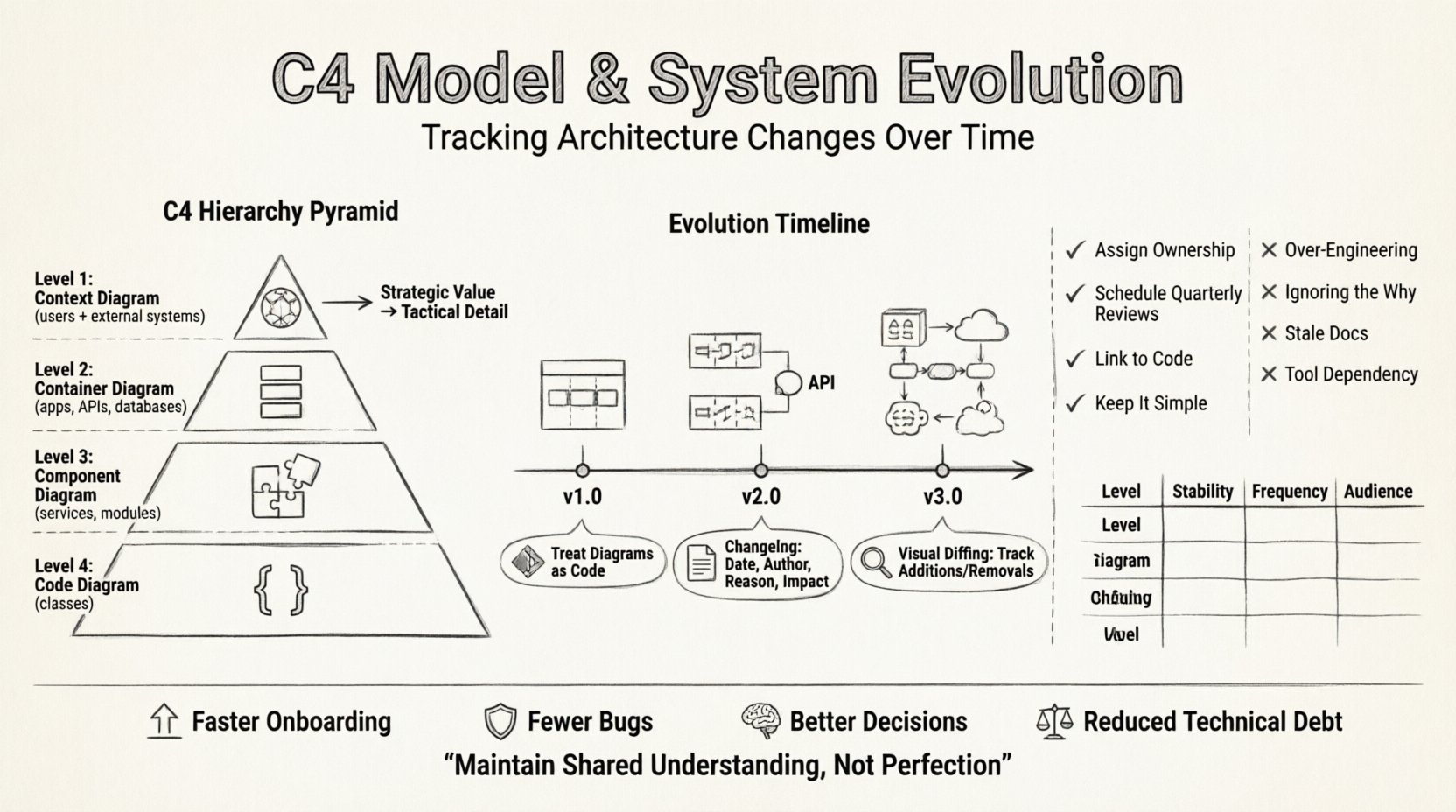
- Level 1: Context Diagram – Shows the system in scope and its users, external systems, and relationships.
- Level 2: Container Diagram – Details the high-level building blocks, such as web apps, mobile apps, databases, and APIs.
- Level 3: Component Diagram – Breaks down containers into smaller units of functionality, such as services, libraries, or modules.
- Level 4: Code Diagram – Shows classes and their relationships within a specific component (used sparingly).
When tracking evolution, it is crucial to decide which levels require versioning. Typically, Level 1 and Level 2 diagrams carry the most strategic value for long-term tracking.
📅 Strategies for Versioning and Tracking Changes
Managing architectural diagrams is not unlike managing source code. You need a system to record what changed, when it changed, and why it changed. Below are strategies for implementing this without relying on specific proprietary tools.
1. Treat Diagrams as Code
Store your diagram definitions in a version control system alongside your application code. This ensures that every change to the architecture is reviewed, tested, and logged.
- Atomic Commits: Commit changes to diagrams in small, logical units.
- Commit Messages: Use descriptive messages explaining the architectural decision.
- Branching: Create branches for major architectural proposals to visualize impact before merging.
2. Define a Change Log
Every diagram should have an associated metadata section or a linked changelog. This record should capture:
- Date: When the change occurred.
- Author: Who proposed the change.
- Reason: Business driver or technical debt reduction.
- Impact: Which parts of the system are affected.
3. Visual Diffing
When comparing two versions of a diagram, visual diffing helps identify additions, removals, and modifications. Look for:
- New containers added to the system.
- Connections removed or redirected.
- Labels updated to reflect new technologies.
🛠️ Managing Evolution by Level
Different parts of the architecture evolve at different speeds. A Context diagram might change once a year, while a Component diagram might change weekly. Understanding this cadence is key.
| Level | Stability | Frequency of Change | Primary Audience |
|---|---|---|---|
| Context (Level 1) | High | Quarterly or Yearly | Stakeholders, Management |
| Container (Level 2) | Medium | Monthly | Architects, Leads |
| Component (Level 3) | Low | Bi-Weekly | Developers |
| Code (Level 4) | Very Low | Per Sprint | Engineers |
Context Diagram Evolution
Changes here usually signal a shift in business strategy. For example, adding a new third-party integration or deprecating an old service. When this happens, update the diagram and notify all stakeholders immediately.
Container Diagram Evolution
This level often changes due to technology updates. Moving from a monolithic server to a set of microservices is a classic example. Document the migration path rather than just the destination state. This helps teams understand the transition.
Component Diagram Evolution
These diagrams are the most granular. They should reflect the current code structure. If a component is split into two, the diagram must update. If a library is replaced, the dependencies must be redrawn.
👩💻 The Human Element: Communication and Review
Diagrams are not just for machines; they are communication tools. Tracking changes is useless if people do not understand them. A rigorous review process ensures that the evolution is understood by the team.
- Architecture Review Boards: Hold regular meetings to discuss diagram updates. Invite developers and product owners.
- Pair Diagramming: When major changes occur, have two people work on the diagram together to ensure accuracy.
- Walkthroughs: Present the updated diagrams during sprint planning or retrospectives.
It is important to avoid creating “wall of text” documentation. Keep annotations concise. Use colors sparingly to highlight changes between versions.
🚨 Common Pitfalls in Architectural Tracking
Even with a good system, teams often fall into traps that reduce the value of their documentation.
1. Over-Engineering the Diagrams
Creating overly detailed diagrams that take hours to update is a waste of time. If a diagram takes longer to maintain than it is worth, simplify it. Focus on the boundaries and connections, not every single variable.
2. Ignoring the “Why”
Tracking the “what” (the shape of the diagram) is not enough. You must track the “why”. Without context on why a change was made, future engineers may revert it thinking it was a mistake.
3. Stale Documentation
The most dangerous state is when documentation is wrong. It creates a false sense of security. If you cannot update the diagram, admit that it is outdated rather than leaving it as a false reference.
4. Tool Dependency
Do not tie your documentation process to a single vendor tool. If the tool becomes unavailable or expensive, you lose your history. Use open standards or formats that allow you to export or migrate data easily.
📂 Integrating with Development Workflows
To make tracking architecture sustainable, integrate it into the existing development workflow. Do not treat documentation as a separate activity.
- Definition of Done: Include diagram updates in the definition of done for relevant tickets. If a container is added, the diagram must be updated.
- Automated Generation: Where possible, generate diagrams from code or configuration files. This reduces manual effort.
- CI/CD Integration: Run checks to ensure diagrams compile or render correctly. This prevents broken diagrams from being merged.
Consider using static analysis to verify that the diagram matches the code. If the code has a new API endpoint, the diagram should ideally reflect that connection.
🔍 Deep Dive: Handling Complex Refactorings
Refactoring is inevitable. Sometimes, you need to move a component from one container to another. This is a high-risk change that requires careful tracking.
- Map the Current State: Document exactly what exists today.
- Define the Target State: Draw the diagram as it should look after the refactor.
- Create a Migration Diagram: Show the intermediate steps. This is vital for rollback planning.
- Execute and Verify: Perform the change and update the diagram immediately after.
This approach prevents the “black box” scenario where a team knows code moved but does not know the new data flow.
📝 Best Practices for Maintenance
Maintaining architecture documentation requires discipline. Here is a checklist for teams to ensure longevity.
- Assign Ownership: Designate specific engineers or architects responsible for keeping diagrams up to date.
- Schedule Reviews: Set a quarterly review to prune outdated diagrams.
- Keep it Simple: Start with the C4 model basics. Do not add custom shapes unless absolutely necessary.
- Link to Code: Where possible, link diagram elements to repository paths or specific classes.
By following these practices, the architecture documentation becomes a living asset rather than a burden.
📊 Measuring the Value of Tracking
How do you know if your tracking strategy is working? Look for these indicators within your team.
- Faster Onboarding: New hires understand the system faster.
- Fewer Bugs: Teams make fewer architectural mistakes.
- Better Decisions: Planning sessions are more informed.
- Reduced Technical Debt: Teams can see where debt is accumulating.
If these metrics improve, the investment in tracking architecture changes is paying off.
🚀 Conclusion on Sustainable Architecture
Tracking system evolution is not about perfection. It is about maintaining a shared understanding. The C4 model offers a flexible framework to do this. By treating diagrams as code, reviewing changes regularly, and integrating with workflows, teams can keep their architecture clear and accurate.
Software changes constantly. Your documentation must change with it. Start small, focus on the critical paths, and build the habit of updating your views as you build your system.



Comments (0)