![Free eBooks of IT [BooksOfAll]](https://www.booksofall.com/wp-content/uploads/2022/06/booksofall-logo-2.png)
C4 Model for Enterprise Architects: Scaling Visualization Across Teams
Enterprise architecture demands clarity. In complex organizations, software systems evolve rapidly, often obscuring the relationships between services, data, and users. When documentation becomes outdated or inconsistent, decision-making slows, and technical debt accumulates. The C4 Model offers a structured approach to software architecture documentation, providing a hierarchy of views that scales from high-level business context down to the code level. This guide explores how enterprise architects can leverage the C4 Model to standardize visualization across distributed teams without stifling creativity or innovation.
Visual communication is not merely about drawing boxes and arrows. It is about aligning mental models. When a developer, a product owner, and a system architect share a common language, friction decreases. The C4 Model facilitates this shared understanding by categorizing diagrams into four distinct levels of abstraction. Each level serves a specific audience and purpose, ensuring that stakeholders see the information relevant to their responsibilities.
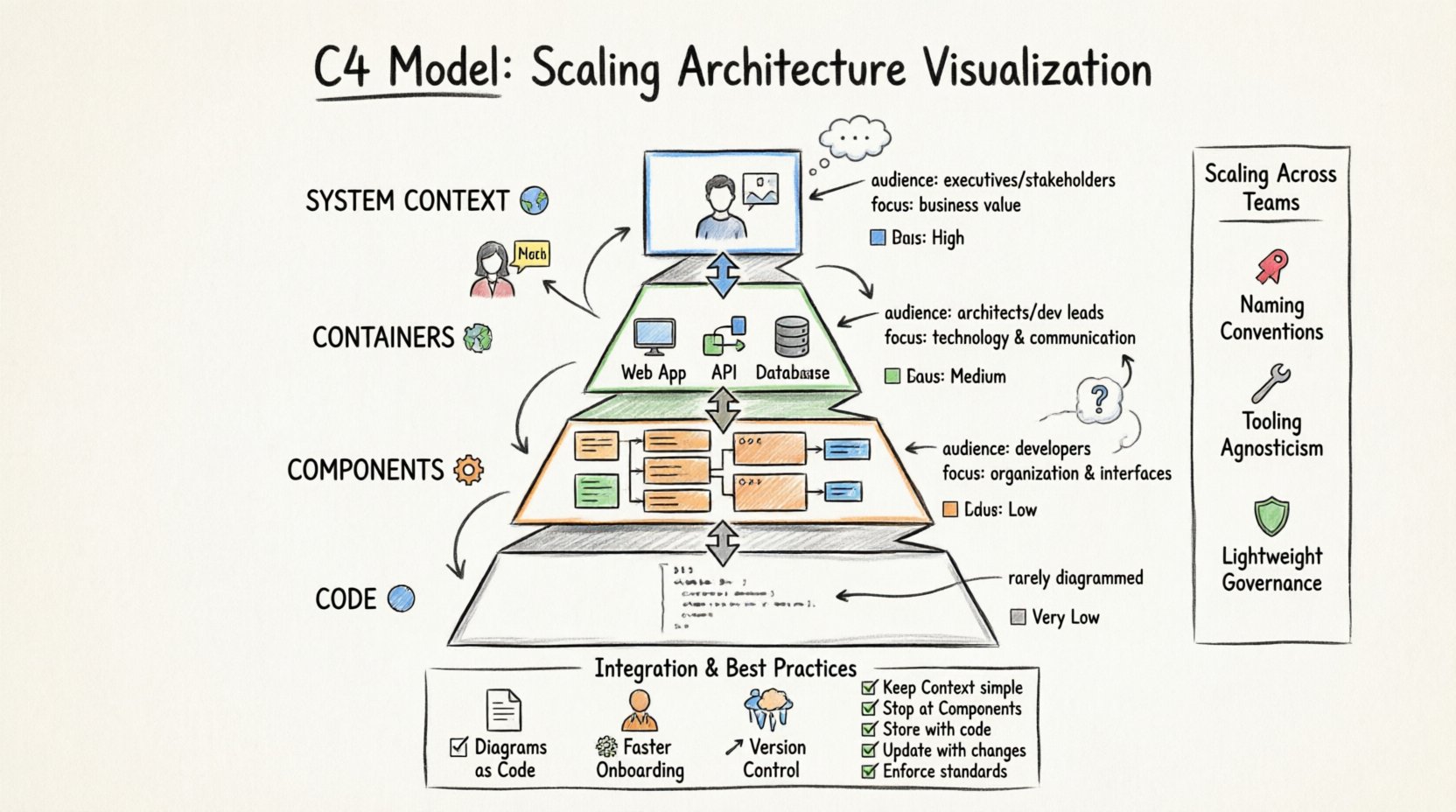
🔍 Understanding the Four Levels of Abstraction
At its core, the C4 Model defines four levels of detail. Moving from the top down, the scope narrows, and the technical specificity increases. This progression allows teams to maintain a coherent narrative of the system without overwhelming the reader with unnecessary data.
1. System Context 🌍
The System Context diagram provides the highest level of abstraction. It depicts the system being designed as a single box and shows how it interacts with users and other systems. This view is critical for enterprise architects who need to understand boundaries and external dependencies.
- Audience: Executives, product managers, stakeholders, and new team members.
- Focus: Business value, external relationships, and data flow boundaries.
- Key Elements:
- The system itself.
- Actors (users or roles).
- External systems (third-party APIs, legacy databases).
- Relationships (data flows, trust boundaries).
In an enterprise environment, this diagram answers the question: “What is this system, and who does it talk to?” It prevents scope creep by clearly defining what lies outside the responsibility of the current team.
2. Containers 📦
The Container level breaks the system down into logical units of deployment. A container is a standalone runtime environment, such as a web application, a mobile application, a microservice, or a database. This level is often the most useful for architects and developers because it bridges the gap between business context and technical implementation.
- Audience: Software architects, developers, and technical leads.
- Focus: Technology selection, deployment topology, and inter-container communication.
- Key Elements:
- Containers (e.g., Web App, API Gateway, Database).
- Software Components (grouped within containers).
- Technologies (e.g., SQL, REST, GraphQL).
When scaling across teams, the Container diagram is vital for identifying integration points. It clarifies which team owns which container and how they interact. This reduces the risk of unintended coupling between services.
3. Components ⚙️
Within a container, the Component level describes the major logical building blocks. These are not physical files but logical groupings of functionality, such as a module, a library, or a service class. This level helps developers understand the internal structure without getting bogged down in every single class or function.
- Audience: Developers, solution architects.
- Focus: Logical organization, responsibility separation, and data storage within the container.
- Key Elements:
- Components (e.g., User Management, Order Processing).
- Interfaces (APIs, methods).
- Data Stores (tables, queues).
This level is essential for large codebases. It allows teams to onboard new developers quickly by showing them the major functional units. It also aids in refactoring efforts by highlighting cohesion and coupling within the container.
4. Code 💻
The Code level is rarely maintained as a separate diagram. Instead, it represents the actual source code. The C4 Model suggests that diagrams should generally stop at the Component level unless specific, complex algorithms require explanation. Relying on code comments and unit tests is often more effective than static diagrams for this level.
- Audience: Individual developers.
- Focus: Implementation details, algorithm logic, class structures.
- Key Elements:
- Classes, methods, and functions.
- Internal data structures.
For enterprise architects, the advice is clear: do not maintain code-level diagrams. They become outdated the moment a commit is pushed. Instead, use the Component level to capture the necessary architectural intent.
📊 Comparison of C4 Levels
| Level | Granularity | Primary Audience | Tooling Requirement |
|---|---|---|---|
| System Context | High | Stakeholders, Management | Low |
| Containers | Medium | Architects, Dev Leads | Medium |
| Components | Low | Developers | High |
| Code | Very Low | Individual Developers | Generated/None |
🚀 Scaling Visualization Across Teams
Implementing the C4 Model in a single team is a manageable task. Scaling it across an enterprise organization introduces complexity. Different teams may use different tools, follow different naming conventions, or prioritize different aspects of the architecture. To achieve consistency without centralizing control to a bottleneck, architects must establish clear standards and governance.
1. Establishing Naming Conventions 🏷️
Consistency in naming is the foundation of scalable documentation. If one team calls a service “Auth” and another calls it “Authentication Service,” searching for documentation becomes difficult. A shared glossary should be maintained.
- System Names: Use business-friendly names (e.g., “Order Management System”).
- Container Names: Use technical but consistent terms (e.g., “Order API”).
- Component Names: Reflect functional domains (e.g., “Inventory Service”).
Architects should define these conventions in a living document. This document should be accessible to all teams and reviewed periodically to ensure it remains relevant.
2. Tooling Agnosticism 🛠️
While it is tempting to mandate a specific diagramming tool, doing so can create friction. Teams may prefer different interfaces or features. The goal is to ensure that the output is consistent, regardless of the tool used.
- Standardized Templates: Provide templates that enforce the C4 structure.
- Export Formats: Require exports in a standard format (e.g., SVG, PNG, or Mermaid text).
- Repository Integration: Store diagrams alongside the code in version control.
If the organization uses a specific repository for architecture documentation, ensure it supports versioning. This allows teams to track changes over time and understand the evolution of the system.
3. Governance and Review 🛡️
Centralized governance can slow down delivery. Instead, adopt a lightweight review process. Architecture Review Boards (ARBs) should focus on high-level decisions rather than diagram aesthetics.
- Checklist for Context: Are all external dependencies identified? Is the scope clear?
- Checklist for Containers: Are technology choices justified? Are security boundaries defined?
- Checklist for Components: Are interfaces documented? Is data flow logical?
Reviews should be collaborative. Instead of “approving” a diagram, architects should ask questions that improve clarity. This builds a culture of shared ownership over the architecture.
⚙️ Integrating C4 into Agile and DevOps Workflows
Documentation often suffers in fast-paced environments. If diagramming is seen as a separate activity from coding, it will be neglected. The C4 Model must be integrated into the continuous delivery pipeline.
1. Diagrams as Code 📝
Maintaining diagrams in text formats (like Mermaid or PlantUML) allows them to be versioned alongside source code. This ensures that when code changes, the diagram can be updated in the same pull request.
- Automated Generation: Use tools to generate diagrams from code metadata.
- CI/CD Checks: Fail builds if diagrams are missing or out of sync.
- Documentation Sites: Automatically publish diagrams to internal wikis.
This approach reduces the maintenance burden. Developers are more likely to update a diagram if it is part of their normal coding workflow rather than an afterthought.
2. Onboarding New Engineers 🎓
One of the most significant benefits of the C4 Model is improved onboarding. New hires often struggle to understand the landscape of a large system. A well-maintained set of C4 diagrams can reduce this ramp-up time.
- Context First: Start new hires with the System Context diagram to understand the business domain.
- Deep Dive: Move to Container and Component diagrams for specific service ownership.
- Q&A Sessions: Use diagrams as the basis for technical discussions during orientation.
🚧 Common Pitfalls and How to Avoid Them
Even with a solid framework, teams often make mistakes that undermine the value of the C4 Model. Recognizing these pitfalls early can save significant effort.
1. Over-Engineering the Context 🌐
It is common for teams to add too much detail to the System Context diagram. This includes internal components or minor external dependencies. The goal is simplicity. If a stakeholder cannot understand the diagram in 30 seconds, it is too complex.
- Solution: Limit the number of external systems to the top 5-10 most critical ones.
- Solution: Remove internal boxes from the Context view.
2. Ignoring the Container Level 📦
Some teams skip the Container level and jump straight to Components. This leads to confusion about deployment boundaries. Without the Container view, it is difficult to understand infrastructure requirements or technology stacks.
- Solution: Enforce the Container level as a mandatory step in design documentation.
- Solution: Require technology tags on containers.
3. Static Documentation 📄
Diagrams that are created once and never updated become misleading. An outdated diagram is worse than no diagram because it creates false confidence.
- Solution: Tie diagram updates to ticket closures.
- Solution: Assign ownership of diagrams to specific teams.
- Solution: Schedule periodic reviews of high-level diagrams.
4. Tooling Overload 🛠️
Investing in complex, expensive tools is not a substitute for good practice. Many teams spend months configuring software that is too difficult to use, leading to low adoption.
- Solution: Start with simple, accessible tools.
- Solution: Prioritize ease of editing over visual polish.
📈 Measuring the Success of C4 Implementation
How do you know if the C4 Model is working? Success is not measured by the number of diagrams created, but by the reduction in friction and the improvement in decision-making.
- Onboarding Time: Track how long it takes new engineers to become productive.
- Incident Resolution: Monitor if architecture diagrams help in troubleshooting production issues.
- Code Review Speed: Observe if pull requests are reviewed faster when architecture is clear.
- Stakeholder Satisfaction: Survey business leaders on their understanding of the system landscape.
🔄 Evolution and Maintenance
Software architecture is not static. Systems evolve, technologies change, and business requirements shift. The C4 Model is not a one-time task; it is a living practice.
- Version Control: Keep diagrams in the same repository as the code to ensure they move together.
- Change Logs: Document major architectural changes in the diagram metadata.
- Feedback Loops: Encourage developers to suggest improvements to diagrams during retrospectives.
Architects must be prepared to retire diagrams that no longer reflect reality. If a system is decommissioned, the diagrams should be archived or marked as obsolete. Cluttered repositories make it hard to find the truth.
🤝 Fostering a Culture of Visual Communication
The ultimate success of the C4 Model depends on culture. If leadership values documentation, teams will prioritize it. If diagramming is seen as a waste of time, it will be ignored.
- Lead by Example: Senior architects should maintain high-quality diagrams.
- Recognition: Acknowledge teams that maintain excellent documentation.
- Training: Provide workshops on how to draw effective C4 diagrams.
When visualization becomes a natural part of the workflow, the organization benefits from clearer communication, reduced risk, and better alignment. The C4 Model provides the structure, but the team provides the discipline.
🔗 Summary of Best Practices
| Area | Recommendation |
|---|---|
| Scope | Keep Context diagrams simple; focus on external boundaries. |
| Detail | Stop at Component level; avoid Code level diagrams. |
| Storage | Store diagrams in version control alongside code. |
| Update | Update diagrams with code changes; avoid stale documentation. |
| Standards | Enforce naming conventions and template structures. |
By adhering to these principles, enterprise architects can create a sustainable ecosystem of architecture documentation. The goal is not perfection, but clarity. When every team understands how their piece fits into the whole, the organization moves faster and builds better software.



Comments (0)