![Free eBooks of IT [BooksOfAll]](https://www.booksofall.com/wp-content/uploads/2022/06/booksofall-logo-2.png)
Scaling Your Kitchen Renovation: Mastering Complex Project Hierarchies with the AI Tree Diagram Maker
Ever tried planning a full-scale kitchen overhaul without losing your mind? It’s usually a chaotic mess of contractors, material orders, and permits. That’s where the AI Tree Diagram Maker steps in to save your sanity. This online AI-powered tree diagram tool is designed to turn your brain-dump of ideas into a structured, professional-grade visual hierarchy in seconds. Whether you are a project manager or a homeowner playing the role of one, this easy-to-use hierarchy builder takes the guesswork out of complex planning by syncing a simple text editor with a high-end visual diagram. No more wrestling with drag-and-drop boxes that won’t align—just type, and let the AI do the heavy lifting. ?
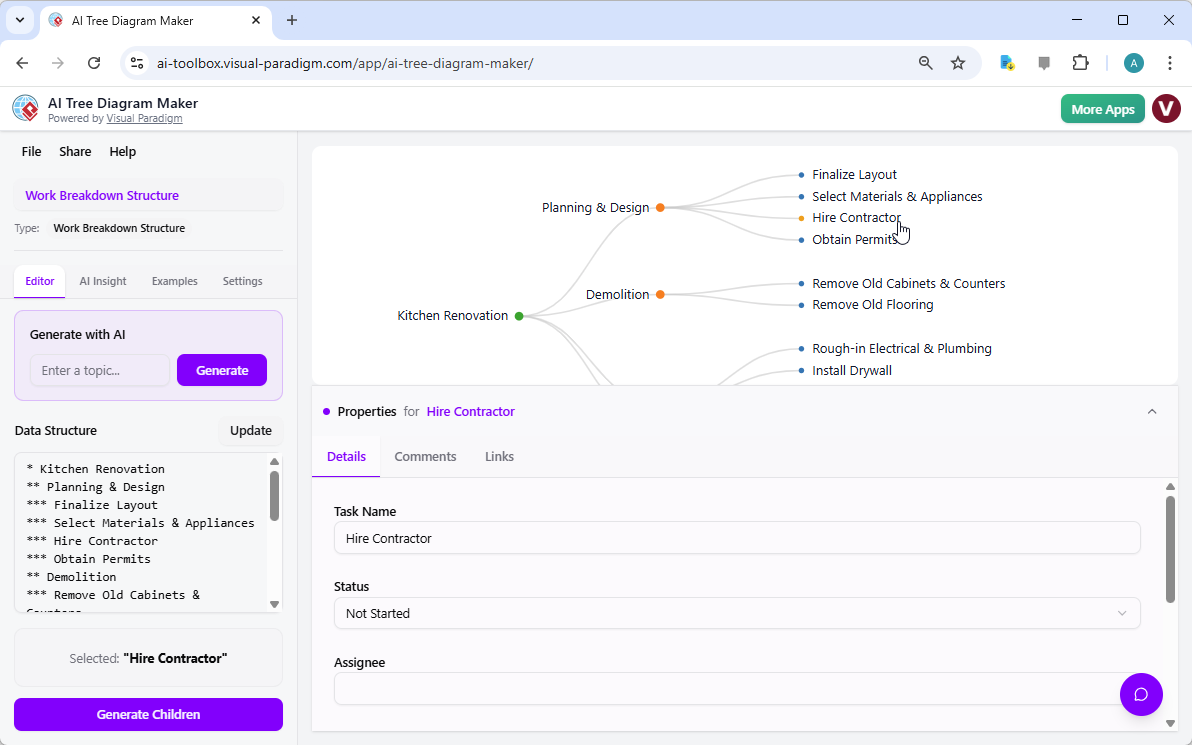
In the interface shown below, you can see exactly how a “Kitchen Renovation” project is broken down. The user isn’t just looking at a static image; they are interacting with a living document. The left-hand panel uses a dead-simple asterisk system to define levels, while the right side renders a beautiful, collapsible tree. It’s a professional Work Breakdown Structure software experience that feels more like a chat with a smart assistant than a chore in a spreadsheet.
Why This AI-Powered Tree Diagram Tool is a Game-Changer
If you’ve used old-school diagramming apps, you know the pain of moving one box and watching the entire layout explode. The AI Tree Diagram Maker by Visual Paradigm Online kills that frustration. It’s built for speed and technical depth. You get a dual-view setup: a text-based “Data Structure” editor on the left and the interactive visualizer on the right. When you click a node like “Hire Contractor” in the diagram, the tool instantly highlights the corresponding text and opens up a detailed Property Editor at the bottom. This isn’t just a “pretty picture”; it’s a database of your project’s DNA.
Key Takeaways for Efficient Planning
-
Instant Generation: Drop a topic like “Plan a company offsite” and the AI builds the entire tree for you.
-
Dual-View Sync: Edit text on the left, see the visual update on the right in real-time.
-
Rich Metadata: Add assignees, statuses (To Do, In Progress, Done), and links directly to any node.
-
Collapsible Branches: Handle massive diagrams with thousands of nodes without feeling overwhelmed.
-
AI Insights: Get a “second opinion” on your plan to spot risks or bottlenecks you missed.
Going Deep: Data-Rich Nodes and Property Editing
Most tree makers stop at labels. This advanced tree diagram app lets you get into the weeds. As seen in the “Kitchen Renovation” example, selecting the “Hire Contractor” node reveals a properties pane. Here, you can track the status of the task, assign it to a specific person, and even leave comments or external links. This turns a simple chart into a functional project management tool. You aren’t just saying you need a contractor; you’re tracking the exact progress of that specific requirement within the larger “Planning & Design” phase. ?️
The “Generate Children” feature is another massive time-saver. Let’s say your “Demolition” branch is looking a bit thin. Instead of manual entry, you just hit the button, and the AI suggests sub-tasks like “Remove Old Cabinets” or “Haul Away Debris.” It’s like having a consultant who knows your project’s context sitting right next to you, suggesting the next logical steps for your Work Breakdown Structure (WBS).
Chatting with Your Project: The AI Assistant
The real “wow” factor is the integrated context-aware AI chatbot. It doesn’t just know general facts; it knows your data. In the second image, the user asks the AI Assistant for suggestions to improve efficiency. Because the AI understands the entire structure of the Kitchen Renovation, it doesn’t give generic advice. It looks at the existing nodes and suggests specific additions like “Conduct Site Survey” and “Create 3D Floor Plan” to ensure the design phase is airtight before the hammers start swinging.

This interactive AI assistant turns your static diagram into a dynamic knowledge base. You can ask things like “Which tasks are assigned to John?” or “What’s the status of the permits?” and get an instant answer. It’s a best-in-class AI-powered tree diagram tool because it bridges the gap between visualization and actionable intelligence. You aren’t just drawing lines; you are communicating with your project’s architecture. ?
Pro Tips for Getting the Most Out of the Maker
-
Use Blueprints: Don’t start from scratch. Choose the “Work Breakdown Structure” or “Decision Tree” blueprint to get the right property fields (like status and assignee) automatically loaded.
-
Master the Asterisks: One asterisk (`*`) is your root. Two (`**`) is a child. It’s the fastest way to build a 100-node tree without ever touching your mouse.
-
Generate Insights: Once your tree is built, head to the “AI Insight” tab. It’ll give you a written breakdown of potential risks—like noticing you haven’t allocated time for “Permit Approval” which could stall the whole kitchen project.
-
Export for Stakeholders: Need to show the contractor the plan? Export your diagram as a high-res PNG or share a read-only cloud link. It looks way more professional than a messy handwritten list.
Conclusion: The Future of Hierarchy Management
Whether you’re mapping out a family tree, a software architecture, or a complex business process, the AI Tree Diagram Maker is the most efficient way to get organized. It combines the raw speed of text editing with the clarity of visual diagrams and the “brains” of modern generative AI. By using this professional online tree diagram tool, you move from just “having an idea” to having a detailed, analyzed, and actionable roadmap. Stop wasting time formatting boxes and start focusing on the actual work. ?
Ready to see your ideas take shape? You can start building your own hierarchies right now with this easy-to-use AI-powered tree diagram tool. Head over to the official tool page to explore more features or jump straight into the app to begin your next project.
Try it now: Launch AI Tree Diagram Maker App
Learn more: Explore AI Tree Diagram Maker Features
Related Links
-
From Text to Diagram: How Symbol Makes Hierarchy Editing Fast and Intuitive: Learn how Visual Paradigm’s Symbol feature enables rapid conversion of hierarchical text into clean, editable tree diagrams for organizational and technical use.
-
Visualizing Complex Ideas with AI-Powered Tree Diagrams: Explores how AI-driven tree diagram tools help users break down complex concepts into structured, visual representations for better understanding.
-
Risk Register Template with Tree Diagram Visualization: Use this interactive tree diagram tool to create and manage a risk register, enabling clear visualization of risk hierarchies and mitigation strategies.
-
AI Tree Diagram Maker | Visualize Hierarchical Data Instantly: Effortlessly create stunning hierarchical diagrams like mind maps, org charts, and work breakdowns with our AI-powered tool. Simply describe your topic and …
-
C4 Model Dynamic Diagram for API Application | C4 Model Template: Visual Paradigm Online (VP Online) is an online diagram software that supports C4 model, various charts, UML, flowchart, rack diagram, org chart, family tree, ERD, floor plan, etc .
-
AI Tree Diagram Maker – Visual Paradigm AI: Visualize Any Idea. Build Your First Tree Diagram Instantly. Get AI-powered risk analysis and structural suggestions to perfect your project before you even start.
-
AI Tree Diagram Maker: Generate Hierarchies Instantly – Visual Paradigm Product Updates: November 4, 2025 – Effortlessly create complex tree diagrams from text with Visual Paradigm’s new AI Tree Diagram Maker. Describe your structure, and let AI build the visualization for you.
-
Vertical Swimlane Diagram Template – Visual Paradigm Online: An online diagram software that supports Swimlane Diagram, various charts, UML, flowchart, rack diagram, org chart, family tree, ERD, floor plan, etc.
-
Decision Tree Software for Visual Modeling: Create and analyze decision trees with intuitive visual tools for better problem-solving and decision-making.
-
Prerequisite Tree Maker for Planning: Visualize prerequisites and dependencies to plan complex projects or processes effectively.
-
Current Reality Tree Maker for Problem Analysis: Use current reality trees to identify root causes and analyze system issues in problem-solving.


Comments (0)