![Free eBooks of IT [BooksOfAll]](https://www.booksofall.com/wp-content/uploads/2022/06/booksofall-logo-2.png)
From Concept to Documentation: A User’s Journey Through Visual Paradigm’s Pipeline Ecosystem
Reviewed by a Product Documentation Specialist | April 2026
Introduction: Breaking Down the Walls Between Modeling and Documentation
As someone who has spent years juggling diagramming tools, documentation platforms, and version control nightmares, I was skeptical when I first heard about Visual Paradigm’s “Pipeline” feature. Like many professionals, I’d grown accustomed to the tedious dance of exporting diagrams as PNGs, uploading them to Confluence or Notion, and then praying I remembered to update them when the source model changed.
But after spending three weeks integrating the Visual Paradigm Pipeline into my daily workflow—spanning desktop modeling, AI-assisted diagram generation, and knowledge base publishing—I can confidently say this isn’t just another feature update. It’s a fundamental shift in how visual modeling and documentation can coexist. In this review, I’ll share my hands-on experience with the Pipeline ecosystem, the April 2026 OpenDocs enhancements, and whether this “Concept-to-Docs” promise holds up in real-world use.
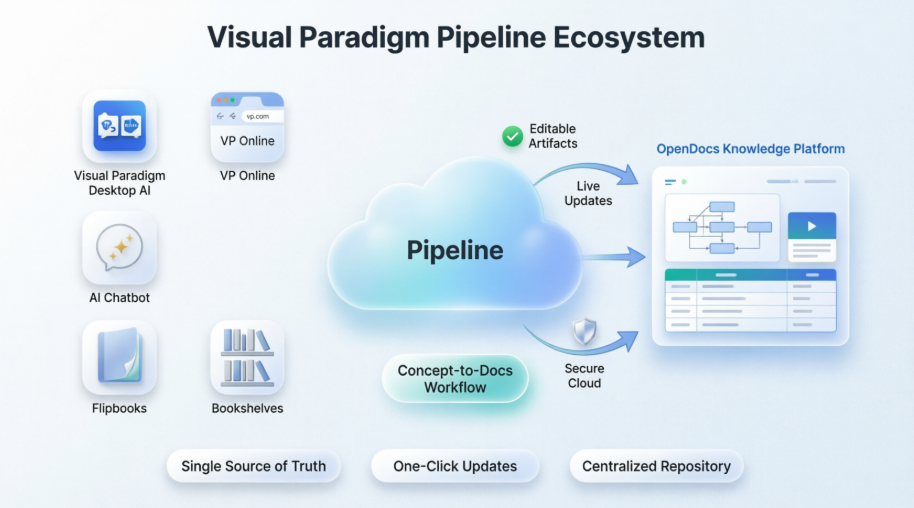
What Is the Pipeline? A User’s First Impressions
When I first logged into my Visual Paradigm account and saw the Pipeline described as “high-speed connective tissue,” I’ll admit I rolled my eyes. Marketing speak, right? But after using it for a week, the metaphor clicked. The Pipeline isn’t just a file transfer tool—it’s a secure, cloud-based repository that treats my diagrams as living, editable artifacts rather than static images.
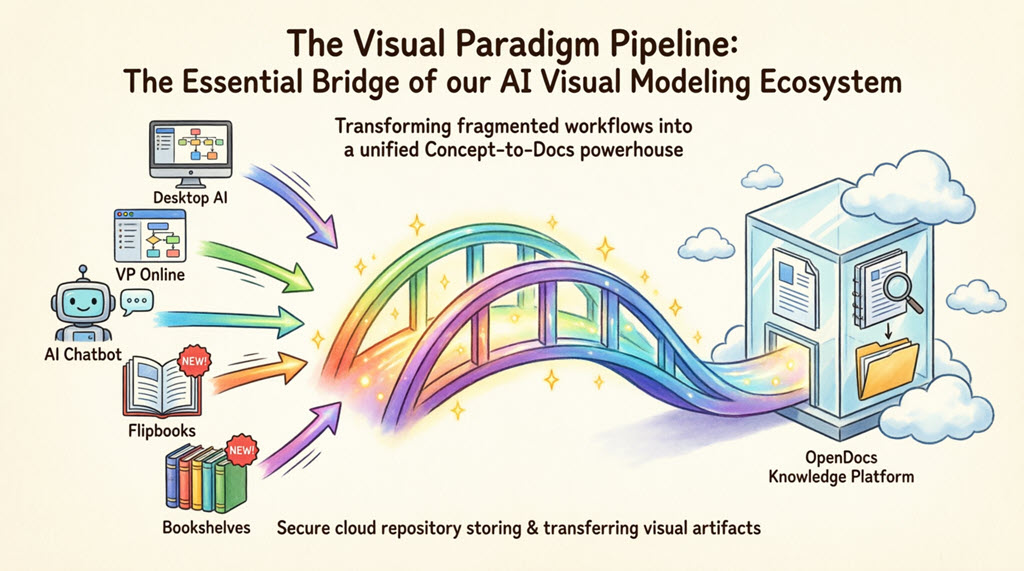
What struck me immediately was the elimination of manual steps. No more downloading a UML diagram from my desktop, renaming it, uploading it to my documentation platform, and then crossing my fingers that the next revision doesn’t break the layout. With Pipeline, my diagrams flow directly from where I create them to where they’re published—while staying fully editable. For teams managing complex system architectures or evolving business processes, this “single source of truth” approach isn’t just convenient; it’s transformative.
OpenDocs as the Destination: Where My Diagrams Finally Feel at Home
While the Pipeline handles the transport, Visual Paradigm OpenDocs is where the magic becomes visible. As a documentation specialist, I’ve used countless knowledge management platforms, but OpenDocs stands out for being genuinely “diagram-aware.” It doesn’t just embed images—it understands the context, structure, and editability of Visual Paradigm artifacts.
My typical workflow now looks like this:
-
Model a complex BPMN process in Visual Paradigm Desktop
-
Brainstorm a quick architecture sketch using the AI Chatbot
-
Send both to the Pipeline with a single click
-
Insert them into my OpenDocs technical manual, where they appear as interactive, updatable elements
The result? Documentation that evolves alongside the project, not lagging behind it.
The 5 Core Connections: Real-World Testing
1. Visual Paradigm Desktop → OpenDocs: Power User’s Dream
As someone who relies on advanced UML and SysML modeling, the Desktop-to-OpenDocs pipeline has been a game-changer. Here’s exactly how I used it last week while documenting a microservices architecture:
-
Opened my complex component diagram in Visual Paradigm Desktop
-
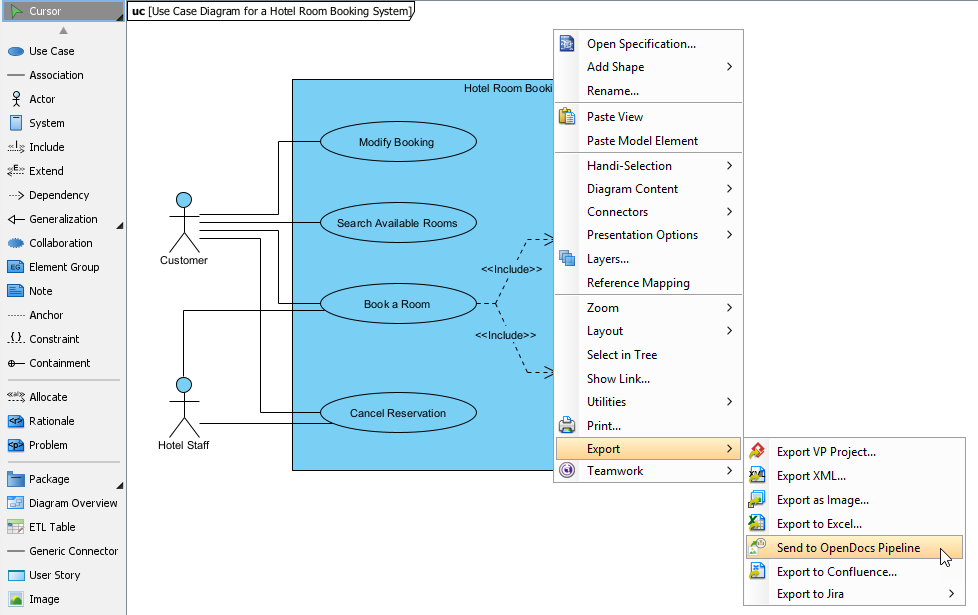
Right-clicked the diagram and selected Export > Send to OpenDocs Pipeline
-
Saved the project when prompted (a quick step that ensures version integrity)
-
Added a comment: “v2.1 – Added payment service dependencies” (this shows up in OpenDocs for team context)
-
Confirmed the export
Within seconds, my diagram appeared in the Pipeline pane inside OpenDocs. When editing a documentation page, I simply clicked Insert > Pipeline, selected my diagram, and it embedded as a live, editable artifact. When I later updated the source model in Desktop, a single “Update to Latest Revision” click in OpenDocs refreshed the diagram everywhere it was used. No re-uploading, no broken links.
Extended Reading: New Feature: Seamlessly Export Visual Paradigm Desktop Diagrams to OpenDocs
2. Visual Paradigm Online → OpenDocs: Cloud-Native Efficiency
For quick iterations or collaborative sessions, I often use Visual Paradigm Online in my browser. The Pipeline integration here feels even more seamless because there’s zero local file handling.
My process:
-
Created a marketing workflow diagram in VP Online
-
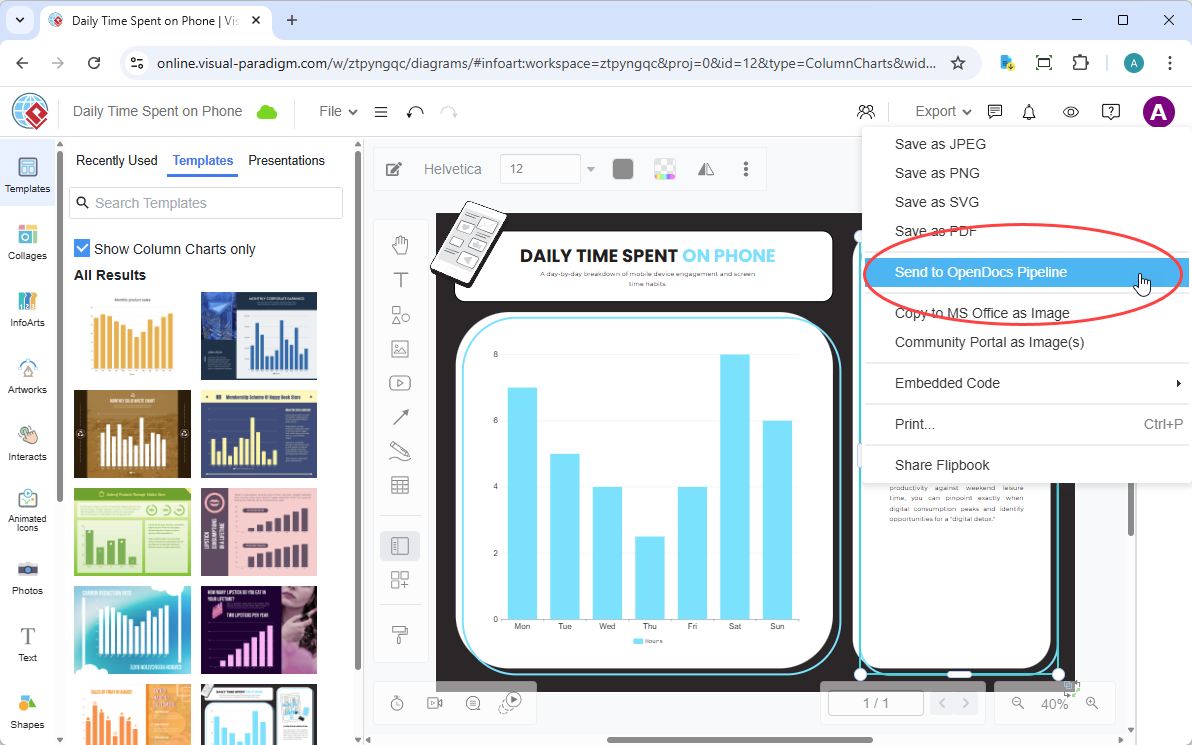
Navigated to Export > Send to OpenDocs Pipeline in the top menu
-
Added a descriptive comment for my team
-
Confirmed export
The diagram instantly appeared in my OpenDocs Pipeline library. What impressed me most: when a colleague edited the same diagram in VP Online later that day, I could update the embedded version in OpenDocs with one click. This eliminated the “which version is current?” confusion that plagues distributed teams.
Extended Reading: New Feature: Send Your Visual Paradigm Online Creations Directly to OpenDocs
3. AI Chatbot → OpenDocs: Conversational Documentation at Its Best
This is where I had my “wow” moment. I was drafting a requirements document and needed a quick class diagram for an online learning platform. Instead of switching contexts to a modeling tool, I asked the Visual Paradigm AI Chatbot:
“Generate a UML class diagram for an online learning platform with User, Course, Enrollment, and Payment modules”
Within seconds, the AI produced a clean, structured diagram. With one click on Export > Send to OpenDocs Pipeline, it was ready for insertion:
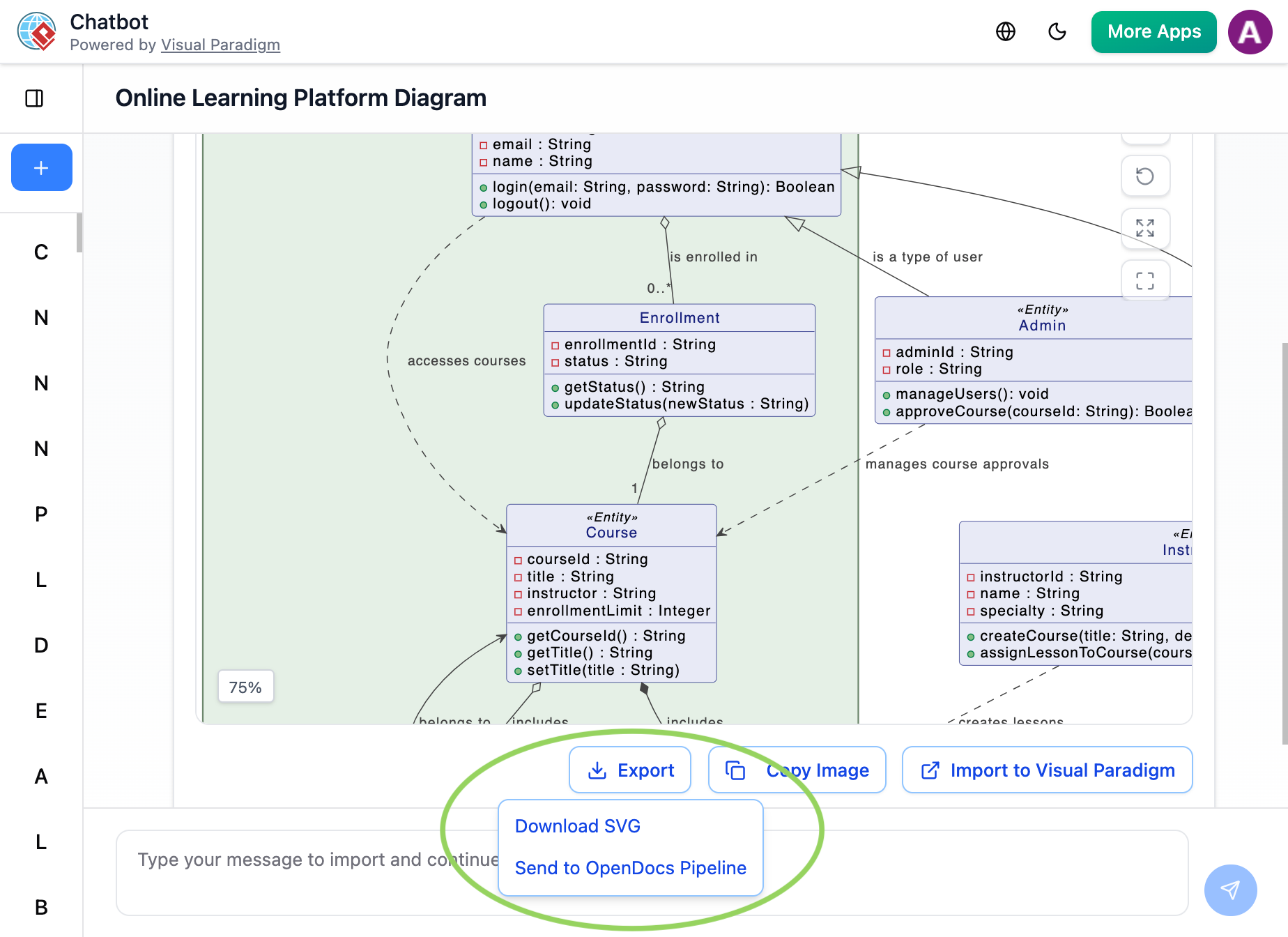
In OpenDocs, I inserted it directly into my requirements page. Later, when I refined the prompt to add a “Quiz” module, the updated diagram flowed through the Pipeline, and I updated the embedded version in seconds. For rapid prototyping and iterative documentation, this workflow is unbeatable.
Extended Reading: New Feature Alert: Send Diagrams from Visual Paradigm AI Chatbot Directly to OpenDocs!
4. Flipbooks → OpenDocs (New!): Interactive Content, Simplified
I recently created a product catalog Flipbook in Visual Paradigm Online for a client presentation. Previously, sharing this meant sending a separate link or embedding an iframe with custom code. With the new Pipeline integration, I simply sent the Flipbook to OpenDocs and embedded it directly into a project documentation page. The result: stakeholders could flip through the interactive catalog without leaving the knowledge base. For training materials, product guides, or executive summaries, this adds a layer of engagement that static PDFs simply can’t match.
5. Bookshelves → OpenDocs (New!): Scaling Knowledge Management
When managing documentation for multiple product lines, organization becomes critical. The Bookshelves-to-OpenDocs feature lets me curate entire collections of Flipbooks and diagrams into a single, embeddable library. I used this last month to create a “Developer Onboarding” Bookshelf containing architecture diagrams, API guides, and setup tutorials. Embedding it into our team’s OpenDocs workspace meant new hires had instant, organized access to everything they needed—no more hunting through scattered folders or outdated wikis.
Why This Workflow Changed My Daily Routine: A Comparison
| My Old Workflow | My New Pipeline Workflow |
|---|---|
| Export diagram as PNG/JPG → Rename → Upload to Confluence → Hope it’s the right version | One-click “Send to Pipeline” → Insert in OpenDocs → Always current |
| Manual re-upload every time a diagram changed | “Update to Latest Revision” button keeps everything synchronized |
| Static images that couldn’t be edited without starting over | Deep-linked, fully editable artifacts that maintain their modeling intelligence |
| Files scattered across local drives, cloud storage, and email attachments | Centralized cloud repository with version history and team comments |
The time savings alone are significant—I estimate I’ve reclaimed 3-5 hours per week previously spent on file management. But the real value is in reduced cognitive load: I no longer worry about version drift or broken documentation.
April 2026 OpenDocs Updates: Enhancements That Matter
Beyond the Pipeline, Visual Paradigm’s April 2026 OpenDocs updates addressed several pain points I’d encountered in knowledge management:
Enhanced Documentation Layouts
-
Flexible Page Width Settings: I can now adjust page width to suit content—narrow for focused text, wide for complex diagrams. This small change dramatically improves readability.
-
Interactive Table Column Resizing: Managing dense data tables used to require HTML tweaks. Now I simply drag column borders directly on the page. [1, 6, 7, 8]
New Sharing and Integration Options
-
Export to WordPress: I published a client-facing knowledge base directly to our WordPress site with full functionality—no manual copying or formatting headaches. [3, 9, 11]
-
Digital Bookshelves: Curating multiple Flipbooks into a single embeddable library has streamlined how we present training materials. [8]
-
Flipbook Integration: Embedding interactive Flipbooks directly into documentation pages has increased engagement with our user guides. [4]
-
Website Embedding: Using the “Embed Code” feature, I integrated our internal knowledge base into our company portal as native content. [10]
Advanced Content Control
-
Static vs. Live Sharing: For formal releases, I create Static Snapshots to freeze content. For ongoing projects, Live Update keeps documentation synchronized with my edits. This flexibility is crucial for managing different stakeholder needs. [1, 9, 12]
-
Browse Share History: The new dashboard lets me audit which pages were shared, when, and manage active links. This has been invaluable for compliance and content governance. [12]
Conclusion: Is the Pipeline Worth the Investment?
After extensive hands-on testing, my verdict is clear: Visual Paradigm’s Pipeline ecosystem delivers on its “Concept-to-Docs” promise. For individuals and teams who create visual models and need to publish them as living documentation, this isn’t just a nice-to-have feature—it’s a workflow revolution.
What impressed me most:
-
The elimination of manual export/import cycles
-
Preservation of diagram editability throughout the documentation lifecycle
-
Seamless integration across desktop, web, and AI-powered tools
-
The April 2026 OpenDocs enhancements that address real-world publishing needs
Who should consider this:
-
Product teams documenting complex systems
-
Technical writers managing evolving architecture diagrams
-
Consultants creating client-facing knowledge bases
-
Any organization struggling with version control between models and documentation
One consideration: If your workflow is entirely static (e.g., you only create final, unchanging diagrams), the Pipeline’s full value may not be realized. But for dynamic, iterative projects—which describes most modern software and business initiatives—the benefits are substantial.
In a landscape where tools often promise integration but deliver friction, Visual Paradigm’s Pipeline stands out as a genuinely cohesive solution. It doesn’t just connect apps; it reimagines how visual thinking and knowledge sharing can work together. For professionals tired of the documentation dance, this ecosystem is worth exploring.
References
- Visual Paradigm Desktop Product Updates: Official release notes detailing desktop application enhancements, including Pipeline integration and layout improvements.
- Visual Paradigm Updates Hub: Central repository for all Visual Paradigm product announcements, feature releases, and technical documentation.
- Export OpenDocs to WordPress Page: Step-by-step guide for publishing OpenDocs knowledge base content directly to WordPress sites.
- Share Visual Paradigm Flipbooks to OpenDocs: Tutorial on embedding interactive Flipbooks into OpenDocs documentation pages.
- Visual Paradigm Release Updates: Comprehensive index of all product updates and feature announcements across the Visual Paradigm ecosystem.
- Visual Paradigm Desktop Product Updates: Detailed changelog for desktop application features, including table resizing and page layout controls.
- Focus on Content with the New Pageless Option in Google Docs: Third-party analysis of flexible document layout trends, providing context for OpenDocs’ page width enhancements.
- Share Digital Bookshelf to OpenDocs: Guide for curating and embedding collections of Flipbooks and resources into OpenDocs workspaces.
- Export OpenDocs to WordPress Page: Technical documentation for WordPress integration features, including authentication and content mapping.
- OpenDocs Embed HTML Code Tutorial: Instructions for embedding OpenDocs knowledge bases into external websites using HTML iframe code.
- Seamlessly Integrate Visual Paradigm OpenDocs into WordPress: Third-party tutorial covering advanced WordPress integration strategies and use cases.
- OpenDocs Browse Share History Guide: Documentation for the share history audit dashboard, enabling content governance and link management.



Comments (0)