![Free eBooks of IT [BooksOfAll]](https://www.booksofall.com/wp-content/uploads/2022/06/booksofall-logo-2.png)
C4 Model for Onboarding New Architects: A Structured Introduction
Welcome to the foundational layer of architectural communication. When a new architect joins a team, the learning curve can be steep. Complex systems often feel like black boxes until someone opens them up with a clear map. The C4 Model offers that map. It provides a standardized way to describe software architecture, breaking down complexity into manageable layers. This guide explores how to use the C4 Model specifically for onboarding new architects, ensuring they gain context quickly without getting lost in technical weeds. 🚀
🧭 Why Structure Matters in Onboarding
Onboarding is not just about granting access to repositories or setting up development environments. It is about transferring mental models. New architects need to understand how data flows, where boundaries exist, and how services interact. Without a structured approach, information overload occurs. They might focus too early on implementation details before understanding the broader system goals. A structured introduction using a standardized notation like the C4 Model helps align expectations. It creates a shared vocabulary between senior and junior staff. This shared language reduces ambiguity and accelerates the time-to-value for new team members. 🗺️
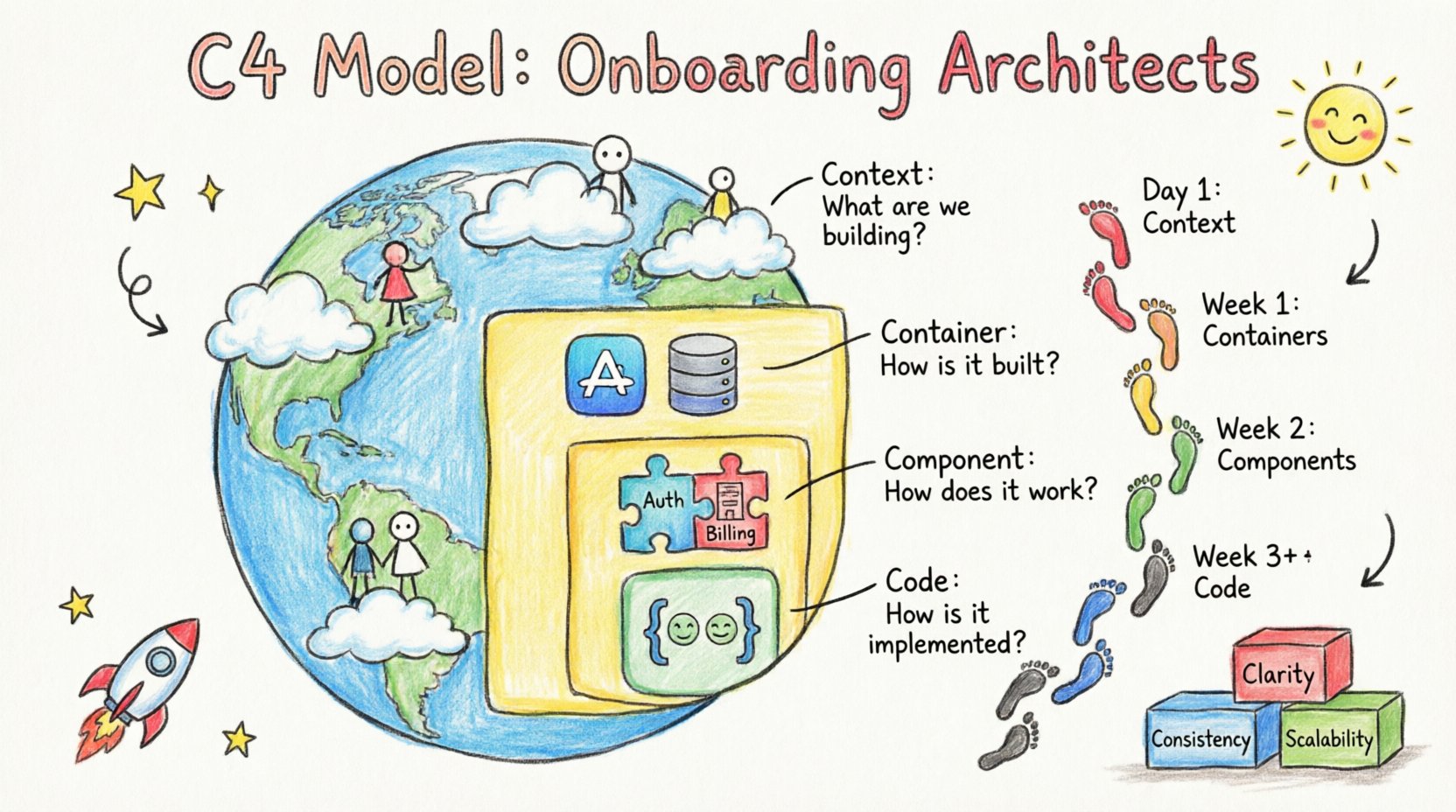
Effective onboarding relies on three pillars:
- Clarity: Diagrams must be self-explanatory at a glance.
- Consistency: Notation must remain uniform across the entire system.
- Scalability: Documentation must evolve as the system grows.
When these pillars are in place, the C4 Model becomes a powerful tool for knowledge transfer. It allows architects to zoom in and out of the system without losing context. This ability to switch levels of detail is crucial for understanding both business goals and technical constraints. 🛠️
🔍 Understanding the C4 Model Layers
The C4 Model is a hierarchy of diagrams. Each level represents a different level of detail. This hierarchy prevents the common pitfall of trying to draw everything in one view. Instead, we use four distinct layers. Each layer answers a specific question for the reader. Let us examine each layer in detail to understand its role in the onboarding process.
1. Context Diagram 🌍
The Context Diagram is the starting point. It sits at the highest level of abstraction. Its primary purpose is to define the system’s boundary. It shows what is inside and what is outside. This is the first thing a new architect should see. It answers the question: “What are we building?”
- System: The software being built or maintained.
- Users: People who interact with the system (e.g., Admin, Customer).
- External Systems: Other software that communicates with the system (e.g., Payment Gateway, Email Service).
- Relationships: Lines connecting these elements to show data flow or interaction.
For onboarding, this diagram sets the stage. It prevents new architects from assuming they need to understand every microservice immediately. They first understand the ecosystem. It highlights dependencies on third-party services, which is often a critical risk factor. 🎯
2. Container Diagram 📦
Once the boundary is clear, we zoom in. The Container Diagram breaks the system down into high-level building blocks. A container is a deployable unit of software. Examples include web applications, mobile apps, databases, or API gateways. This level answers the question: “How is it built?”
- Technology Stack: Shows the language or framework used (e.g., Java, Node.js, Python).
- Communication Protocols: HTTP, gRPC, or message queues.
- Security Boundaries: Trust zones between containers.
This layer is vital for architects who need to understand deployment strategies. It clarifies how the system is partitioned. For example, a new architect might need to know if the database is shared or dedicated. This information guides infrastructure decisions. It also helps identify bottlenecks where containers communicate frequently. 🔄
3. Component Diagram 🧩
Zooming further in, we reach the Component Diagram. This level details the internal structure of a container. A component is a logical grouping of functionality. It is not a physical file but a module within the codebase. This answers the question: “How does it work internally?”
- Responsibilities: Each component has a specific job (e.g., Authentication, Billing).
- Interfaces: How components talk to each other.
- Dependencies: What other components are required for this component to function.
For onboarding, this diagram helps developers understand code organization. It reduces the cognitive load of navigating a large codebase. If a new architect wants to add a feature, they look at the component diagram to see where it fits. It prevents “spaghetti code” by enforcing logical separation. This clarity is essential for maintaining long-term health. 🧱
4. Code Diagram 💻
The final layer is the Code Diagram. It shows the relationships between classes and functions. This is usually generated automatically from the codebase. It answers the question: “How is it implemented?”
- Class Structure: Inheritance and composition.
- Method Calls: Execution flow.
- Complexity: Cyclomatic complexity metrics.
While useful for deep debugging, this level is often too detailed for initial onboarding. However, having it available is important for architectural reviews. It allows senior architects to verify that the design matches the implementation. It ensures that refactoring efforts are grounded in reality. 📝
📊 Comparison of C4 Diagrams by Audience
Different stakeholders need different views. During onboarding, it is important to know which diagram to present to whom. The table below outlines the appropriate usage for each layer.
| Diagram Level | Primary Audience | Key Question Answered | Onboarding Priority |
|---|---|---|---|
| Context | Business Stakeholders, Product Managers | What does the system do? | High (Day 1) |
| Container | Developers, DevOps, Architects | How is the system deployed? | High (Week 1) |
| Component | Backend Developers, Architects | How is the code organized? | Medium (Week 2) |
| Code | Senior Developers, Code Reviewers | How are classes structured? | Low (As Needed) |
Using this matrix ensures that new architects are not overwhelmed. Start with the Context. Move to Containers once they understand the business scope. Only introduce Components when they are ready to write code. This pacing is critical for retention and confidence. 📈
🛠️ Structuring the Onboarding Workflow
Integrating the C4 Model into an onboarding program requires a plan. It cannot be an afterthought. It must be woven into the daily activities of the new hire. Here is a structured workflow to guide the process over the first few weeks.
Phase 1: The Overview (Days 1-2)
Begin with the Context Diagram. Do not show code yet. Do not show databases. Show the system boundary. Explain the users and external dependencies. This gives the new architect a mental map. Ask them to explain it back to you. This confirms understanding. If they can describe the system in their own words, they are ready for the next step. 🗣️
Phase 2: The Architecture (Days 3-7)
Introduce the Container Diagram. Discuss technology choices. Why was this database selected? Why is this API gateway used? Encourage questions about trade-offs. This is where architectural decisions are justified. New architects need to understand the “why”, not just the “what”. Discuss security boundaries here. Trust zones are critical for compliance and safety. 🔒
Phase 3: The Implementation (Week 2)
Now introduce the Component Diagram. Walk through a specific feature. Trace how a request flows from the container into a component. Show how data is transformed. This connects the high-level design to the code. It helps them navigate the repository. Use this phase to introduce coding standards. Consistency in naming conventions matters. 📂
Phase 4: The Deep Dive (Week 3+)
Allow the new architect to explore the Code Diagram. Encourage them to generate their own diagrams for specific modules. This reinforces learning. They should be able to identify dependencies and potential bottlenecks. At this stage, they should be contributing to design discussions. Their fresh perspective is valuable. 🧠
⚠️ Common Pitfalls in C4 Documentation
Even with a good model, mistakes happen. During onboarding, you will likely encounter documentation issues. Being aware of these pitfalls helps you correct them early. Avoid these common errors to maintain clarity.
- Over-Engineering: Trying to document everything at once. Start small. Add detail as the system grows.
- Outdated Diagrams: Documentation that does not match the code is worse than no documentation. Establish a process for updates.
- Inconsistent Notation: Using different shapes for the same element confuses readers. Stick to the standard.
- Ignoring the Audience: Showing code diagrams to business stakeholders creates confusion. Match the level to the reader.
- Static Documentation: Treat diagrams as living documents. They must change when the system changes.
Addressing these issues requires discipline. It is not enough to create diagrams once. They must be maintained. This maintenance effort is part of the architectural responsibility. New architects should be taught that documentation is a deliverable, not a side task. 🛡️
🔄 Maintaining the Model Over Time
Once the new architect is onboarded, the model must continue to serve the team. Architecture drift is a real threat. Code changes faster than diagrams. To combat this, establish a review process. When a Pull Request modifies the architecture, the diagram should be updated. This keeps the knowledge base accurate. It also forces the team to think about impact before merging code. 🔄
Consider automating where possible. Some tools can generate diagrams from the codebase. This reduces the manual burden. However, manual review is still necessary to ensure the diagram reflects the intent. Automation captures reality; manual review captures design. Both are needed. 🤖
📏 Measuring Onboarding Success
How do you know the onboarding worked? Use clear metrics. Do not rely on vague feelings of readiness. Look for tangible outputs.
- Time to First PR: How long until they contribute code?
- Diagram Accuracy: Can they identify errors in the diagrams?
- Decision Making: Do they make sound architectural decisions without constant guidance?
- Communication: Can they explain the system to others clearly?
If these metrics are positive, the structured introduction was successful. If not, revisit the onboarding plan. Perhaps the diagrams were too complex. Perhaps the mentorship was insufficient. Adjust the approach based on feedback. Continuous improvement is key to a healthy engineering culture. 📊
🤝 The Role of Mentorship
Tools alone are not enough. Mentorship is the glue that holds the onboarding process together. A senior architect should guide the new hire through the diagrams. They should explain the history behind decisions. Why was this pattern chosen? Why was that service deprecated? This context cannot be found in a diagram. It comes from conversation. 🗣️
Encourage pair programming during the early weeks. It allows the mentor to see how the new architect applies the knowledge. It also provides a safe space to ask questions. Mistakes should be viewed as learning opportunities. This builds confidence. Confidence leads to better decision-making. Trust is built over time through consistent support. 🤝
🌱 Final Thoughts on Architectural Growth
Onboarding is a journey. It transforms a newcomer into a capable contributor. The C4 Model provides the structure for this journey. It breaks down complexity into understandable pieces. It ensures that knowledge is transferred accurately and efficiently. By following a structured approach, teams can reduce risk and improve velocity. 🏁
Remember that documentation is a communication tool. It is not a requirement to be checked off. It is a living artifact that supports the team. As the system evolves, so must the diagrams. The goal is to build a sustainable environment where new architects can thrive. This requires commitment, consistency, and care. With the right foundation, teams can scale their architecture without losing their minds. 🚀
Start with the Context. Build the Containers. Organize the Components. Review the Code. Repeat. This cycle ensures clarity at every stage. Embrace the model as a guide, not a rulebook. Flexibility within the structure allows for innovation. When architects feel supported, they perform at their best. That is the true measure of a successful onboarding program. 🌟



Comments (0)