![Free eBooks of IT [BooksOfAll]](https://www.booksofall.com/wp-content/uploads/2022/06/booksofall-logo-2.png)
C4 Model for Non-Technical Stakeholders: Making Architecture Accessible
Software systems are complex structures. They involve data, logic, networks, and user interactions. For business leaders, project managers, and clients, understanding how these pieces fit together can feel overwhelming. Technical jargon often creates barriers. The C4 Model provides a solution. It is a method for visualizing software architecture that works for everyone.
This guide explains how to use the C4 Model effectively. We will focus on clarity, communication, and business value. You do not need to write code to benefit from this approach. You need to understand how your digital products are built and how they grow.
🤔 Why Architecture Matters to Business
Many stakeholders view architecture as a technical task. They assume developers handle it alone. This is a mistake. The structure of a system affects speed, cost, and reliability.
When architecture is unclear, several problems arise:
- Slower Delivery: Teams spend time debating how to build features instead of building them.
- High Costs: Poorly designed systems require constant maintenance and refactoring.
- Risk of Failure: Critical bottlenecks are discovered late in the process.
- Communication Gaps: Developers and business owners speak different languages.
The C4 Model bridges this gap. It standardizes how we talk about structure. It creates a shared vocabulary. This allows everyone to see the same picture.
📦 What is the C4 Model?
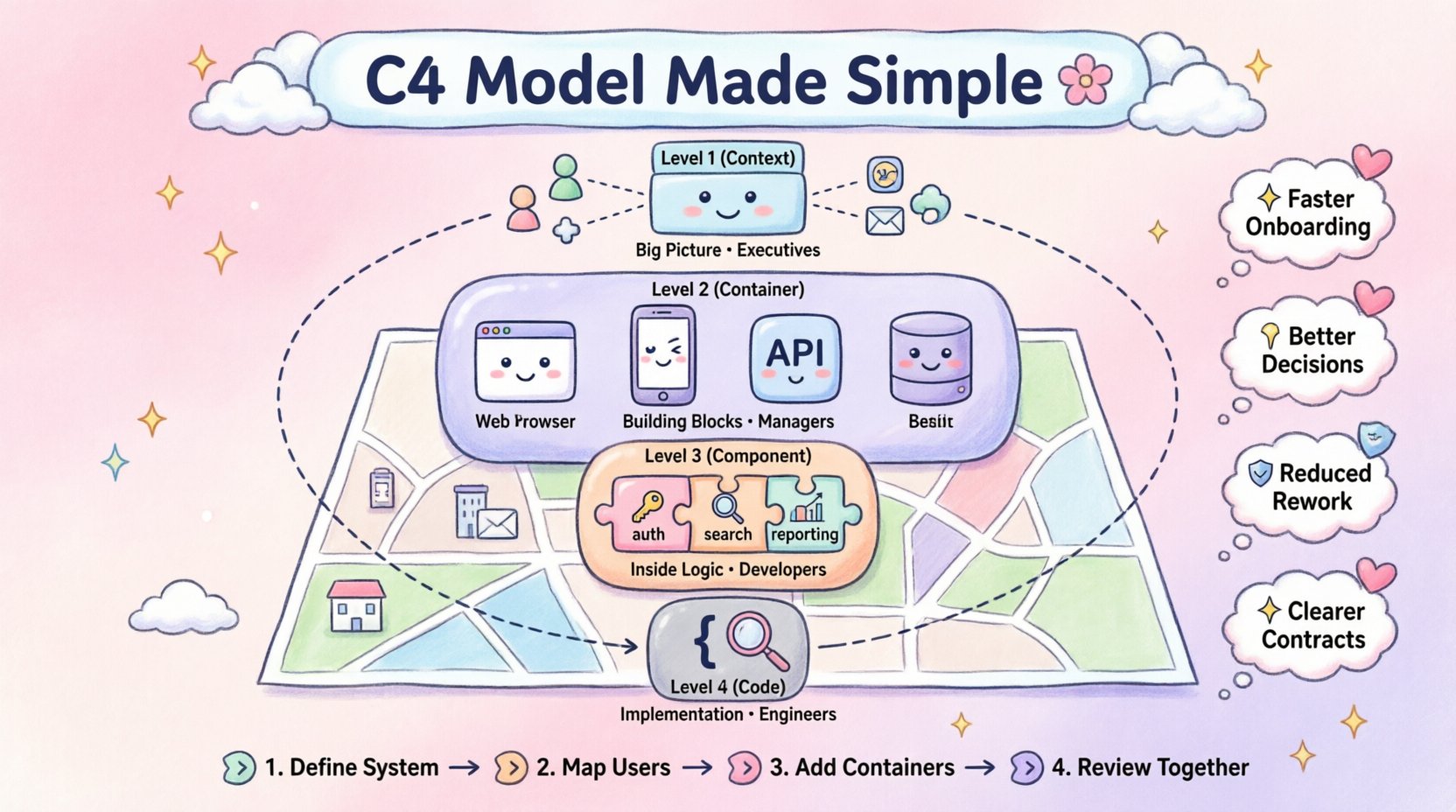
The C4 Model is a hierarchical approach to software architecture. It breaks down a system into four levels. Each level provides a different view of the system.
Think of it like looking at a city:
- Level 1: A map of the continent. You see countries and major relationships.
- Level 2: A map of the city. You see districts and main roads.
- Level 3: A map of a neighborhood. You see individual buildings and streets.
- Level 4: A blueprint of a single building. You see the walls and rooms.
In software, these levels are Context, Container, Component, and Code. Each level serves a specific audience. Level 1 is for executives. Level 4 is for engineers. The goal is to start high and drill down only when necessary.
🌍 Level 1: System Context Diagram
This diagram shows the big picture. It places your system in the wider world. It answers the question: “What does this system do, and who uses it?”
Key Elements
- System Boundary: A box representing your software.
- Users: People who interact with the system (Customers, Admins, Employees).
- External Systems: Other software your system talks to (Payment Gateways, Email Services, CRM).
- Relationships: Lines showing data flow or interaction.
Why Stakeholders Need This
Executives need to understand scope. They need to know if a project fits the business strategy. The System Context Diagram makes this clear.
It helps identify dependencies. If you rely on an external payment processor, you need to know what happens if it goes down. It also helps new employees understand their role in the ecosystem quickly.
Business Value:
- Clarifies project boundaries.
- Identifies third-party risks.
- Aligns technical scope with business goals.
🚀 Level 2: Container Diagram
Once the big picture is clear, we zoom in. The Container Diagram shows the building blocks of the system. A container is a standalone unit of software.
What is a Container?
A container is not necessarily a physical server. It is a distinct runtime environment. Examples include:
- A web application running in a browser.
- A mobile app on a phone.
- A backend service running on a server.
- A database storing information.
- A batch job processing files overnight.
Connections Between Containers
The diagram shows how these containers talk to each other. It highlights the technology stack at a high level.
- Web Application: Talks to the API.
- API: Talks to the Database.
- Database: Stores persistent data.
Why Stakeholders Need This
This level helps with resource planning. You can see where infrastructure is needed. It helps estimate hosting costs. It also helps in understanding scalability.
If you plan to increase users, you need to know which containers will get heavy traffic. The Container Diagram reveals these hotspots.
Business Value:
- Assists in infrastructure budgeting.
- Highlights data storage requirements.
- Clarifies security boundaries between services.
⚙️ Level 3: Component Diagram
Now we go deeper. The Component Diagram shows what is inside a container. A container is like a house; components are the rooms.
What is a Component?
A component is a logical grouping of functionality. It is not a single file. It is a module that performs a specific task.
Examples within a Web Application container:
- Authentication Component: Handles login and logout.
- Search Component: Finds items in the catalog.
- Reporting Component: Generates monthly summaries.
Relationships Within Containers
This level shows how components interact. It reveals the internal logic flow.
- Does the Search Component talk directly to the Database?
- Does the Reporting Component get data from the Search Component?
Why Stakeholders Need This
This level is useful for feature estimation. When a stakeholder requests a new feature, developers can map it to a component. This makes scope clearer.
It also helps in risk management. If a specific component is complex, it might need more testing. If a component is critical, it needs a backup plan.
Business Value:
- Improves feature estimation accuracy.
- Identifies complex areas requiring more attention.
- Facilitates modular upgrades without breaking the whole system.
💻 Level 4: Code Diagram
At the lowest level, we look at the code. This is usually not necessary for non-technical stakeholders. It shows classes, methods, and variables.
However, it is important to know that this level exists. It is the implementation detail. Most business decisions do not require seeing the code structure.
When to Use This:
- During deep debugging sessions.
- When explaining specific technical debt.
- For code review processes.
For general business communication, Levels 1, 2, and 3 are usually sufficient. Keeping the focus here prevents confusion.
📊 Comparing the Levels
To make this easier to remember, we can compare the levels side by side.
| Level | Focus | Audience | Time to Create |
|---|---|---|---|
| Context | System vs. World | Executives, Stakeholders | Short |
| Container | Software Units | Managers, Architects | Medium |
| Component | Internal Logic | Developers, Leads | Long |
| Code | Implementation | Engineers | Very Long |
🤝 Improving Communication
Using the C4 Model changes how teams talk. It reduces ambiguity. Instead of saying “the backend stuff,” a team member says “the API container.”
Here is how to apply this in meetings:
- Start with Context: Always show the big picture first. Ensure everyone agrees on what the system does.
- Use Containers for Planning: Discuss infrastructure and integration at this level.
- Use Components for Details: Discuss specific features at this level.
- Keep Diagrams Updated: A diagram that is outdated is worse than no diagram. Update them when major changes occur.
🛠️ Implementation Steps
You do not need expensive tools to start. You can use basic drawing software. The goal is communication, not aesthetics.
- Identify the System: Define the boundary clearly. What is inside and what is outside?
- Map Users: Who interacts with the system? Draw them as actors.
- Map External Systems: What other tools does it connect to?
- Define Containers: What are the main applications or databases?
- Define Components: What are the main logical parts of the applications?
- Review with Stakeholders: Walk through the diagrams with non-technical team members. Ask if they understand the flow.
⚠️ Common Pitfalls
Even with a good model, mistakes happen. Be aware of these common issues.
- Too Much Detail: Do not put code details in the Context diagram. It confuses the audience.
- Inconsistency: Use the same icons for the same things. Do not use a server icon for a database.
- Static Images: Do not let diagrams become static images. They must evolve with the software.
- Ignoring the Audience: Do not show a Component diagram to an executive. They care about value, not logic.
🚀 Business Benefits
Why invest time in this? The return on investment is clear.
- Faster Onboarding: New hires understand the system in days, not months.
- Better Decisions: Leaders can make informed choices about investment and risk.
- Reduced Rework: Problems are spotted early in the design phase.
- Clearer Contracts: When working with external vendors, diagrams define the scope clearly.
❓ Frequently Asked Questions
Do I need to document every system?
No. Use the model for systems that are complex or critical. Simple scripts or one-off projects may not need detailed diagrams.
How often should I update the diagrams?
Update them when the architecture changes significantly. Do not update them for every minor bug fix. Aim for quarterly reviews or major release cycles.
Can I use this for legacy systems?
Yes. Documenting existing systems helps plan migration or refactoring. It helps you understand what you have before you change it.
Is this model specific to cloud or on-premise?
No. The model is technology-agnostic. It works for cloud services, on-premise servers, and hybrid environments.
🏁 Final Thoughts
Software architecture is not just for engineers. It is a business asset. The C4 Model makes this asset visible. It brings clarity to complexity.
By adopting this approach, you empower your team. You enable better conversations. You ensure that technology serves the business, not the other way around. Start with the Context. Build understanding layer by layer. Keep the focus on value.
Clear diagrams lead to clear thinking. Clear thinking leads to better products. This is the path to sustainable growth.



Comments (0)