![Free eBooks of IT [BooksOfAll]](https://www.booksofall.com/wp-content/uploads/2022/06/booksofall-logo-2.png)
C4 Model at Scale: Managing Complexity in Large-Scale Systems
Modern software architecture is not merely about writing code. It is about managing the inevitable complexity that arises when systems grow. As organizations expand, the number of microservices, integrations, and data flows increases exponentially. Without a standardized approach to documentation, architectural understanding becomes siloed, fragile, and difficult to onboard new engineers to. The C4 model offers a structured solution. It provides a hierarchy of diagrams that allow architects to communicate design at varying levels of detail. However, applying this model to a single project is different from applying it across an enterprise.
Managing the C4 model at scale requires discipline, governance, and a clear strategy. It involves balancing the need for high-level context with the granularity required by development teams. This guide explores how to implement the C4 model effectively in large-scale environments without drowning in bureaucracy. We will examine the four levels of abstraction, strategies for maintaining consistency, and methods to ensure documentation remains relevant as systems evolve.
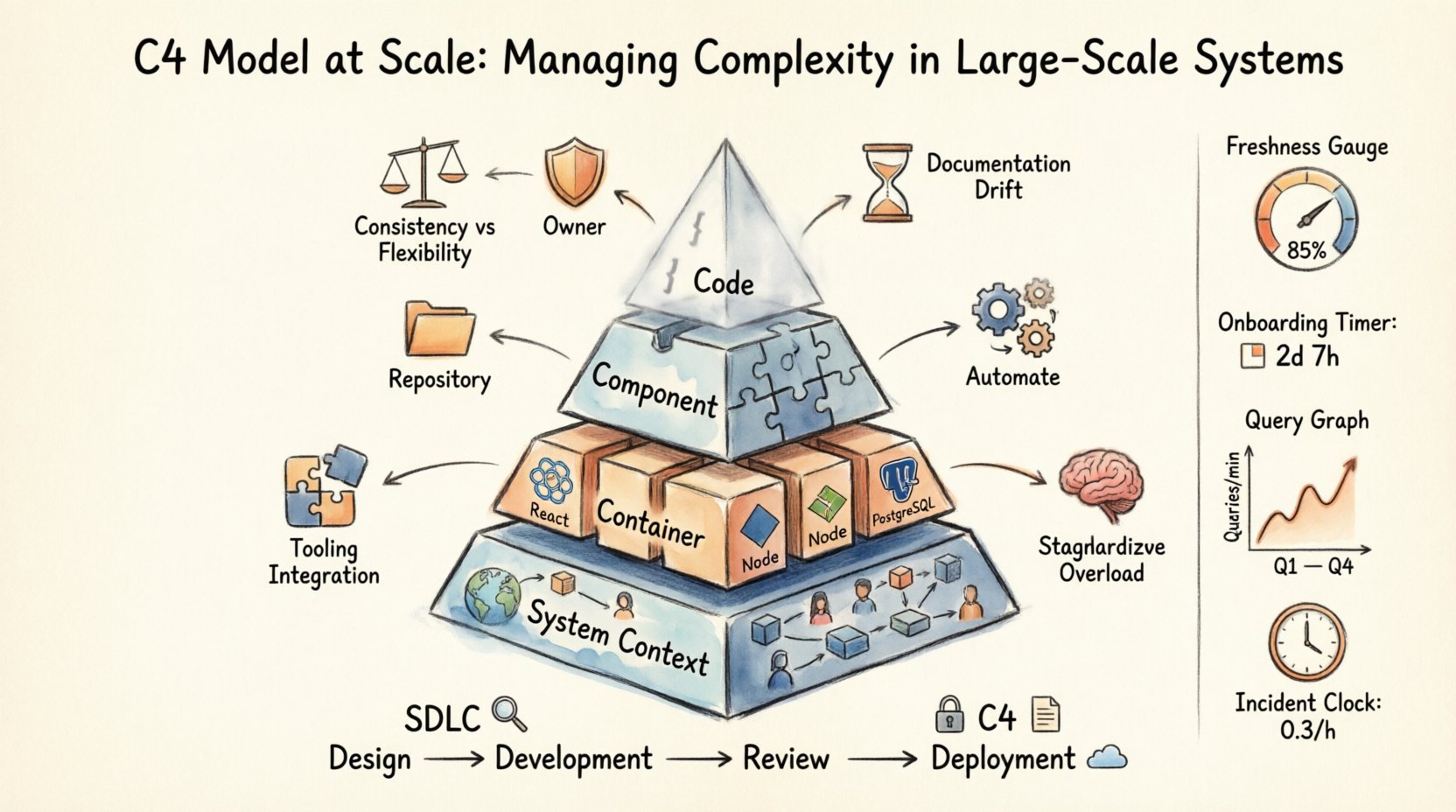
📚 Understanding the Hierarchy
The core strength of the C4 model lies in its simplicity. It organizes documentation into four distinct levels, moving from the high-level context down to the implementation details. This hierarchy allows different stakeholders to find the information they need without getting lost in unnecessary technical noise.
When scaling, it is crucial to understand that not every system needs every level of diagram. Some services are simple wrappers around external APIs, while others are complex distributed systems. The goal is to maintain a consistent standard without forcing a square peg into a round hole.
🌍 Level 1: System Context
This is the high-level view. It shows the system you are building and how it relates to users and other systems. It is the map for the entire organization. At scale, this diagram serves as the entry point for new engineers and architects to understand where a specific service fits within the broader ecosystem.
- People: Define the roles interacting with the system (e.g., End Users, Administrators, Support Staff).
- Systems: Identify other software systems that integrate with your service. This includes external third-party services and internal enterprise systems.
- Relationships: Describe the nature of the data flow or communication between these entities.
In large organizations, consistency is key. A user should expect to see a similar style of diagram regardless of which team owns the service. This reduces cognitive load when navigating documentation across different domains.
🏢 Level 2: Container
This level zooms in to show the high-level technical building blocks. A container is a deployable unit, such as a web application, a mobile app, a database, or a serverless function. It represents a distinct runtime environment.
- Containers: List the major components that make up the system. For example, a frontend React app, a backend Node.js API, and a PostgreSQL database.
- Technologies: Briefly note the primary technology stack used for each container.
- Connections: Explain how containers communicate (e.g., HTTP, gRPC, Message Queue).
At scale, this diagram helps teams understand dependencies between different parts of the architecture. It is vital for impact analysis. If a database container needs to be migrated, the team can see which other containers will be affected.
🧩 Level 3: Component
This level drills down further into a specific container. It shows the internal structure of that container. A component is a logical grouping of functionality, such as a service layer, a controller, or a repository. This is where the business logic lives.
- Components: Break down the container into manageable pieces. A user authentication container might have components for login, registration, and token management.
- Interfaces: Define the public APIs or methods exposed by the component.
- Responsibilities: Clearly state what each component does.
This level is often the most dynamic. As the code evolves, components change. Maintaining this level at scale requires automation. Manual updates to component diagrams often lag behind the code, rendering them obsolete quickly.
💻 Level 4: Code
This level is optional and rarely necessary for architectural planning. It maps components to specific classes or methods in the codebase. It is useful for onboarding new developers to a complex legacy system or for explaining intricate algorithms.
- Classes: Show the specific classes involved in a component.
- Methods: Highlight key methods and their interactions.
- Flow: Trace the execution path through the code.
Most large-scale systems do not require this level of detail in documentation. It is often better to rely on code comments and automated API documentation for this granularity.
📊 Comparing the Levels
| Level | Focus | Primary Audience | Frequency of Updates |
|---|---|---|---|
| 1. System Context | Enterprise Overview | Architects, Product Owners | Low |
| 2. Container | Technical Structure | Developers, DevOps | Medium |
| 3. Component | Internal Logic | Developers | High |
| 4. Code | Implementation Details | Specialists, Onboarding | Very High |
🚧 Challenges in Large-Scale Implementation
Adopting a modeling standard across a large organization introduces specific challenges. The friction between the need for documentation and the speed of development can create bottlenecks. Here are the primary hurdles to address.
1. Consistency vs. Flexibility
Every team has a different way of thinking. Some prefer high-level abstractions, while others dive into details immediately. Enforcing a strict standard can stifle innovation, but allowing too much freedom leads to a fragmented documentation landscape. The solution lies in setting guardrails rather than rigid rules. Define the required levels for specific system types (e.g., all public APIs must have Level 2 diagrams).
2. Documentation Drift
The most common failure point is outdated diagrams. If the code changes but the diagram does not, the documentation becomes misleading. In large systems, this happens frequently due to the velocity of deployment. Automated generation tools are essential here. They should extract information directly from the code or configuration files to keep diagrams in sync.
3. Tooling Integration
Documentation should not exist in a silo. It needs to be part of the developer workflow. If engineers have to open a separate tool to view architecture, they likely won’t. Integration with version control systems and code repositories is critical. The diagrams should live alongside the code they represent.
4. Cognitive Overload
Having too many diagrams can be as bad as having none. In a large enterprise, there might be hundreds of services. Providing a Level 3 diagram for every single microservice creates noise. Teams must prioritize. Focus on complex systems and critical paths. Simple services may only require a Level 1 or Level 2 overview.
🛠️ Strategies for Governance and Maintenance
To sustain the C4 model over time, organizations need a governance framework. This does not mean creating a large committee to approve every diagram. It means establishing clear processes and standards that empower teams to maintain their own documentation accurately.
Establish a Central Repository
All diagrams should be stored in a central, searchable location. This ensures that anyone in the organization can find the architecture of a specific service. The repository should support versioning. When a diagram changes, the history should be visible. This helps in understanding architectural evolution over time.
Define Ownership
Every diagram must have an owner. This is usually the lead architect or the senior developer of the specific service. Ownership implies responsibility for accuracy. During code reviews, the diagram should be reviewed alongside the code. If the code changes significantly, the diagram must be updated as part of the pull request.
Leverage Automation
Manual drawing is a bottleneck. Use tools that support code-first definitions. This allows the diagram to be generated from the source code. While this is not perfect, it significantly reduces the maintenance burden. The goal is to make the diagram a byproduct of development, not a separate task.
Standardize Symbols and Notation
Consistency in visual language is vital. Define a standard set of icons for people, containers, and databases. Avoid using custom shapes that require explanation. If a team introduces a new shape, it should be documented and agreed upon by the wider architecture community. This ensures that a diagram from Team A is readable by Team B.
🔄 Integrating into the SDLC
Documentation should not be an afterthought. It must be integrated into the Software Development Life Cycle (SDLC). Here is how to embed the C4 model into the development process.
- Design Phase: Before coding begins, create Level 1 and Level 2 diagrams. This forces the team to think about the system boundaries and integration points early.
- Development Phase: As components are built, update Level 3 diagrams. This ensures the internal logic is documented as it is implemented.
- Review Phase: Include diagram updates in the Code Review checklist. A PR that changes the architecture without updating the documentation should be rejected.
- Deployment Phase: Ensure the documentation reflects the deployed state. If a new container is spun up, it should appear in the architecture diagram immediately.
This integration creates a culture where documentation is valued as part of the product, not as a separate administrative burden.
📈 Metrics for Success
How do you know if your C4 implementation is working? You need metrics that reflect health and usability, not just volume.
- Diagram Freshness: Measure the time between a code change and a diagram update. Aim for this to be minimal.
- Onboarding Time: Track how long it takes a new engineer to understand the system. Good documentation should reduce this time.
- Query Rate: How often are the diagrams accessed? If no one is viewing them, they are not useful. If they are accessed frequently, they are serving a purpose.
- Incident Resolution: During outages, how quickly can teams reference the diagrams to identify dependencies? Faster identification indicates better architecture visibility.
🌐 Scaling Across Multiple Teams
When moving from a single team to a multi-team organization, the scope changes. You are no longer managing one system; you are managing a portfolio of systems. This requires a shift in focus from individual diagrams to the ecosystem.
Inter-Service Dependencies
As systems grow, dependencies multiply. A change in Service A might break Service B. The C4 model helps visualize these connections. At the Enterprise level, maintain a master diagram that links all Level 1 System Context diagrams. This provides a global view of data flow across the organization.
Standardized Templates
Create templates for different types of systems. A payment service has different requirements than a logging service. Templates ensure that common elements are always present. This reduces the effort required to create a diagram and ensures consistency.
Community of Practice
Establish a community of architects and technical leads. They should meet regularly to discuss documentation standards. This forum allows teams to share best practices and solve common problems. It fosters a sense of shared ownership over the architecture documentation.
⚠️ Common Pitfalls to Avoid
Even with a solid plan, teams often stumble. Be aware of these common mistakes.
- Over-Engineering: Do not try to document everything. Focus on the complex parts. Simple scripts do not need complex diagrams.
- Static Snapshots: Do not treat diagrams as static pictures. They are living documents. If they do not change, they are not being used.
- Lack of Context: Do not assume the reader knows the business. Include context about why a design decision was made. This is often more valuable than the diagram itself.
- Ignoring Legacy: Do not forget existing systems. Integrating legacy code into the C4 model can be difficult but is necessary for a complete picture.
🔍 The Role of Automation
Automation is the backbone of scalable documentation. Manual maintenance is unsustainable at scale. Tools can parse code repositories to extract class structures, dependencies, and API endpoints. These tools can then render the diagrams automatically.
While automated diagrams are not perfect, they provide a baseline. They ensure that the structure is visible even if the labels are generic. This is far better than having no diagram at all. Teams can then refine the diagrams manually where necessary to add business context.
Integration with CI/CD pipelines is also crucial. If a build fails, the documentation check should also fail. This ensures that documentation quality is maintained alongside code quality.
🤝 Collaboration and Communication
Documentation is a communication tool. It bridges the gap between technical teams and business stakeholders. When scaling, this bridge becomes wider. The C4 model helps by providing layers of abstraction.
Business stakeholders can look at Level 1 to understand the value proposition. Technical teams can look at Level 3 to understand the implementation. This separation of concerns prevents information overload. Everyone sees what they need to see.
Regular reviews of the architecture help keep everyone aligned. These sessions are not just about code; they are about the documentation that represents the code. This reinforces the importance of the diagrams as a source of truth.
🎯 Final Thoughts on Architecture
Building large-scale systems is a challenge of complexity management. The C4 model provides a framework to manage this complexity. It brings order to chaos and clarity to confusion. However, the model itself is not a magic solution. It requires commitment, discipline, and a culture that values understanding.
Success comes from treating documentation as a first-class citizen. It is part of the product. When teams invest in their diagrams, they invest in their future maintenance. They reduce the risk of knowledge loss and improve the speed of onboarding.
Start small. Define a standard for one team. Measure the impact. Expand the standard as the organization grows. The journey is iterative. The goal is not perfection, but progress. By following these principles, organizations can navigate the complexities of modern architecture with confidence and clarity.
The path forward is clear. Adopt the model, automate the process, and maintain the culture. This is how you manage complexity at scale.



Comments (0)