![Free eBooks of IT [BooksOfAll]](https://www.booksofall.com/wp-content/uploads/2022/06/booksofall-logo-2.png)
C4 Model Q&A: Answers to the Top 10 Questions from Beginner Architects
Creating clear software architecture documentation is a critical skill for any technical professional. Yet, many teams struggle with how to visualize systems without getting lost in implementation details. The C4 Model offers a structured approach to solving this problem. It provides a consistent way to create software architecture diagrams, focusing on the big picture first and drilling down into specifics only when necessary. This guide addresses the most common inquiries regarding the C4 Model, providing clarity for those new to the methodology.
Whether you are designing a microservices platform or maintaining a legacy monolith, having the right diagrams helps stakeholders understand the system. This document answers the ten most frequent questions asked by architects starting their journey with this framework.
1. What exactly is the C4 Model? 🤔
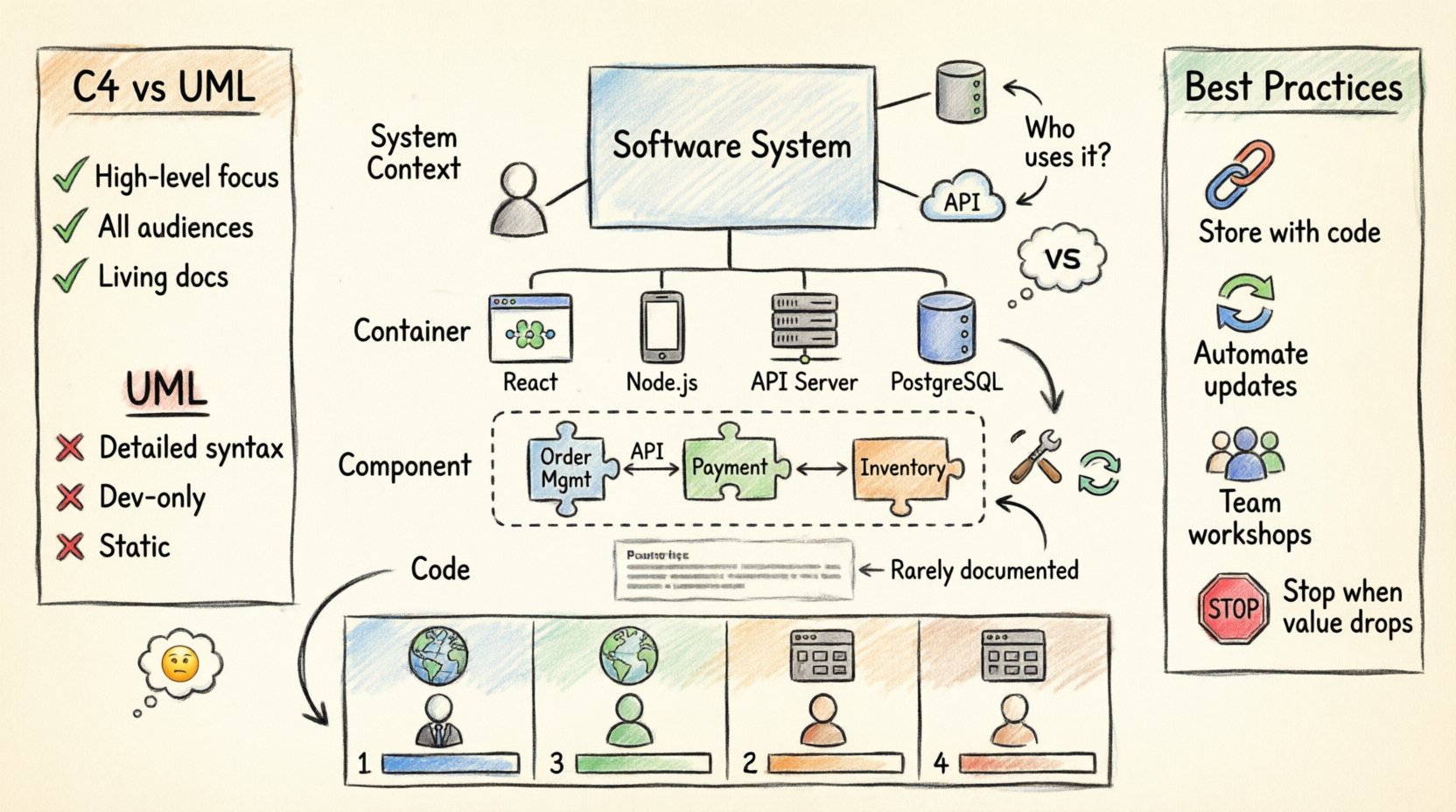
The C4 Model is a hierarchical approach to documenting software architecture. It uses a set of standardized diagram types to describe software systems at different levels of detail. The name comes from the four levels of abstraction it defines.
- Level 1: System Context – The big picture.
- Level 2: Container – The technology boundaries.
- Level 3: Component – The internal logic.
- Level 4: Code – The implementation details.
Each level serves a specific audience. The context level is for managers and non-technical stakeholders. The container level is for developers and DevOps teams. The component level is for the core development team. The code level is rarely used in the C4 context, as it is usually better suited for standard code comments and unit tests.
Key Characteristics
- Simple: It uses standard shapes and lines.
- Flexible: It works for any technology stack.
- Scalable: It grows with your system.
Unlike other diagramming standards that might get bogged down in syntax or specific notation, the C4 Model focuses on the relationships and responsibilities of the system parts. This ensures that the documentation remains readable even as the system evolves.
2. Why use C4 instead of UML? 🆚
Unified Modeling Language (UML) has been the industry standard for decades. However, it is often too detailed for high-level architectural discussions. UML is excellent for specifying exact class relationships, but it can become overwhelming when trying to explain how a system fits into a business environment.
The C4 Model solves this by prioritizing communication over strict syntax. Here is how they differ:
- Abstraction Level: UML often jumps straight into classes and methods. C4 starts with the system context and containers.
- Audience: UML is primarily for developers. C4 includes stakeholders, product managers, and operations teams.
- Maintainability: UML diagrams are often created once and never updated. C4 encourages living documentation that evolves with the code.
For beginner architects, the C4 Model reduces the cognitive load. You do not need to learn complex notations. You focus on what matters: who uses the system, what technologies are involved, and how the parts interact.
3. What belongs in a System Context Diagram? 🌍
The System Context diagram is the starting point. It shows the software system as a single box and its interactions with users and other systems.
Essential Elements
- The System Box: This represents the entire application or service you are documenting.
- People: Users, administrators, or support staff who interact with the system.
- Other Systems: Databases, third-party APIs, external services, or legacy systems.
- Relationships: Lines connecting the system to the actors, labeled with the data or protocol flowing between them.
What to Exclude
- Do not show internal components.
- Do not show specific servers or database tables.
- Do not show technical infrastructure like load balancers unless they are external to the system boundary.
The goal is to answer: “What does this system do, and who uses it?” Keep it to one page. If you find yourself adding more than five actors or systems, you may need to split the context or refine the scope.
4. How do I define a Container? 📦
A container is a high-level physical building block. It represents a deployable unit of software. Think of it as a server, a website, a mobile app, or a microservice.
Container Criteria
- Deployable: It can be built and deployed independently.
- Technological Boundary: It has a specific technology stack (e.g., Java Spring Boot, Node.js, React, PostgreSQL).
- Network Boundary: It is usually separated by a network, even if it runs on the same physical machine.
Examples of Containers
- Web Application (HTML/CSS/JS)
- Mobile Application (iOS/Android)
- API Service (REST/GraphQL)
- Database (SQL/NoSQL)
- Serverless Function (Lambda)
When creating a container diagram, you should list the technologies used. This helps operations teams understand the infrastructure requirements. It also helps developers see the boundaries between different technologies.
5. When should I use a Component Diagram? 🧩
Once you have defined your containers, you need to explain how they work internally. The Component Diagram answers: “How is this container built?”
Definition of a Component
A component is a logical grouping of functionality. It is not a class or a file. It is a module that performs a specific responsibility.
- Single Responsibility: Each component should do one thing well.
- Internal Logic: It hides implementation details from the outside.
- Interfaces: It exposes APIs or methods for other components to use.
For example, in an e-commerce container, you might have components like “Order Management,” “Payment Processing,” and “Inventory Tracking.” These components interact with each other via internal APIs.
When to Stop
Do not create a component diagram if the container is too small. If a container has only one or two components, the diagram adds no value. Conversely, if a container is massive, you might need multiple component diagrams to avoid clutter.
6. What is the Code Level? 💻
The Code Level is the lowest level of the C4 Model. It shows the relationship between classes, methods, and objects.
Usage Guidelines
In most modern architecture practices, the Code Level is rarely documented with diagrams. Tools that automatically generate class diagrams from code are often sufficient. The C4 Model suggests stopping at the Component Level for most architectural documentation.
However, there are specific scenarios where the Code Level is useful:
- Complex Algorithms: When a specific algorithm needs visual explanation.
- Refactoring: When planning significant changes to the internal structure of a component.
- Legacy Systems: When understanding the existing class structure is critical for maintenance.
For most teams, documenting the Component Level is sufficient. The Code Level is too detailed and changes too frequently to be a reliable source of architectural truth.
7. How do I choose the right tools? 🛠️
There is no single software product that defines the C4 Model. You can use any tool that allows you to draw boxes and lines. The choice depends on your team’s workflow.
Tool Categories
- Diagramming Tools: Drag-and-drop interfaces for creating static images. Good for one-off documentation.
- Code-based Tools: Write diagrams in code to keep them versioned. Good for automated pipelines.
- Collaboration Platforms: Tools that allow multiple users to edit in real-time.
Selection Criteria
- Accessibility: Can everyone on the team access it?
- Export Formats: Can you export to PDF, PNG, or SVG?
- Integration: Does it work with your documentation platform or repository?
Focus on the content, not the tool. A hand-drawn sketch is better than a beautiful diagram that no one reads. The goal is communication, not aesthetics.
8. How do I keep diagrams up to date? 🔄
One of the biggest challenges is keeping documentation synchronized with the code. If diagrams are outdated, they become misleading.
Best Practices for Maintenance
- Link to Code: Store diagram definitions in the same repository as the code.
- Automated Checks: Use tools to validate that the diagram structure matches the code structure.
- Review Process: Include diagram updates in the pull request review process.
- Assign Ownership: Designate a specific person or role responsible for updating the architecture docs.
If a diagram is too hard to maintain, it will be abandoned. Keep the complexity low. Use automation where possible to reduce the manual effort required to update the documentation.
9. How do I align the team on the model? 🤝
Introducing a new modeling standard requires team alignment. Not everyone will agree on the boundaries or the levels immediately.
Strategies for Alignment
- Workshops: Conduct sessions where the team practices creating diagrams together.
- Templates: Provide templates for each level to ensure consistency.
- Examples: Share examples of good and bad diagrams from previous projects.
- Feedback Loops: Encourage team members to critique diagrams constructively.
Consistency is key. If every developer draws boxes differently, the documentation becomes hard to read. Establish a style guide that defines colors, shapes, and line types.
10. When should I stop documenting? 🛑
Documentation can easily become a sunk cost. It is important to know when to stop adding detail.
Stop Criteria
- Diminishing Returns: If adding more detail does not help understanding, stop.
- Too Frequent Changes: If you update the diagram every day, it is too detailed.
- Low Interest: If stakeholders do not read the diagrams, simplify them.
Document what is necessary for the current stage of the project. A startup might only need a System Context and a Container diagram. An enterprise system might require full Component diagrams.
Summary of Levels
Here is a quick reference table to summarize the four levels and their purpose.
| Level | Name | Focus | Audience | Detail |
|---|---|---|---|---|
| 1 | System Context | Who uses the system? | Business, Managers | High |
| 2 | Container | What technologies are used? | Developers, Ops | Medium |
| 3 | Component | How is it built? | Developers | Low |
| 4 | Code | Class relationships | Developers | Very Low |
By following these guidelines, you can create architecture documentation that is useful, readable, and maintainable. The C4 Model provides a common language for teams to discuss system design without getting lost in the weeds. Start with the context, refine as you go, and ensure your diagrams serve the people who need them.
Remember that the goal is clarity. If a diagram confuses someone, simplify it. If it helps someone understand the system faster, you have succeeded. Apply these principles consistently, and your architecture documentation will become a valuable asset for your organization.



Comments (0)