![Free eBooks of IT [BooksOfAll]](https://www.booksofall.com/wp-content/uploads/2022/06/booksofall-logo-2.png)
C4 Model Myth-Buster: Separating Fact from Fiction for New Practitioners
Software architecture is often a source of confusion for teams navigating complex systems. When starting out, it is easy to feel overwhelmed by the sheer volume of documentation required. Many practitioners stumble into the C4 Model expecting rigid rules or excessive overhead. This guide aims to clarify the core principles of the C4 Model for software architecture visualization. We will strip away the noise and focus on what actually works in real-world development environments.
Understanding the C4 Model is essential for creating clear, maintainable documentation. It provides a structured way to communicate system design without getting lost in implementation details. Whether you are a developer, a technical lead, or a system architect, grasping the nuances of this approach can significantly improve team alignment.
🧐 What Is the C4 Model?
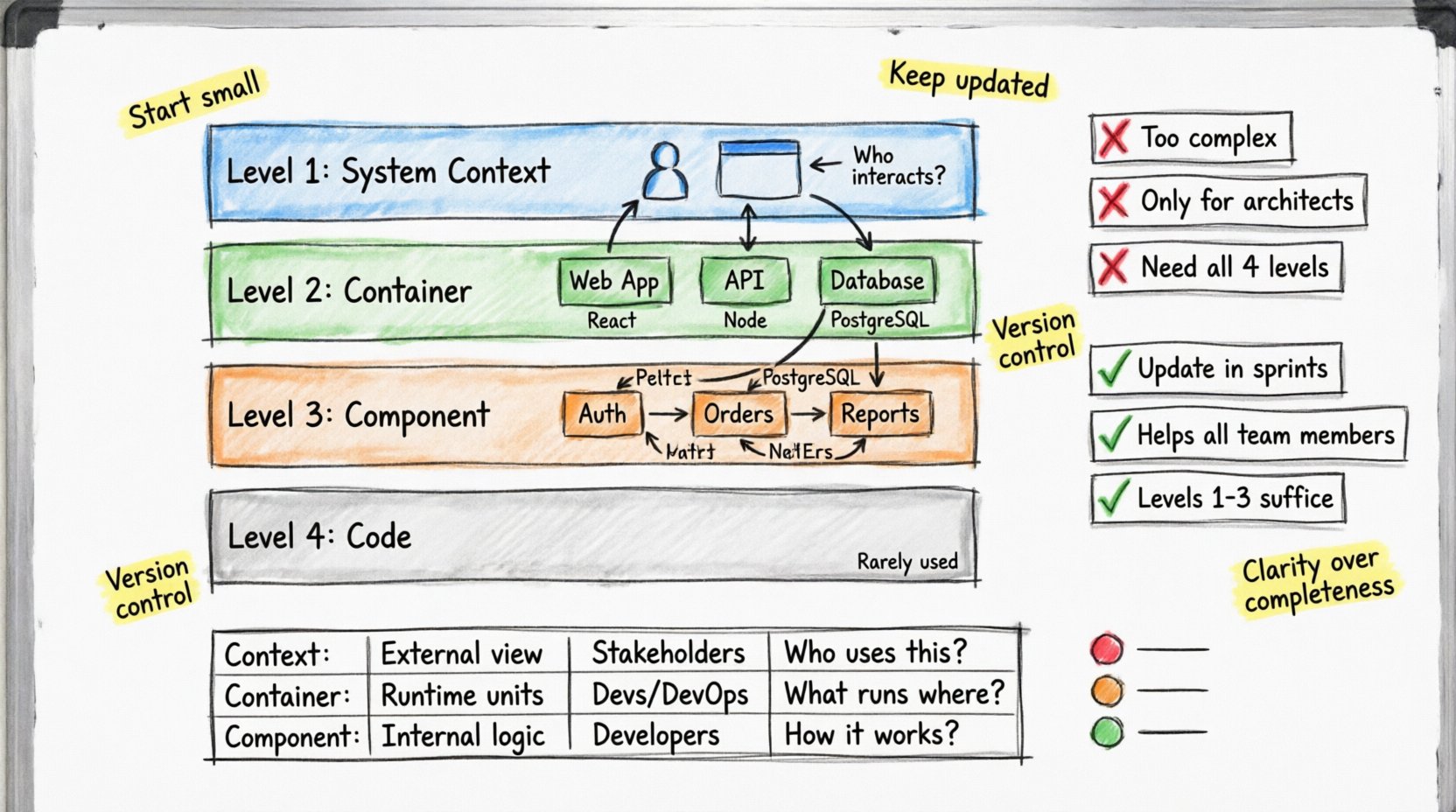
The C4 Model is a hierarchical approach to software architecture documentation. It was designed to help teams visualize systems at different levels of detail. Instead of one massive diagram, the model breaks down the system into four distinct layers. This separation ensures that stakeholders see only the information relevant to their role.
- Level 1: System Context – Shows the big picture. Who interacts with the system?
- Level 2: Container – Breaks the system into runtime units like web apps or databases.
- Level 3: Component – Details the internal structure of those containers.
- Level 4: Code – Zooms in on specific classes and methods (rarely used).
This structure prevents information overload. A stakeholder does not need to see code classes to understand how the system fits into the business. Conversely, a developer needs to see components to understand where to write logic. The model balances these needs effectively.
🚫 Common Myths vs. Reality
There is a lot of misinformation surrounding architecture diagrams. Many teams avoid them because they believe the process is too time-consuming. Others think they are only for high-level design reviews. Let us examine the most common misconceptions and the actual facts behind them.
❌ Myth 1: It Is Too Complex to Maintain
One of the biggest barriers to adoption is the fear of maintenance. Many practitioners believe that updating diagrams requires a dedicated team of engineers. This is incorrect.
Fact: Diagrams should evolve with the code. If the system changes, the diagram should change. However, this does not mean manual updates are required for every commit. The goal is to maintain a high-level view that remains accurate over time. You can achieve this by:
- Updating diagrams during sprint planning when major changes occur.
- Using automated tools to generate diagrams from code (though manual refinement is often better).
- Focusing only on the diagram level relevant to the current task.
Over-documenting is a greater risk than under-documenting. Keeping diagrams simple ensures they remain useful. If a diagram takes more effort to maintain than it is worth, it is likely too detailed.
❌ Myth 2: It Is Only for Architects
Some teams treat architecture documentation as a gatekeeping activity reserved for senior staff. This creates silos where developers do not understand the broader system.
Fact: The C4 Model is inclusive. It allows developers to understand the system context without needing to memorize every class. When a new developer joins the team, a System Context diagram helps them understand where the application fits. This accelerates onboarding significantly.
Furthermore, developers can create Component diagrams to clarify their own work. This promotes ownership and reduces dependency on others for basic architectural questions.
❌ Myth 3: The Code Level Is Essential
There is a misconception that you must document every level to be thorough. This leads to cluttered repositories filled with diagrams that no one reads.
Fact: The Code Level is the least used in the C4 Model. It is rarely necessary to create a diagram showing individual classes. This level is better suited for inline code comments or API documentation tools. Most architectural decisions are made at the Component level. Focusing on Levels 1, 2, and 3 is usually sufficient for 95% of use cases.
📊 Deep Dive into the Diagram Levels
To truly understand the model, we need to look at what belongs in each layer. Each diagram type serves a specific audience and purpose. Mixing these levels often leads to confusion.
| Level | Focus | Audience | Key Question |
|---|---|---|---|
| System Context | External systems & users | Stakeholders, Managers | Who uses this and why? |
| Container | Runtime processes | Developers, DevOps | What runs where? |
| Component | Internal logic | Developers | How does it work internally? |
| Code | Classes & methods | Specialized Developers | What is the specific logic? |
1️⃣ Level 1: System Context
This diagram is the starting point. It defines the boundaries of your software system. It shows how the system fits into the larger ecosystem. You should list the people or systems that interact with it. These are called “People” or “Software Systems”.
- System Boundary: Clearly mark what is inside and what is outside.
- Relationships: Use arrows to show data flow or user interaction.
- Labels: Briefly describe the data flow (e.g., “User Data”, “Authentication Requests”).
Do not include internal details here. If you are showing a database, do not show the tables inside it. Just show the database as an external dependency. This keeps the diagram high-level and easy to read.
2️⃣ Level 2: Container
A container is a runtime unit. It is where the code actually executes. Common examples include web applications, mobile apps, microservices, and databases. This level is crucial for understanding deployment and infrastructure.
- Technologies: Indicate the technology used (e.g., “React”, “Node.js”, “PostgreSQL”).
- Connections: Show how containers talk to each other (HTTP, gRPC, SQL).
- Boundaries: Ensure you do not confuse containers with components. A container is a runtime environment; a component is a logical grouping within it.
If you are building a monolith, you might only have one container. If you are building a microservice architecture, you might have dozens. The diagram should reflect the actual deployment topology.
3️⃣ Level 3: Component
This is where the logic lives. A component is a logical grouping of functionality. It does not necessarily map to a physical file, but it represents a distinct part of the system. Examples include “User Authentication”, “Order Processing”, or “Reporting Engine”.
- Responsibilities: Define what the component does.
- Interfaces: Show how other components interact with it.
- Decoupling: Use this level to identify tight coupling. If two components depend heavily on each other, consider refactoring.
This level is often the most valuable for developers. It provides a roadmap for where to place new features. It helps in understanding dependencies without reading source code.
4️⃣ Level 4: Code
This level dives into classes and methods. While the C4 Model supports this, it is rarely recommended for general documentation. Diagrams at this level become outdated quickly as refactoring occurs.
Instead of a static diagram, consider using:
- Automated class diagrams generated from the codebase.
- API documentation tools.
- Inline code comments.
Reserve the Code Level for complex algorithms or specific architectural patterns that need visual explanation. For most projects, stopping at the Component level is the best practice.
🛠️ Implementing the Model in Your Workflow
Adopting the C4 Model requires a shift in mindset. It is not just about drawing pictures; it is about thinking about structure. Here is how to integrate it into your daily work without creating bottlenecks.
Start Small
Do not attempt to document the entire system in one day. Start with the System Context diagram. Get the boundaries right. Once that is agreed upon, move to the Container level. This incremental approach prevents overwhelm.
Keep It Updated
Documentation becomes useless if it is stale. Integrate diagram updates into your definition of done. If a major architectural change occurs, the diagram must be updated before the feature is merged. This ensures the documentation stays relevant.
Use the Right Tools
You need a way to create and store these diagrams. While there are many options available, the choice should not dictate the model. Select a tool that supports the hierarchy and allows for easy editing. Look for features that:
- Support drag-and-drop diagramming.
- Allow for version control integration.
- Enable collaboration among team members.
- Export to common formats like PNG or PDF.
The tool is secondary to the model. Focus on clarity and communication first.
🤝 Collaboration and Communication
Architecture is a team sport. The C4 Model facilitates better communication between different roles. It provides a shared language that everyone can understand.
Onboarding New Hires
When a new developer joins, they often struggle to understand the system. A System Context diagram provides a quick overview. It answers the question: “What does this system do?”. This reduces the time needed for basic orientation.
Design Reviews
During design reviews, use the diagrams to discuss trade-offs. Instead of debating abstract concepts, point to the diagram. “If we add this service, where does it fit in the Container diagram?” This makes discussions concrete and actionable.
Stakeholder Updates
Non-technical stakeholders need to understand progress. A high-level System Context diagram is perfect for status updates. It shows the system as a whole without overwhelming them with technical details.
⚠️ Pitfalls to Avoid
Even with a good model, mistakes can happen. Be aware of these common errors to ensure your documentation remains effective.
- Over-detailing: Do not put too much text on a diagram. If it needs a paragraph to explain, it is too complex.
- Inconsistent Naming: Ensure terms used in the diagram match the code. If the code calls it “User Service”, do not label it “User Manager” in the diagram.
- Ignoring Dependencies: Always show how systems talk to each other. Hidden dependencies lead to integration failures later.
- Static Diagrams: Do not treat diagrams as one-time artifacts. They must evolve as the system evolves.
- Confusing Levels: Do not mix Container and Component details. Keep the levels distinct to maintain clarity.
🔄 Long-Term Maintenance Strategy
Maintaining architecture documentation is an ongoing process. It requires discipline but pays off in reduced technical debt. Here is a strategy for long-term success.
Regular Audits
Schedule periodic reviews of your diagrams. Once a quarter, check if the diagrams match the current codebase. If significant changes have occurred, update them. This prevents the “shadow documentation” problem where the code and docs diverge.
Automated Checks
Where possible, automate the generation of diagrams. Some tools can read your code and generate the structure automatically. This reduces the manual effort required to keep diagrams up to date. However, always review the output for accuracy.
Version Control
Store your diagrams in the same repository as your code. This ensures they are versioned alongside the changes they represent. Use meaningful commit messages when updating diagrams to track the history of architectural decisions.
🧭 When to Stop Diagramming
There is a point of diminishing returns. At what point do you stop adding diagrams? The answer depends on the complexity of the system.
- Simple Projects: A single System Context diagram might be enough. The code structure is simple enough to understand without further breakdown.
- Medium Projects: Add Container and Component diagrams. These help manage the growing complexity of the application.
- Large Systems: Use all four levels, but focus primarily on the first three. The Code Level should only be used for critical modules.
The goal is clarity, not completeness. If a diagram adds value, keep it. If it adds confusion, remove it.
📈 The Value of Clear Architecture
Investing time in the C4 Model yields tangible benefits. Teams that practice clear architecture documentation tend to have:
- Faster onboarding for new members.
- Reduced bugs caused by integration errors.
- Better decision-making during design reviews.
- Lower technical debt over time.
It is not about creating perfect diagrams. It is about creating a shared understanding. When everyone sees the system the same way, collaboration becomes smoother. Problems are identified earlier, and solutions are implemented more efficiently.
🔍 Final Thoughts on Practice
Mastering the C4 Model is a journey, not a destination. It requires practice and iteration. Start with the basics. Focus on the System Context and Container levels first. As your understanding grows, add more detail where needed.
Remember that the model is a tool for communication, not a constraint. Use it to enhance your team’s workflow. Do not let the process slow you down. If a diagram is not helping, simplify it or remove it.
By separating fact from fiction, you can leverage the C4 Model to build better software. The structure provides a foundation for growth and stability. Embrace the hierarchy, respect the levels, and keep your documentation alive.
Software architecture is the backbone of any successful project. Treat it with care, and it will support your team for years to come.



Comments (0)