![Free eBooks of IT [BooksOfAll]](https://www.booksofall.com/wp-content/uploads/2022/06/booksofall-logo-2.png)
Common C4 Model Mistakes That Trip Up Beginners (And How to Avoid Them)
Software architecture is the backbone of any successful digital product. It defines how components interact, how data flows, and where boundaries exist. Without clear documentation, teams face confusion, technical debt, and integration failures. The C4 model has become a standard for visualizing system structure because it scales from high-level context down to code logic. However, applying it correctly requires discipline. Many developers and architects stumble on specific pitfalls when creating their first diagrams. This guide explores the most frequent errors and provides actionable strategies to prevent them.
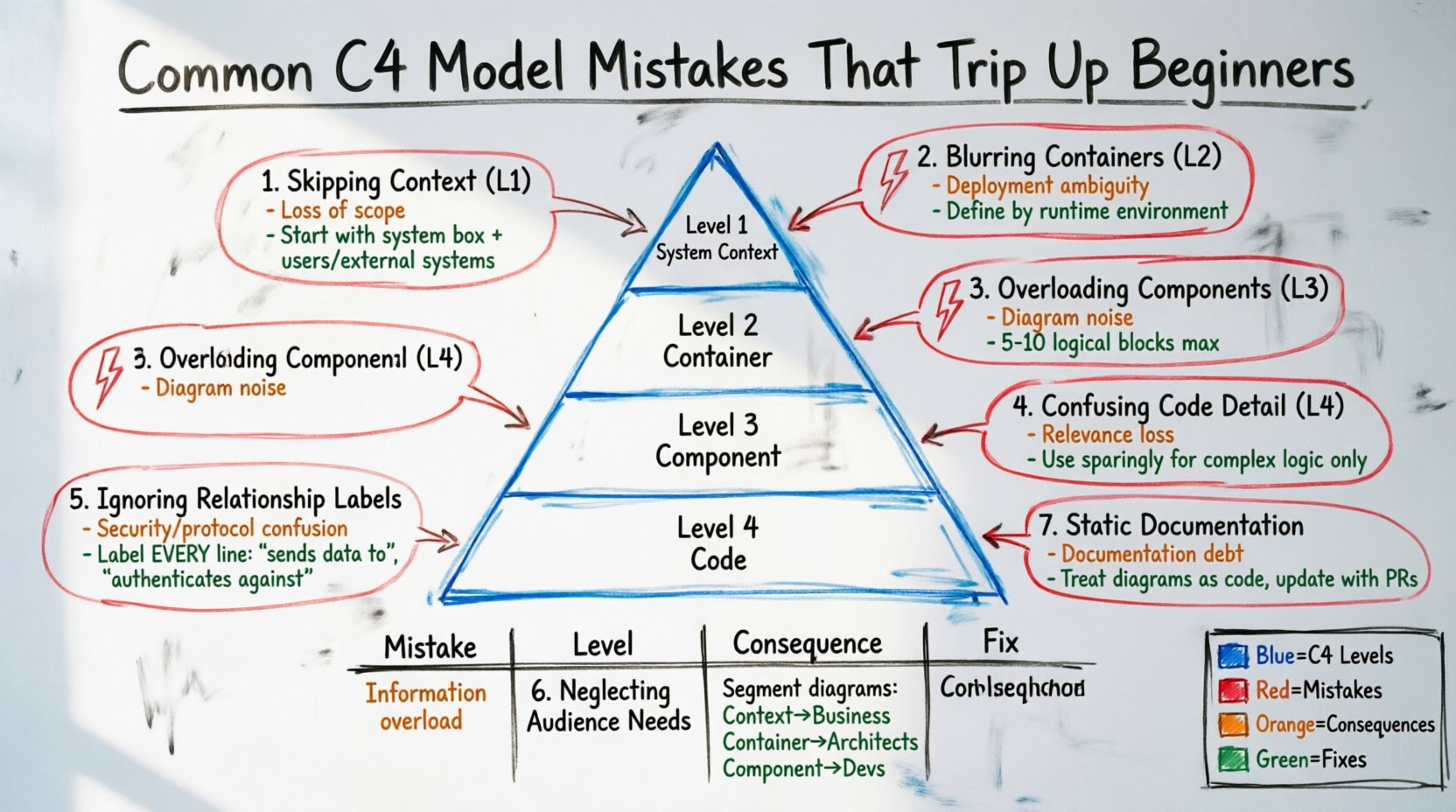
🧐 Why the C4 Model Matters
Before diving into mistakes, it is essential to understand what the model aims to achieve. The C4 model focuses on creating a hierarchy of diagrams. This hierarchy helps stakeholders understand the system at different levels of detail. It prevents the common problem of overwhelming readers with too much information at once. By structuring your documentation this way, you create a narrative about the system. You guide the reader from the “big picture” down to the “specifics”. This narrative structure is crucial for onboarding new team members and communicating with non-technical stakeholders.
When done correctly, the model serves as a single source of truth. It aligns the development team and the business team. It ensures that everyone speaks the same language when discussing system design. However, achieving this alignment is difficult if the diagrams are poorly constructed. Errors in the modeling process can lead to misinterpretations that cost time and resources later in the development lifecycle.
🚫 Mistake 1: Skipping the Context Diagram (Level 1)
The first level of the C4 model is the System Context diagram. It shows the software system as a single box in the middle. It then shows the people and systems that interact with it. Beginners often skip this level, jumping straight into internal components. This is a critical error. Without a context diagram, there is no anchor for the rest of the documentation.
The Consequence of Skipping
- Loss of Scope: Stakeholders do not know what is inside the system and what is outside.
- Integration Confusion: Teams may not realize which external systems are dependencies.
- Security Blindspots: External identities and data flows are often overlooked.
How to Fix It
Always start here. Draw a box for the main system. Add a label that clearly identifies the system name. Draw lines connecting this box to:
- Users (personas)
- External systems (third-party APIs, databases)
- Other systems in the organization
Label every line with the relationship type. Use terms like “sends data to” or “authenticates against”. Do not clutter this view with internal details. Keep it high-level. If you cannot fit everything on one page, you have too much detail. Simplify the external relationships.
🚫 Mistake 2: Blurring Container Boundaries (Level 2)
The second level is the Container diagram. Containers represent deployable units of code. Examples include web applications, mobile apps, microservices, and data stores. Beginners often confuse containers with components. They might draw a “user interface” as a container and a “server” as another, without considering deployment.
The Consequence of Blurring Boundaries
- Deployment Ambiguity: Developers do not know what needs to be deployed together.
- Network Complexity: Communication protocols between containers become unclear.
- Technology Stack Confusion: It becomes hard to see which technologies power which parts of the system.
How to Fix It
Define a container as a distinct runtime environment. Ask yourself: “Does this run on its own server?” If yes, it is a container. If no, it is likely a component within a container. Ensure you distinguish between:
- Application Containers: Web apps, mobile apps, background jobs.
- Data Containers: Databases, caches, file stores.
Be careful not to create too many containers. If you have fifty microservices, a single diagram will be unreadable. Consider grouping related services or creating multiple diagrams for different domains. Label the technology stack used for each container. This helps future maintainers understand the constraints and capabilities of each unit.
🚫 Mistake 3: Overloading Component Diagrams (Level 3)
The third level is the Component diagram. This zooms into a single container to show its internal structure. It reveals the key logical building blocks inside. Beginners often make the mistake of treating this level like a class diagram. They try to show every method, property, and class interaction.
The Consequence of Overloading Detail
- Diagram Noise: The diagram becomes a wall of text that no one reads.
- Rapid Obsolescence: As code changes, the diagram becomes inaccurate quickly.
- Loss of Focus: The architectural intent gets lost in implementation details.
How to Fix It
Components are logical building blocks, not specific classes. Focus on what the component *does*, not how it is coded. Ask: “What is the responsibility of this box?” Group related functions together. For example, a “Payment Processing” component might contain logic for authorization, charging, and logging, but you do not need to show the specific API endpoints.
- Keep the count low. Aim for 5 to 10 components per container.
- Use meaningful names. Avoid generic names like “Module1” or “Service”.
- Focus on interfaces. Show how components talk to each other, not the internal code logic.
🚫 Mistake 4: Confusing Code-Level Detail (Level 4)
The fourth level is the Code diagram. This is the lowest level of abstraction. It shows how a specific component is implemented. Beginners often skip this or misuse it. Some try to include full class diagrams, including getters and setters, while others ignore it entirely when it is needed for complex logic.
The Consequence of Misuse
- Relevance: Most stakeholders do not care about code-level details.
- Maintainability: Code diagrams should be generated or synced with the code.
- Communication: They are best used for peer-to-peer developer communication, not for business stakeholders.
How to Fix It
Use this level sparingly. Only create a code-level diagram when a specific algorithm or data structure is complex and non-obvious. For example, if you have a caching strategy or a complex encryption routine, a code diagram helps explain the flow. Do not use it to document standard CRUD operations. If you must use this level, ensure it is generated from the source code if possible to keep it in sync.
🚫 Mistake 5: Ignoring Relationship Labels
Lines connecting boxes are not just decorative. They represent data flow or control flow. Beginners often draw lines without labels. They assume the viewer knows the direction or the nature of the data. This is a dangerous assumption.
The Consequence of Unlabeled Lines
- Security Risks: It is unclear if data is sensitive or public.
- Protocol Confusion: Is this HTTP? gRPC? A database query?
- Directionality: It is hard to tell if data flows one way or two ways.
How to Fix It
Every line connecting two boxes needs a label. The label should describe the data or action. Examples include:
- “User Credentials”
- “Transaction Data”
- “Authentication Request”
Additionally, consider using different line styles. A solid line might represent synchronous calls, while a dashed line might represent asynchronous events. Consistency is key. Create a legend if you use multiple styles. This ensures that anyone reading the diagram understands the communication pattern immediately.
🚫 Mistake 6: Neglecting Audience Needs
A common error is creating a single diagram that tries to satisfy everyone. You cannot please a CTO, a developer, and a business analyst with one view. Beginners often create one giant diagram that mixes context, containers, and components.
The Consequence of One-Size-Fits-All
- Confusion: Different audiences miss the information relevant to them.
- Overwhelm: Technical details scare off business stakeholders.
- Inefficiency: Developers get bogged down in high-level strategy.
How to Fix It
Segment your documentation. Create specific diagrams for specific audiences:
- Context Diagram: For business stakeholders and project managers.
- Container Diagram: For system architects and DevOps engineers.
- Component Diagram: For lead developers and implementation teams.
Ensure there is a clear navigation path between these diagrams. A link from a container to its component diagram should be obvious. This allows the reader to drill down into detail only when they need it. Do not force them to scroll through irrelevant layers of abstraction.
🚫 Mistake 7: Creating Static Documentation
Documentation that does not change with the code becomes a liability. Beginners often create a diagram once and forget it. When the system evolves, the diagram remains static. This leads to a “documentation debt” where the text no longer matches the reality.
The Consequence of Static Docs
- Trust Loss: Teams stop trusting the documentation entirely.
- Errors: Developers follow outdated diagrams and introduce bugs.
- Wasted Effort: Time is spent updating diagrams manually instead of building features.
How to Fix It
Treat diagrams as code. Store them in the same version control system as your application. If possible, use tools that generate diagrams from code annotations. This ensures that the diagram updates when the code changes. If you draw manually, make updating the diagram part of the definition of done. A pull request should include a diagram update if the architecture changes. This keeps the documentation living and relevant.
📊 Summary of Common Errors
| Mistake | Level Affected | Primary Consequence | Recommended Fix |
|---|---|---|---|
| Skipping Context | Level 1 | Loss of system scope | Always draw the context first |
| Blurring Containers | Level 2 | Deployment ambiguity | Define containers by runtime |
| Overloading Components | Level 3 | Diagram noise | Focus on logical responsibility |
| Unlabeled Relationships | All Levels | Security/Protocol confusion | Label every data flow |
| Neglecting Audience | All Levels | Information overload | Segment by stakeholder role |
| Static Documentation | All Levels | Documentation debt | Integrate into CI/CD workflow |
🔄 Moving Forward with Architecture
Adopting the C4 model is a journey. It requires practice to get the level of detail right. You will likely make mistakes in your first few diagrams. That is normal. The goal is not perfection on day one, but continuous improvement. Review your diagrams periodically. Ask yourself: “Would I understand this if I came back in six months?” If the answer is no, simplify it.
Remember that the purpose of architecture documentation is communication. It is a tool to facilitate understanding, not a trophy to display complexity. Keep the focus on clarity. Ensure that the diagrams serve the people who read them. When you prioritize the reader over the tool, your architecture documentation becomes a valuable asset rather than a burden.
Start small. Pick one system. Draw the context. Then the containers. Then the components. Iterate. Share with your team. Get feedback. Adjust. This iterative process is how you build a robust architectural understanding that scales with your organization. Avoid the traps listed here, and you will set a strong foundation for your software projects.



Comments (0)