![Free eBooks of IT [BooksOfAll]](https://www.booksofall.com/wp-content/uploads/2022/06/booksofall-logo-2.png)
C4 Model for Domain Architects: Mapping Business Domains Visually
Enterprise architecture is a complex discipline that requires balancing business goals with technical constraints. For domain architects, the challenge lies in translating abstract business capabilities into concrete system structures without losing the narrative. The C4 model offers a standardized approach to visualizing software architecture at multiple levels of abstraction. When applied specifically to domain architecture, it becomes a powerful tool for mapping business domains, clarifying boundaries, and improving cross-functional communication.
This guide explores how domain architects can leverage the C4 model to create clear, maintainable, and meaningful visual documentation. It focuses on the structural principles rather than specific tools, ensuring the concepts remain applicable regardless of the technology stack.
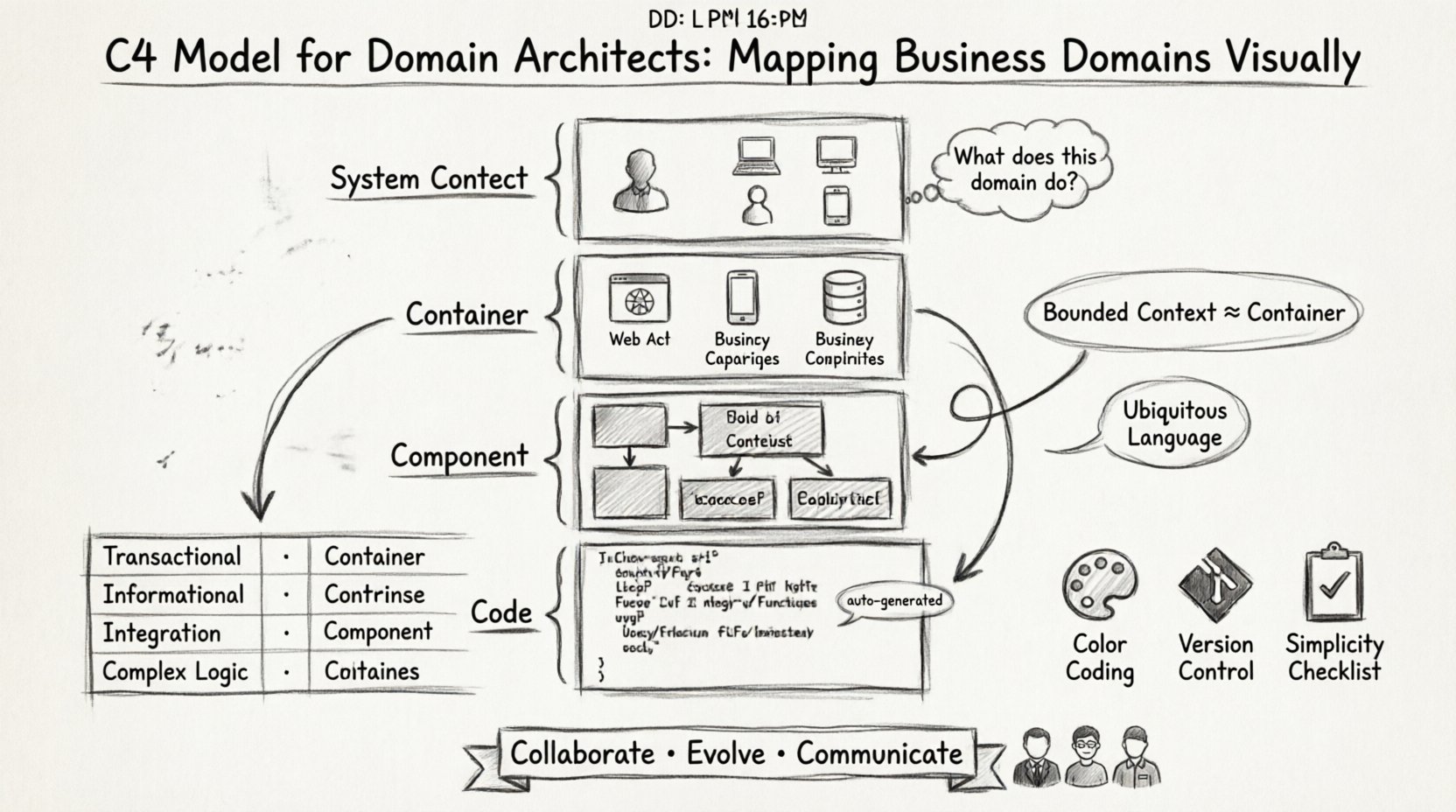
📚 Understanding the Hierarchy of Abstraction
The C4 model is built on the concept that different stakeholders need different levels of detail. A single diagram rarely serves everyone. The model divides architecture into four distinct levels, each serving a specific purpose in the documentation hierarchy.
For a domain architect, understanding these levels is critical for deciding where to draw the line between business logic and technical implementation. Each level answers a specific question about the system.
Level 1: System Context
The System Context diagram provides the highest-level view. It shows the system as a single box and illustrates how it interacts with users and other systems. For domain architects, this level is essential for defining the scope of the domain itself.
- Who are the actors? Identify the human users and external systems interacting with the domain.
- What are the relationships? Define the data flows and interactions between the domain and the outside world.
- Where does the domain end? Clearly mark the boundaries of the bounded context.
This diagram helps answer the question: “What does this domain do for the organization?” It aligns technical boundaries with business capabilities.
Level 2: Container
Containers represent high-level categories of software, such as web applications, mobile apps, databases, or microservices. This level moves inside the system box to reveal the major building blocks.
For domain architecture, this is where the mapping between business capabilities and technical containers begins. A single container often corresponds to a specific business service or a distinct part of the domain.
- Technology Independence: Focus on the role of the container, not the specific language or framework.
- Data Ownership: Identify which data stores belong to which business domain.
- Interaction Patterns: Show how containers communicate, whether through APIs, message queues, or shared databases.
Level 3: Component
Components are the building blocks within a container. They represent a logical grouping of functionality, such as a specific module or service within a larger application. This is often where the core business logic resides.
In the context of domain architecture, component diagrams help clarify the internal structure of a bounded context. They show how responsibilities are distributed within a single container.
- Responsibility Separation: Ensure each component has a single, well-defined purpose.
- Internal Dependencies: Map how components rely on one another to deliver functionality.
- Domain Entities: Highlight where domain logic is implemented versus infrastructure logic.
Level 4: Code
The Code level represents individual classes, interfaces, or functions. While often generated automatically from source code, it provides the lowest level of detail. Domain architects rarely need to maintain this level manually, but it is useful for understanding implementation details when debugging complex domain issues.
- Implementation Specifics: Focus on class relationships and data structures.
- Traceability: Link high-level domain concepts back to specific code artifacts if necessary.
- Automation: This level is best suited for automated generation rather than manual drawing.
🧩 Aligning C4 with Domain-Driven Design
The C4 model and Domain-Driven Design (DDD) share a common philosophy: organizing complexity through clear boundaries. Integrating these two approaches allows domain architects to create maps that are both technically accurate and business-relevant.
Bounded Contexts and Containers
In DDD, a bounded context defines the semantic boundaries of a domain. In the C4 model, containers often align closely with these bounded contexts. When mapping domains visually, a container should ideally represent a cohesive unit of business capability.
- One Context, One Container: Whenever possible, map a bounded context to a single container to reduce coupling.
- Shared Kernel: If multiple containers share data, define a shared kernel to prevent semantic drift.
- Context Map: Use the System Context level to visualize the relationships between different bounded contexts.
Ubiquitous Language
Documentation must speak the same language as the business. Using technical jargon like “API endpoint” without explaining the business function creates friction. The C4 model encourages clarity, which supports the DDD principle of a ubiquitous language.
- Labeling: Name boxes and lines using business terms, not technical terms.
- Descriptions: Write clear descriptions for each element that explain the business value.
- Consistency: Ensure the terminology used in diagrams matches the terminology used in business strategy documents.
🗺️ Visualizing the Business Landscape
Visualizing business domains requires more than just drawing boxes. It requires understanding the flow of value and the flow of information. A well-structured diagram tells a story about how the domain operates.
Mapping Strategies
Different domains require different mapping strategies. Some domains are transaction-heavy, while others are information-heavy. The visual representation should reflect these characteristics.
| Domain Type | C4 Focus | Key Visual Element |
|---|---|---|
| Transactional | Level 2 & 3 | Data flow and state changes |
| Informational | Level 1 & 2 | Data ownership and access paths |
| Integration | Level 1 | External connections and protocols |
| Complex Logic | Level 3 | Component interactions and rules |
Defining Boundaries
One of the most critical tasks for a domain architect is defining where one domain ends and another begins. Visual boundaries help prevent scope creep and architectural drift.
- Clear Edges: Use solid lines to denote strong relationships and dashed lines for weaker dependencies.
- Antifouling: Prevent non-domain logic from leaking into domain boxes.
- Context Switching: Highlight where the system transitions from one domain context to another.
📝 Best Practices for Documentation
Creating diagrams is only half the battle. Maintaining them and ensuring they remain useful is the other half. Poor documentation becomes technical debt. Good documentation becomes a shared asset.
Standards and Conventions
Consistency is key to readability. Establishing a set of conventions ensures that anyone reading the documentation understands the meaning of the symbols and colors.
- Color Coding: Use colors consistently to represent different types of elements (e.g., blue for systems, green for databases).
- Iconography: Use standard icons for common elements like users, databases, and external systems.
- Layout: Adopt a standard layout pattern, such as left-to-right flow or top-down hierarchy.
Version Control
Architecture diagrams should be treated as code. They need to be versioned, reviewed, and stored in a repository. This ensures that changes are tracked and old versions can be referenced if necessary.
- Change Logs: Document why a diagram changed, not just what changed.
- Review Process: Implement a peer review process to ensure accuracy before publication.
- Accessibility: Ensure diagrams are accessible to all stakeholders, including non-technical ones.
Avoiding Over-Engineering
It is easy to get caught up in making diagrams look perfect. However, the goal is communication, not artistry. Overly complex diagrams can obscure the main points.
- Simplicity: Remove unnecessary details that do not add value to the current discussion.
- Focus: Keep the focus on the domain logic rather than infrastructure details.
- Abstraction: Use abstraction to hide complexity that is not relevant to the audience.
🤝 Collaboration and Communication
Architecture is not just about structure; it is about people. The C4 model facilitates collaboration by providing a common visual language. This is particularly important when working with business stakeholders who may not understand technical jargon.
Stakeholder Alignment
Different stakeholders have different concerns. Executives care about business value, developers care about implementation, and operations care about reliability. The C4 model allows you to tailor the view for each group.
- For Executives: Use Level 1 diagrams to show business capabilities and high-level value streams.
- For Developers: Use Level 3 diagrams to show component interactions and data structures.
- For Operations: Use Level 2 diagrams to show deployment units and infrastructure dependencies.
Facilitating Discussions
Diagrams serve as a focal point for discussions. They help identify gaps in understanding and reveal hidden dependencies.
- Workshops: Use diagrams as a starting point for architecture workshops.
- Feedback Loops: Encourage feedback from stakeholders to ensure the model reflects reality.
- Iterative Refinement: Treat diagrams as living documents that evolve as the system evolves.
🔄 Evolving the Model over Time
Domains are not static. Business requirements change, technologies evolve, and systems grow. The C4 model must evolve alongside the domain to remain useful.
Tracking Changes
Maintaining an accurate record of architectural changes is essential for long-term health. This helps new team members understand the history of decisions and prevents repeated mistakes.
- Changelog: Maintain a record of major architectural changes.
- Impact Analysis: Assess the impact of changes on other domains before implementing them.
- Retirement: Clearly mark deprecated components or domains to prevent their continued use.
Preventing Drift
Architectural drift occurs when the implementation diverges from the documented model. Regular audits help prevent this.
- Regular Reviews: Schedule periodic reviews of the C4 diagrams against the actual system.
- Automated Checks: Use tools to verify that the code structure matches the component diagram.
- Feedback Mechanisms: Create channels for developers to report discrepancies between code and documentation.
🛠️ Common Pitfalls to Avoid
Even with a solid framework, it is easy to make mistakes when applying the C4 model to domain architecture. Being aware of common pitfalls helps avoid them.
- Too Much Detail: Including too many components in a single diagram makes it unreadable. Split diagrams if necessary.
- Ignoring Business Context: Focusing solely on technical relationships ignores the business value. Always link back to business goals.
- Static Thinking: Treating diagrams as static artifacts rather than evolving guides. Update them regularly.
- Lack of Standards: Using inconsistent notation or naming conventions creates confusion.
- Over-Simplification: Hiding too much complexity can lead to surprises later. Ensure critical dependencies are visible.
🔍 Conclusion
The C4 model provides a robust framework for domain architects to visualize and communicate complex system structures. By mapping business domains visually, architects can bridge the gap between business strategy and technical execution. The key lies in maintaining a balance between abstraction and detail, ensuring that diagrams remain useful over time.
Success in this area requires discipline, consistency, and a willingness to adapt. By following the principles outlined in this guide, domain architects can create documentation that empowers teams, clarifies boundaries, and drives better architectural decisions. The result is a system that is not only technically sound but also aligned with business needs.
Remember that the goal is not to create perfect diagrams, but to facilitate understanding. Use the C4 model as a tool for conversation, not just documentation. When the team agrees on the map, they can navigate the complexity of the domain together.



Comments (0)