![Free eBooks of IT [BooksOfAll]](https://www.booksofall.com/wp-content/uploads/2022/06/booksofall-logo-2.png)
In modern software architecture, bridging the gap between high-level ideas and detailed behavioral models used to demand hours of manual effort — positioning lifelines, drawing arrows, and adjusting fragments. Visual Paradigm has revolutionized this process with its powerful AI sequence diagram generator, allowing teams to create precise, industry-standard UML sequence diagrams directly from plain English descriptions in seconds.
From quick prototyping in a chat interface to enterprise-grade modeling in the desktop application or structured requirements workflows, Visual Paradigm turns natural language into intelligent, fully editable interaction diagrams — freeing architects and developers to focus on core system logic instead of diagram mechanics.
Why Visual Paradigm AI Sequence Diagrams Are a Game-Changer
- Instant UML Generation — Describe your scenario in plain text and get a professional sequence diagram immediately
- Multiple Smart Entry Points — Use conversational AI chatbot, robust desktop tool, or integrated Use Case Modeling Studio
- Intelligent Logic Understanding — Automatically handles alt fragments, loops, optional flows, references, and error paths
- Native & Fully Editable — Every diagram is a live Visual Paradigm model — ready for refinement, simulation, and documentation
- Accelerated Design Process — Move seamlessly from requirements to detailed interaction design without manual drafting
1. Speak Your Scenario – AI Chatbot for Sequence Diagrams
The simplest and fastest way to start is Visual Paradigm’s conversational AI chatbot. Just describe the interaction you want to model. For example:
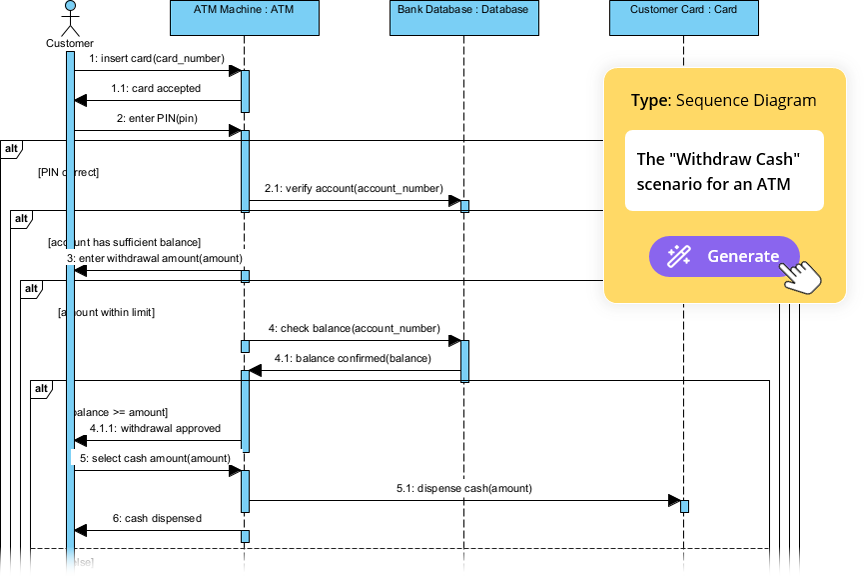
“Create a sequence diagram for an ATM cash withdrawal process including user authentication, balance check, dispense cash, and error handling for insufficient funds or invalid card.”
The AI quickly identifies participants (User, ATM, Bank System), maps the message flow, and applies combined fragments (alt, opt) to represent conditional paths. You get a clean, professional diagram plus the underlying PlantUML code for transparency.
Here’s what the generated ATM cash withdrawal sequence diagram looks like:
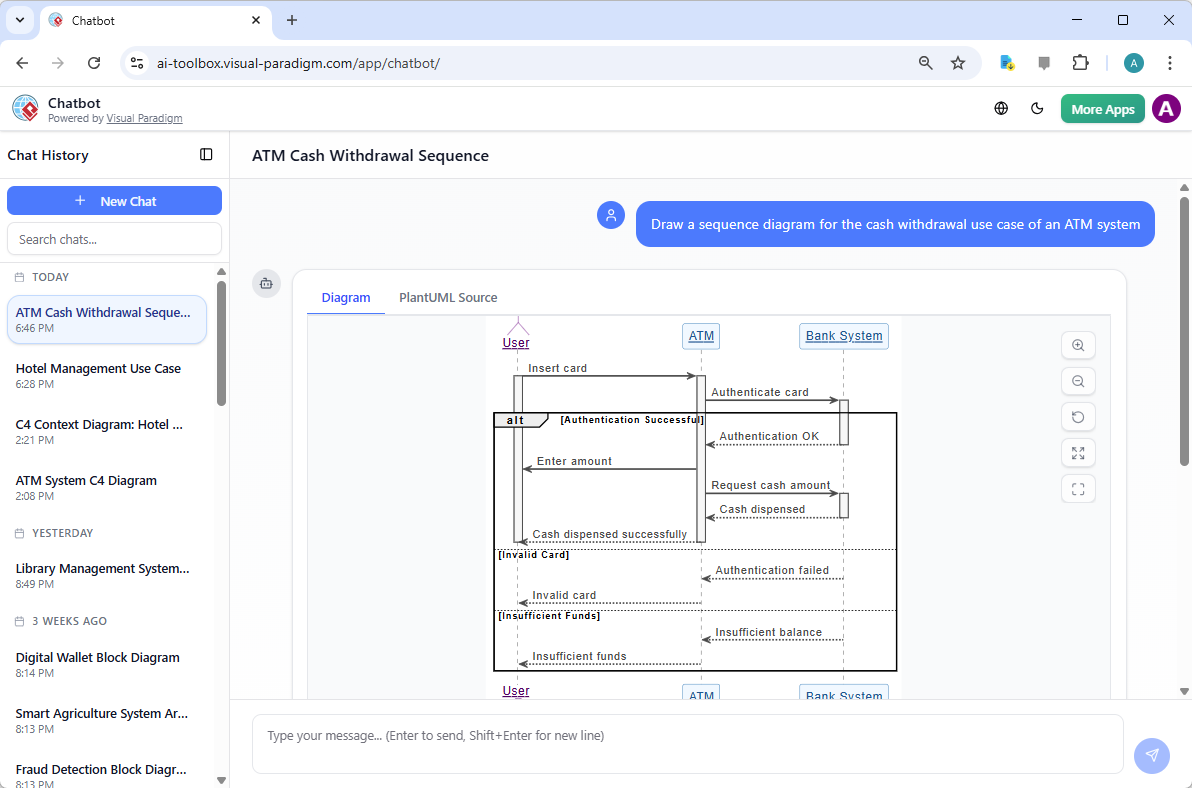
Need to refine it? Simply reply: “Add a loop for multiple withdrawal attempts.” The chatbot updates everything instantly — perfect for rapid iteration and brainstorming.
2. Enterprise Precision with Desktop AI Sequence Generation
For professional architects who prefer a full-featured workspace (with offline support), Visual Paradigm Desktop integrates the AI sequence diagram generator directly into the modeling environment.
Go to Tools → AI Diagram Generation, select “Sequence Diagram”, and enter your scenario:
“Online purchase flow: Customer browses store, adds items to cart, proceeds to checkout, communicates with Payment Gateway, updates Order System, and handles success/failure cases.”
Here’s a view of the AI generation interface:
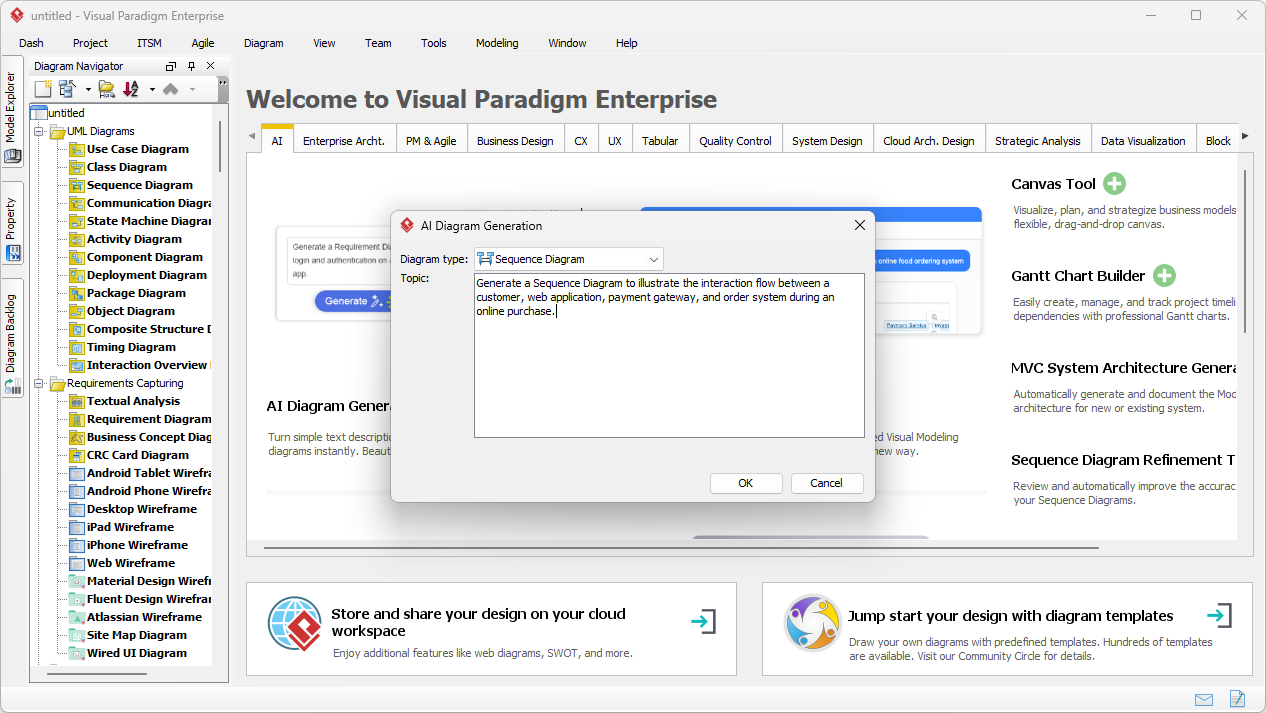
The AI intelligently creates lifelines, activation bars, synchronous/asynchronous messages, return arrows, and conditional fragments — all perfectly aligned and UML-compliant.
Resulting online purchase sequence diagram example:
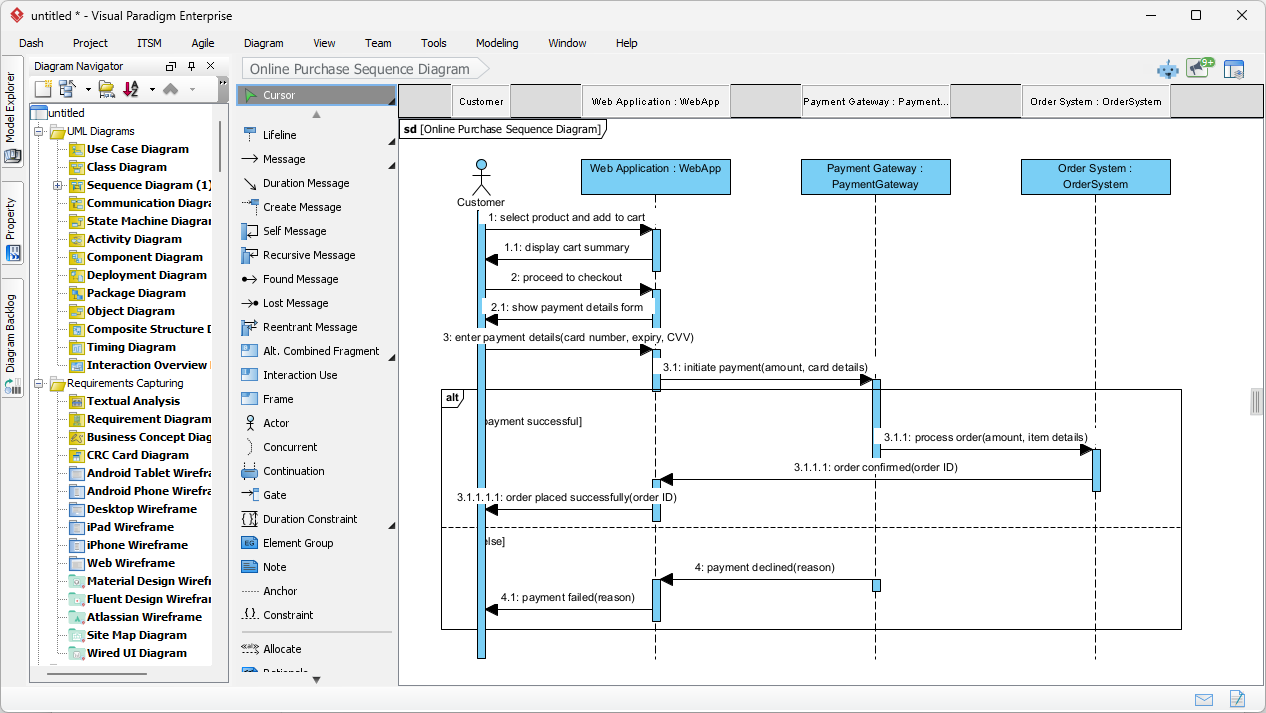
The output is 100% native — edit, reorder messages, add notes, or generate related diagrams (activity, communication, etc.) with ease.
3. From Requirements to Behavior – Use Case Modeling Studio
The web-based Use Case Modeling Studio connects textual use case descriptions directly to behavioral models. In the “UC Behavior View”, you can generate sequence diagrams from your use case flows with one click.
For a “Search Restaurants” use case, the AI reads preconditions, main flow, and alternatives, then builds a synchronized sequence diagram showing interactions between the Diner, the GourmetReserve application, and backend services.
Preview of the Behavior View with AI-generated sequence diagram:
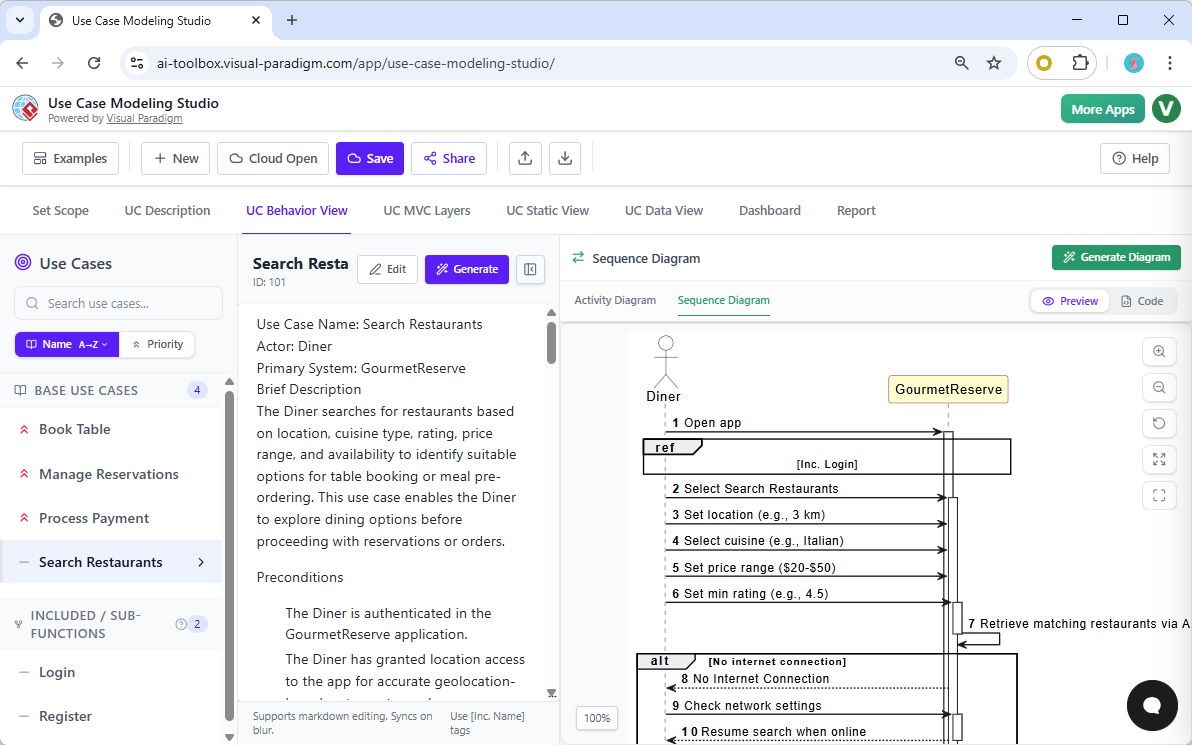
This tight integration ensures requirements and design stay perfectly aligned — a huge advantage for business analysts, product owners, and development teams.
The Future of Interaction Modeling Is Already Here
Visual Paradigm’s AI-powered sequence diagram tools combine the speed of generative AI with the depth and precision of professional UML modeling software.
Whether you’re sketching quick flows in the chatbot, building enterprise architecture in the desktop app, or maintaining end-to-end requirements in the Studio — these tools dramatically reduce modeling time while improving accuracy and consistency.
Ready to Stop Drawing and Start Designing Smarter?
- Download Visual Paradigm Desktop: Get the full offline AI modeling suite
- Try Use Case Modeling Studio: Start requirements-to-behavior workflow in the cloud
Experience the power of AI-assisted UML modeling today and take your system design to the next level in 2026.
Related Links
The following resources examine the application of artificial intelligence to the creation and optimization of UML sequence diagrams. According to the sources, AI-powered tools allow developers to instantly generate interaction models from natural language prompts and refine existing diagrams with intelligent suggestions. By leveraging AI chatbots and specialized refinement engines, teams can transform use-case descriptions into detailed visualizations, ensuring that complex system behaviors and communication flows are accurately documented.
- Visual Paradigm – AI-Powered UML Sequence Diagrams: This article explains how to generate UML sequence diagrams instantly by using artificial intelligence within the Visual Paradigm modeling suite.
- AI-Powered Sequence Diagram Refinement Tool: This feature overview describes an AI tool that enhances sequence diagrams with intelligent suggestions to improve the accuracy and clarity of software models.
- Mastering Sequence Diagrams with Visual Paradigm: AI Chatbot Tutorial: This beginner-level tutorial provides a step-by-step guide to creating sequence diagrams using an AI chatbot and a real-world e-commerce case study.
- Beginner’s Tutorial: Create Your First Professional Sequence Diagram in Minutes: This resource helps new users quickly build professional-grade sequence diagrams by interacting with a conversational AI chatbot.
- Comprehensive Tutorial: Using the AI Sequence Diagram Refinement Tool: This in-depth tutorial teaches users how to apply AI refinement features to ensure their diagrams maintain high quality and structural consistency.
- AI-Powered Sequence Diagram Refinement in Visual Paradigm: This guide demonstrates how to transform standard use-case descriptions into precise and professional sequence diagrams using AI-driven automation.
- From Simple to Sophisticated: AI-Powered Sequence Diagram Refinement Tool: This article highlights the capability of AI to evolve basic, simple diagrams into sophisticated architectural models with minimal manual input.
- Mastering MVC Architecture with Sequence Diagram Refinement: This guide focuses on using AI refinement to validate and improve the behavior of Model-View-Controller (MVC) system interactions.
- AI Sequence Diagram Example: Video Streaming Playback Initiation: This resource provides a practical example of a sequence diagram generated from a simple prompt to illustrate a video streaming workflow.
- PlantUML Sequence Diagram Generator | Visual Builder Tool: This tool allows users to create professional sequence diagrams rapidly through a visual PlantUML generator and a dedicated message wizard.
Comments (0)