![Free eBooks of IT [BooksOfAll]](https://www.booksofall.com/wp-content/uploads/2022/06/booksofall-logo-2.png)
Creating a Dynamic Urban Conversation: An AniFuzion Animation Guide
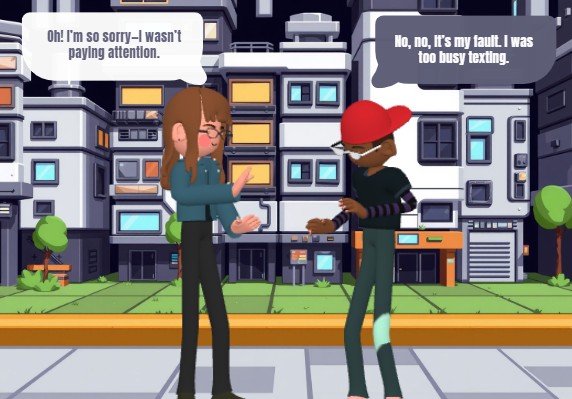
Imagine crafting a compelling story about a modern urban misunderstanding, complete with expressive characters and realistic dialogue, all in a matter of minutes. That’s exactly what this screenshot from Visual Paradigm’s Animation Maker (AniFuzion) showcases—a vibrant, 3D animated scene set in a cityscape. It features two characters in a tense conversation, their dialogue captured in speech bubbles, bringing a relatable moment to life. This powerful tool allows anyone, regardless of design experience, to create such engaging content. With its intuitive interface and advanced features, AniFuzion is the ultimate online animation maker for turning ideas into dynamic visual narratives.
Visual Paradigm’s Animation Maker, also known as AniFuzion, is an online platform that makes professional-quality 2D and 3D animation accessible to everyone. It’s not just a tool; it’s a creative studio in your browser. You can build animated videos, interactive flipbooks, and text animations without needing to install any software or possess advanced design skills. The platform’s user-friendly drag-and-drop interface and extensive library of assets mean you can focus on your story, not the technical complexities of animation.
How to Bring Your Story to Life with AniFuzion
Creating a scene like the one in the image is surprisingly straightforward. The process starts with a clear goal: to visually communicate a specific narrative moment. AniFuzion provides the tools to do this efficiently. First, you would open a new project and select a template or start from a blank canvas. Then, you’d drag a 3D character from the extensive library onto the scene. The beauty of AniFuzion is that you can easily customize these characters, adjusting their appearance with different colors, textures, and even body parts to perfectly match your vision.
Quick summary
-
Use a drag-and-drop interface to build your scene with characters and props.
-
Choose from a vast library of 3D characters, backgrounds, and props.
-
Apply pre-built actions to create natural movements like walking or gesturing.
-
Generate voiceovers with AI and use automatic lipsync to make dialogue feel authentic.
-
Export your animation as an MP4 video or a shareable interactive flipbook.
Next, you’d select a character and apply a motion from the pre-built actions library. For a scene like the one shown, you might choose a “waving” or “gesturing” action to make the characters appear engaged in conversation. The timeline at the bottom of the interface allows you to control the duration and sequence of these actions, ensuring a smooth flow. The scene is then enhanced with a background and props, which are also available in the library, to create a rich, contextual environment.
Adding Dialogue and Voiceover
One of the most impressive features of AniFuzion is its AI-powered text-to-speech (TTS) and automatic lipsync. To create the dialogue seen in the image, you would simply input your script into the TTS panel. The tool can generate voiceovers with various accents and emotional tones, such as a concerned or apologetic voice, adding depth to the characters. Once the audio is generated, AniFuzion automatically synchronizes the character’s mouth movements with the spoken words, a process known as automatic lipsync. This eliminates the need for manual, time-consuming keyframing and ensures that your characters’ dialogue feels natural and immersive.
Enhancing Your Animation with Effects
To add more visual interest, you can apply shape effects and animation presets to text, shapes, or objects. For instance, you could make the speech bubbles appear with a “fade-in” effect or have the background elements subtly animate. These small touches can significantly boost audience engagement. The platform also allows you to create interactive flipbooks, which are perfect for presenting a series of scenes or a story in a digital, book-like format that users can flip through.
How to Use Animation Maker (AniFuzion) – Core Workflows
Creating Your First Animated Video
To produce a short explainer video like the one in the image, start by selecting a template or creating a new project. Drag your chosen characters onto the canvas and customize them. Add actions to the timeline to animate their movements. Input your script into the TTS tool to generate the voiceover, and AniFuzion will handle the lipsync. Incorporate your background, props, and text animations to complete the scene. Finally, preview your animation, make any necessary adjustments, and export it as an MP4 file.
Building an Animated Flipbook
If you want to create an interactive story, you can build an animated flipbook. Add pages by dragging in scenes or backgrounds for each frame. Insert animated elements like characters and apply actions. You can also add audio for narration on each page. Set transitions between pages, such as a flip or fade, to create a seamless flow. Once you’re satisfied with the interactive experience, generate a shareable link or embed code to easily distribute your flipbook.
Adding Text and Shape Animations
To enhance a video or presentation, you can add dynamic text and shape animations. Open your project and use the drawing tools to create text or shapes. Select the element and browse the animation presets library to apply effects like bounce, spin, or fade. Layer these with other elements for a cohesive and visually appealing result. Preview the animation to ensure the timing is correct before exporting.
Why AniFuzion is a Game-Changer
For educators, marketers, and business professionals, AniFuzion is a powerful solution for creating engaging content. Educators can use it to develop interactive lessons that captivate students. Marketers can create promotional videos and product demos to boost audience engagement. Business professionals can build onboarding materials and training modules to improve clarity and retention. The tool’s versatility makes it suitable for a wide range of applications, from personal projects to commercial videos.
One of the key benefits of AniFuzion is that it saves time and resources. With pre-built templates, characters, and AI tools, you can produce high-quality animations in minutes instead of hours. This means you don’t need to hire designers or voice actors, making it a cost-effective solution. Additionally, the platform’s browser-based nature allows you to work on projects from any device, collaborate easily, and share outputs instantly.
For those new to animation, AniFuzion is incredibly accessible. The intuitive interface and ready-to-use assets encourage you to experiment and iterate quickly. You can build confidence as a creator by producing polished work, even as a novice. The platform’s extensive library of 3D characters, actions, and scenes provides a creative toolbox that makes world-building and character design fast and fun.
Start Your Animation Journey Today
If you’re ready to bring your ideas to life with dynamic visuals, AniFuzion is the perfect tool. Whether you want to create a simple explainer video or a complex interactive story, this online animation maker offers everything you need. The process is intuitive, the features are powerful, and the results are impressive. You can start with a free account and explore the core features, or upgrade to access advanced options and premium assets.
Try Now
Ready to create your first animated video? Visit Visual Paradigm Online to sign up for a free account and start exploring the world of AniFuzion. You’ll be amazed at how quickly you can turn a simple idea into a captivating animated story. The possibilities are endless, and the journey begins with just a few clicks.
Visual Reference:
Related Links
-
Visual Paradigm Online Animation Maker (AniFuzion): Create professional-quality animated videos and motion graphics easily with Visual Paradigm’s versatile online animation tool.
-
Comprehensive Guide to Using Visual Paradigm Online’s Anifuzion: Explore this comprehensive resource to learn how to navigate AniFuzion’s interface and leverage its powerful animation tools for professional storytelling.
-
Introducing Visual Paradigm’s Anifuzion: The Ultimate Animated Video Maker: Learn how Anifuzion streamlines the creation of dynamic animations with features like AI-powered text-to-speech and a diverse library of 3D characters.
-
Creative Motion Graphics with Anifuzion (Pinterest Inspiration): Explore visual inspiration and creative examples of professional motion graphics and video projects developed using the Anifuzion animation engine.
-
Comprehensive Guide to Swapping Characters in AniFuzion: Master the character swap functionality within Visual Paradigm Online to maintain creative flow and save time by reusing animations across different character models.
Comments (0)