![Free eBooks of IT [BooksOfAll]](https://www.booksofall.com/wp-content/uploads/2022/06/booksofall-logo-2.png)
A Comprehensive Guide to Conversational Diagram Engineering with Visual Paradigm’s AI Modeling Suite
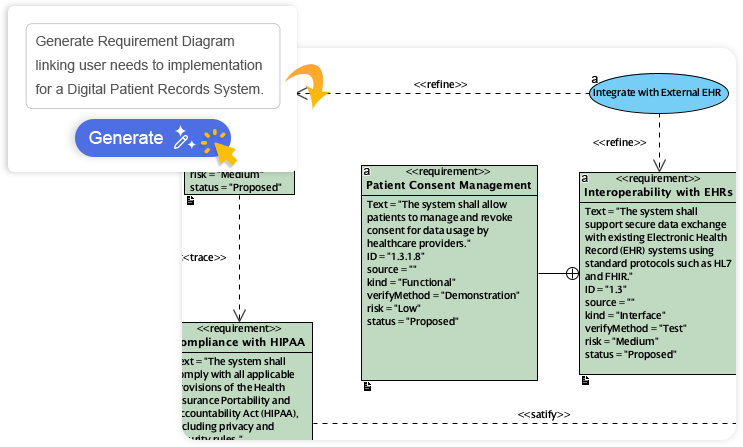
Enterprise architecture and software design have undergone a paradigm shift in recent years, driven not just by advancements in modeling tools, but by the integration of artificial intelligence into the core modeling workflow. At the heart of this transformation lies Visual Paradigm’s AI diagram generator, a sophisticated ecosystem that enables teams to move from time-intensive, manual diagramming to a fluid, natural-language-driven modeling experience—what we now refer to as conversational diagram engineering.
From Manual Drawing to Intelligent Co-Creation
Traditionally, enterprise modeling relied on static, laborious processes where stakeholders would sketch out diagrams using pens, paper, or basic tools, only to face significant delays when translating those into formal, standards-compliant models. With the advent of AI-powered modeling assistants, teams can now describe their vision in plain English and receive instantly generated, contextually accurate diagrams—without sacrificing rigor or clarity.
Visual Paradigm’s AI architecture is not a standalone feature but an embedded intelligence within its modeling platform. The primary interface is theAI Chatbot, a purpose-built assistant trained on domain-specific standards such asArchiMate 3.2, UML 2.x, andTOGAF. This ensures that the generated diagrams maintain semantic consistency with established enterprise modeling practices—something that generic large language models struggle to achieve due to their lack of domain grounding.
How the AI Chatbot Works in Practice
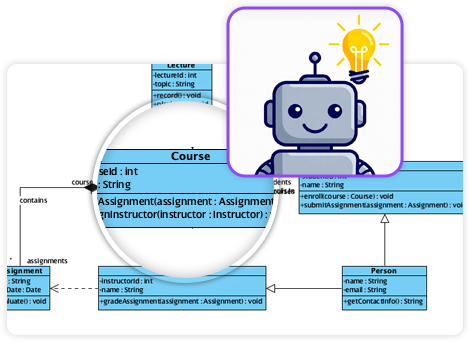
- Prompting: Team members describe functional or systemic requirements using everyday language. For example, “Generate a sequence diagram for a video streaming platform starting playback” results in a fully structured, properly sequenced diagram showing client, server, and media processing interactions.
- Seamless Integration: The AI is accessible within both Visual Paradigm Online and Visual Paradigm Desktop, enabling a unified workflow where users can generate, refine, and edit diagrams without switching tools or environments.
- Rapid Project Kickoff: For new initiatives, the AI produces a first draft of a model—whether it’s a use case diagram, a C4 context model, or a class diagram—within seconds, dramatically reducing the initial modeling friction and accelerating time-to-insight.
End-to-End Workflow for Enterprise and Software Modeling
Visual Paradigm’s AI does not operate in isolation. It is strategically deployed across key phases of the software and systems lifecycle to enhance clarity, reduce cognitive load, and increase modeling velocity. Here’s how teams leverage the AI at each stage:

1. Requirement Analysis and Vision Translation
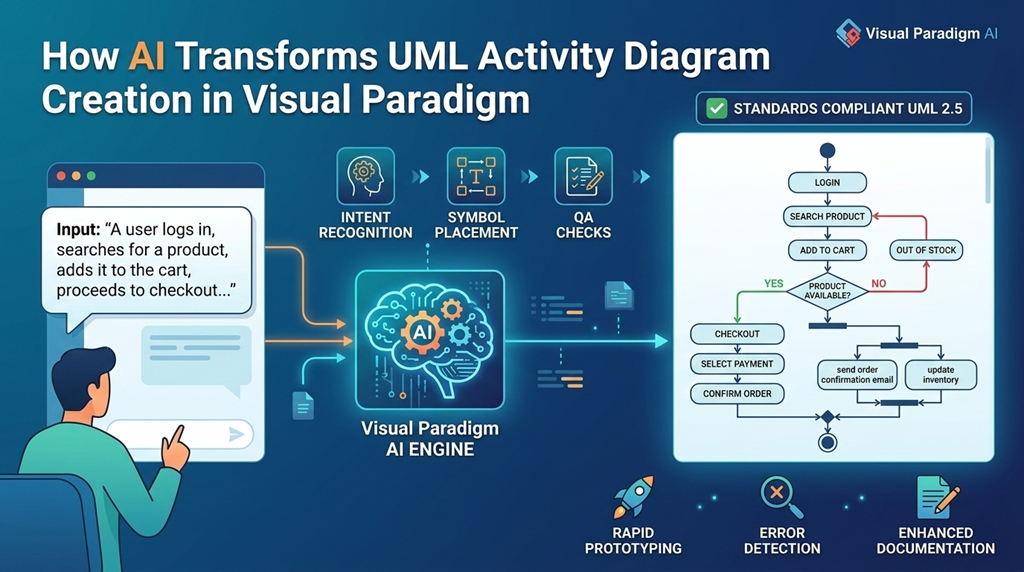
Raw business or user stories often exist as unstructured text—filled with ambiguity and missing structure. Visual Paradigm’s AI-Powered Textual Analysis transforms those descriptions into formal, structured visual models such as class diagrams or use case diagrams. For instance, a statement like “The system must allow users to update their profile, including name, address, and contact info” is instantly mapped into a clean, well-structured use case and class diagram with precise actor, boundary, and control boundaries.
2. Database Design with Contextual Intelligence
Designing a robust database schema is one of the most challenging tasks in software engineering. Visual Paradigm’sDBModeler AI streamlines this process through a seven-step workflow:
- Input domain text (e.g., “We need to track employee shifts with location, start time, and status”)
- Automatically infer entities (e.g., Shift, Employee, Location)
- Generate relationships and cardinalities
- Apply normalization rules (1NF, 2NF, 3NF)
- Build an ER diagram with clear semantics
- Propose constraints and indexes
- Validate against consistency and integrity rules
This automated process ensures that the resulting schema is not only accurate but also production-ready, reducing the risk of human error during the transition from requirements to database schema.
3. Architecture Design at the Strategic Layer
High-level architecture decisions require clarity in domain boundaries, technology decisions, and business-technology alignment. For this, the AI C4 Diagram Generatorprovides automated support across the four C4 levels:
- Context: Shows the system within its business environment (e.g., users, stakeholders, external services).
- Container: Identifies internal components such as microservices or modules.
- Component: Visualizes individual modules, their interactions, and dependencies.
- Deployment: Maps components to physical infrastructure.
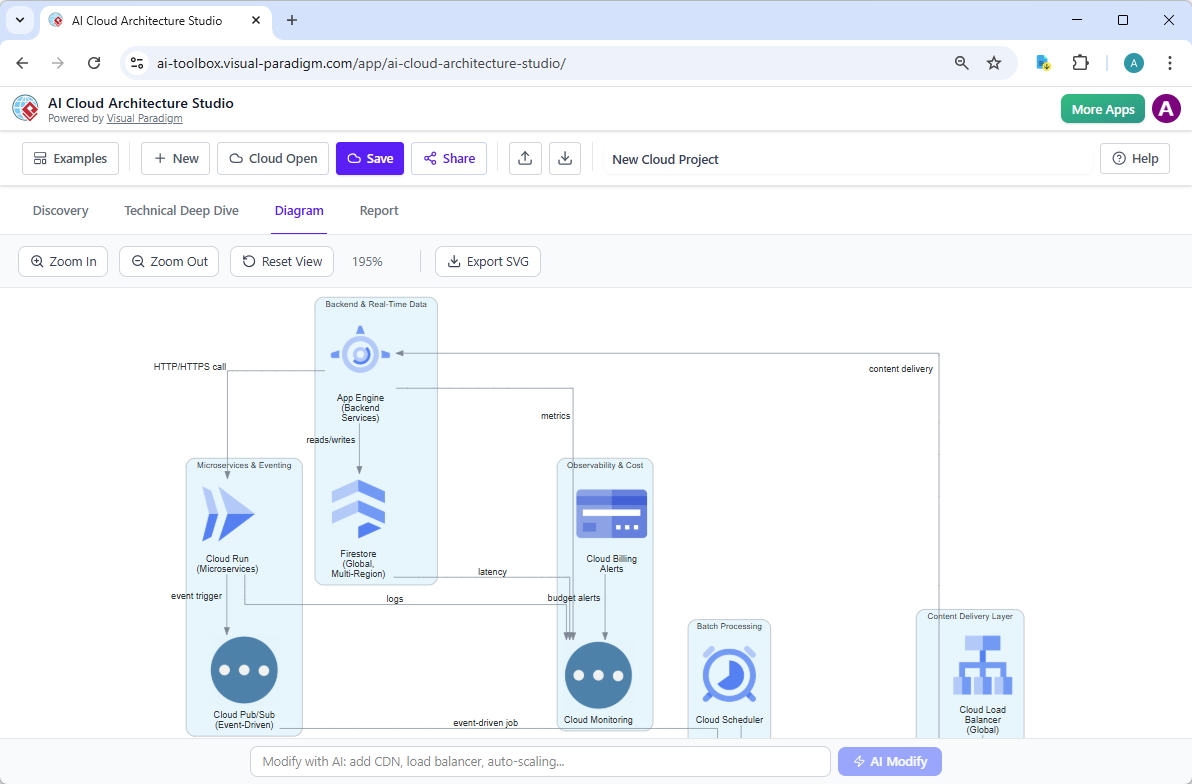
By simply describing a system, such as “Design a cloud-based e-commerce platform with inventory, order, and payment systems”, the AI generates a complete C4 model that aligns with architectural best practices and enables stakeholders to communicate at a shared conceptual level.
4. Refinement and Validation of Technical Models
While initial AI-generated diagrams offer valuable starting points, they are not always complete or perfectly readable. Visual Paradigm’s AI Sequence Diagram Refinement Toolacts as a post-generation validator, analyzing the logical flow of interactions and suggesting improvements in:
- Message ordering and sequence clarity
- Missing participant roles or objects
- Redundant or conflicting interactions
- Layout optimization for visual readability
This level of refinement ensures that the final diagram is not only structurally sound but also serves as a reliable blueprint for developers and testers.
Strategic and Business Frameworks: Beyond Technical Models
Visual Paradigm’s AI capabilities extend well beyond software modeling into strategic business planning and decision-making. The AI does not simply generate diagrams—it helps teams analyze, compare, and align their strategies with market dynamics and organizational goals.
Strategic Analysis with AI-Driven Frameworks
Teams routinely use AI-powered tools to conduct:
- SWOT Analysis: The AI analyzes internal strengths and weaknesses, and external opportunities and threats.
- PESTLE Analysis: Explores political, economic, social, technological, legal, and environmental factors.
- TOWS Matrix: Integrates SWOT findings to generate actionable strategies like “Oportunistic Responses” or “Threat Mitigation.”
One of the most powerful features is the AI’s ability to connect the dots between frameworks. For example, after identifying political risks in a PESTLE scan, the AI can automatically generate a SWOT analysis that reflects those risks—ensuring strategic insights are not siloed but integrated across business functions.
Ideation and Idea Organization
During the ideation phase, raw ideas are often disjointed and unstructured. The AI Tree Diagram Maker (IntelliTree) transforms markdown-style text inputs into hierarchical, visually structured outputs such as:
- Work Breakdown Structures (WBS)
- Organizational charts
- Mind maps with logical groupings
- Decision trees
For instance, a team member might input: “We want to launch a new subscription service with three tiers: Basic, Pro, and Enterprise”. IntelliTree then maps this into a structured WBS with clear deliverables, timelines, and dependencies—making it instantly usable for project planning.
Gap Analysis for Architecture Validation
A critical gap in traditional architecture reviews is the manual, time-consuming process of identifying mismatches between current and desired states. Visual Paradigm’s AI Gap Analysis Tool automates this process by comparing baseline models (current state) with target models (future state).

It identifies:
- Missing capabilities
- Technologies or processes that are underutilized
- Compliance risks
- Performance or security deficiencies
The output is a clear, actionable list of improvements—reducing risk and accelerating validation cycles from days to minutes.
Why This Approach Works: Key Differentiators
Unlike general-purpose AI assistants, Visual Paradigm’s AI is deeply rooted in enterprise modeling standards. This context-awareness delivers significant advantages:
1. Domain-Specific Training
The AI is trained on authoritative modeling standards such as ArchiMate 3.2, UML 2.x, and TOGAF. This ensures that generated models contain correct semantics—for example, proper representation of information flows, business-technology alignment, and cross-layer dependencies. This mitigates the common issue of “hallucinations” where generic AI fabricates incorrect or semantically invalid patterns.
2. Contextual Co-Design
Instead of generating a new model from scratch, the AI acts as a co-designer. It understands the current state of the model and interprets new instructions in context. This preserves naming conventions, connection logic, and architectural patterns across different layers—ensuring consistency and reducing rework.
3. Lossless Round-Tripping
A critical technical enabler is the use of a VP-specific JSON schema that allows seamless, bidirectional data transfer between the AI chatbot and the desktop modeling environment. This means models generated in the AI interface can be edited, exported, or imported without data loss or formatting issues—ensuring full fidelity across platforms.
4. Democratization of Enterprise Modeling
Previously, enterprise architecture was considered a domain accessible only to experienced professionals with deep modeling knowledge. With Click-Start AI, team members with no formal training can begin producing high-quality, structured diagrams—even in complex domains like cloud computing or healthcare systems. This lowers the barrier to entry and empowers every stakeholder—from product managers to developers—to contribute meaningfully to the design process.
Supported AI Diagram Types
Our team has successfully implemented and used the following diagram types through the AI interface:
| Category | Diagram Types | Use Case |
|---|---|---|
| Technical | UML (Class, Sequence, Activity, Package, Component, State Machine) | Software design, system behavior modeling, component interaction |
| Technical | C4 Models (Context, Container, Component, Deployment) | Enterprise architecture, system boundary definition, cloud architecture |
| Technical | SysML (Block Definition, Requirements) | Systems engineering, complex system specifications |
| Technical | ER Diagrams | Database schema design, data modeling |
| Business | Org Charts, Mind Maps, PERT Charts, Project Roadmaps | Team structure, project planning, idea mapping |
| Strategic | Balanced Scorecard, Ansoff Matrix, Blue Ocean Four Actions | Performance metrics, market strategy, competitive positioning |
Conclusion: A New Era of Modeling
Visual Paradigm’s AI diagram generator is not merely a tool—it represents a fundamental shift in how enterprises approach modeling. It transforms the role of the enterprise architect from a manual drafter to a strategic facilitator, enabling teams to explore ideas, validate designs, and align stakeholders through conversational, intelligent co-creation.
By combining domain-specific training, contextual intelligence, and seamless integration, this ecosystem enables organizations to produce accurate, standards-compliant diagrams rapidly—without sacrificing depth or clarity. As teams continue to adopt AI as a co-pilot in design, the future of enterprise architecture will be defined not by how many diagrams are drawn, but by how effectively stakeholders collaborate in a shared, intelligent modeling space.
Visual Paradigm’s AI resources
-
AI-Powered Visual Modeling and Design Solutions by Visual Paradigm: This portal allows users to explore cutting-edge AI-driven tools for visual modeling, diagramming, and software design to enable faster development workflows. It acts as a central hub for various intelligent modeling applications.
-
AI Chatbot Feature – Intelligent Assistance for Visual Paradigm Users: This feature leverages AI-powered chatbot functionality to provide instant guidance and automate repetitive tasks within the modeling environment. It is designed to enhance user productivity by interpreting natural language instructions.
-
Visual Paradigm Chat – AI-Powered Interactive Design Assistant: This interactive AI chat interface assists users in generating diagrams, writing code, and solving complex design challenges in real time. It supports multiple languages and allows for conversational diagram creation.
-
AI Textual Analysis – Transform Text into Visual Models Automatically: This tool utilizes AI to analyze unstructured text documents and automatically generate structured diagrams such as UML, BPMN, and ERD. It streamlines documentation by identifying key entities and relationships directly from written requirements.
-
AI-Assisted UML Class Diagram Generator – Visual Paradigm: An interactive, step-by-step tool that helps users create UML class diagrams using AI-powered suggestions and validation. It also supports PlantUML export and design analysis for software engineers.
-
Visual Paradigm AI Diagram Generation Guide: This is a comprehensive, step-by-step guide for utilizing AI-powered tools to generate various diagram types quickly and accurately. It provides practical instructions for analysts and architects to integrate AI into their modeling workflows.
-
C4-PlantUML Studio | AI-Powered C4 Diagram Generator: This purpose-built tool transforms natural language prompts into correct, layered C4 diagrams for software architecture visualization. It supports all four core levels—Context, Container, Component, and Code.
-
AI-Powered MVC System Architecture Generator by Visual Paradigm: This feature leverages AI to automatically generate clean and scalable MVC architectures with minimal manual effort. It helps developers visualize the Model-View-Controller layers of their systems instantly.
-
AI-Powered Use Case Diagram Refinement Tool – Smart Diagram Enhancement: Users can leverage this tool to automatically refine and optimize use case diagrams for better clarity and completeness. It identifies missing actors and suggests improvements to existing models.
-
AI-Powered ArchiMate Viewpoints Generator in Visual Paradigm: This release features an AI-driven generator that automates the creation of professional enterprise architecture views. It is specifically designed to support the ArchiMate 3.2 standard for aligning business goals with IT infrastructure.
Comments (0)