![Free eBooks of IT [BooksOfAll]](https://www.booksofall.com/wp-content/uploads/2022/06/booksofall-logo-2.png)
Mastering AI Research: Annotate and Organize Web Insights with Visual Paradigm Annotator
In an era where information about breakthrough technologies like Artificial General Intelligence (AGI) evolves daily, passive reading is no longer sufficient. To truly understand complex subjects, we must engage with the material actively. The Visual Paradigm Annotator empowers students, researchers, and professionals to transform the web from a static library into a dynamic, interactive workspace. By allowing users to place context-aware notes directly on live webpages, this online annotation tool ensures that your critical insights remain anchored exactly where they belong—right alongside the source material.
Whether you are conducting a deep dive into the history of neural networks or gathering competitive intelligence, keeping your thoughts organized is paramount. This guide explores how to leverage this powerful web research software to capture, refine, and secure your knowledge without ever leaving your browser.
Quick Takeaways: Elevate Your Research Game
-
Contextual Anchoring: Attach notes directly to specific text on any webpage to prevent information silos.
-
Rich Text Editing: Use formatting, links, and emojis to create structured and expressive study notes.
-
Flexible Privacy: Choose between private reflection or collaborative group discussions instantly.
-
Seamless Integration: Access your annotated library anytime via your secure account.
Anchoring Critical Concepts to Their Source
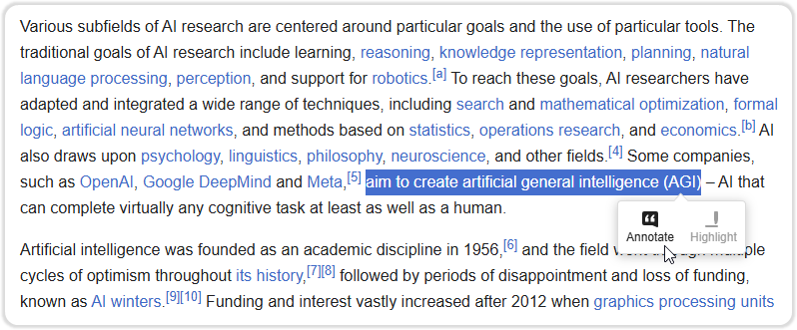
The biggest challenge in modern research is the disconnection between a source and the notes taken about it. Traditionally, you might copy a sentence about AGI goals into a separate document, losing the surrounding context of the article. Visual Paradigm Annotator eliminates this fragmentation. As you browse complex articles—such as a dense Wikipedia entry on Artificial Intelligence—you can identify key definitions or pivotal arguments instantly.
By simply selecting the relevant text, such as the definition of AGI aiming to “create artificial general intelligence,” the tool presents an intuitive tooltip. This immediate reaction capability allows you to mark essential passages for review or deeper analysis without breaking your reading flow. It transforms a standard browser into a professional web highlighter that captures the exact moment of discovery.
Crafting Detailed and Expressive Insights
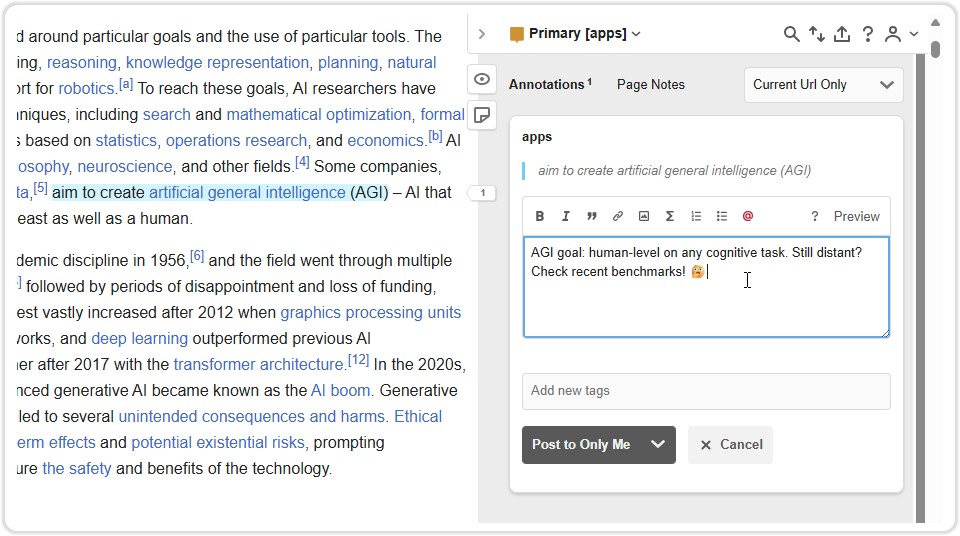
Highlighting is just the first step; true understanding comes from synthesis. Once you have selected your text and clicked “Annotate,” the tool opens a dedicated sidebar, transforming the margin of the web page into a powerful writing environment. This isn’t just a sticky note; it is a full-featured digital note-taking editor designed for depth.
In the example of researching AGI, a simple highlight isn’t enough to capture the nuance of “human-level cognitive tasks.” The sidebar allows you to type detailed thoughts, questions, or reminders. With rich-text support, you can bold key terms, create lists, or even insert links to cross-reference recent benchmarks. You can also add personality and visual cues using emojis—like a “🧐” to signal skepticism or a need for further verification. This level of detail turns a generic webpage into a personalized study guide tailored to your specific intellectual journey.
Controlling Visibility and Workflow
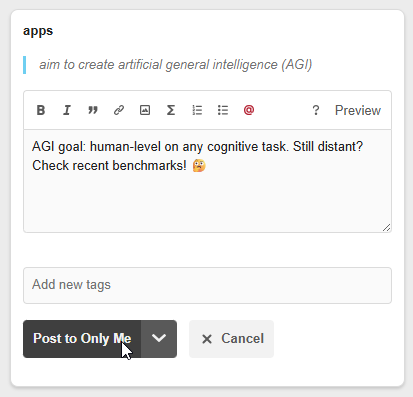
Research is often a hybrid process involving solitary deep work and collaborative team review. The Visual Paradigm Annotator recognizes the need for flexible privacy settings. After drafting your insight about AGI benchmarks, you are presented with clear options for how to save that knowledge. You aren’t forced to share every thought immediately.
For personal study sessions or early-stage hypothesis gathering, the “Post to Only Me” function ensures your notes remain a private digital garden. This allows you to draft rough ideas or “notes to self” without cluttering a shared workspace. Conversely, if you are working with a research team, you can switch the scope to a specific group, turning the webpage into a collaborative whiteboard. This granular control over information sharing makes it the best collaborative research tool for teams who need to balance privacy with transparency.
Transforming Information into Knowledge
The journey from reading a definition of Artificial Intelligence to fully comprehending its implications requires a tool that adapts to your thinking process. By using Visual Paradigm Annotator, you stop collecting disconnected bookmarks and start building a cohesive layer of intelligence on top of the web. This method of active engagement ensures that every article you read contributes meaningfully to your long-term knowledge base.
Don’t let valuable insights slip away as you switch tabs. Experience a smarter, more organized way to conduct research online.
Start annotating your research with Visual Paradigm Annotator today.



Comments (0)