![Free eBooks of IT [BooksOfAll]](https://www.booksofall.com/wp-content/uploads/2022/06/booksofall-logo-2.png)
Creating a Core Banking Modernization Plan with AI
Imagine launching a complex IT outsourcing project with the precision of a well-oiled machine. The IT Outsourcing Project Guide by Visual Paradigm makes this a reality. This powerful, AI-powered tool streamlines the entire process, transforming a daunting task into a clear, step-by-step journey. It’s the ultimate IT outsourcing software for professionals who demand structure and efficiency. From defining your core banking modernization goals to generating a comprehensive final report, this guide provides the framework to ensure your project is a resounding success. This deep dive reveals how the tool’s interactive features and intelligent automation empower you to manage complexity with confidence.
Let’s take a closer look at how this AI-powered project guide works in action, using a real-world example of modernizing a core banking platform. The journey begins with a simple input, and the tool does the heavy lifting.
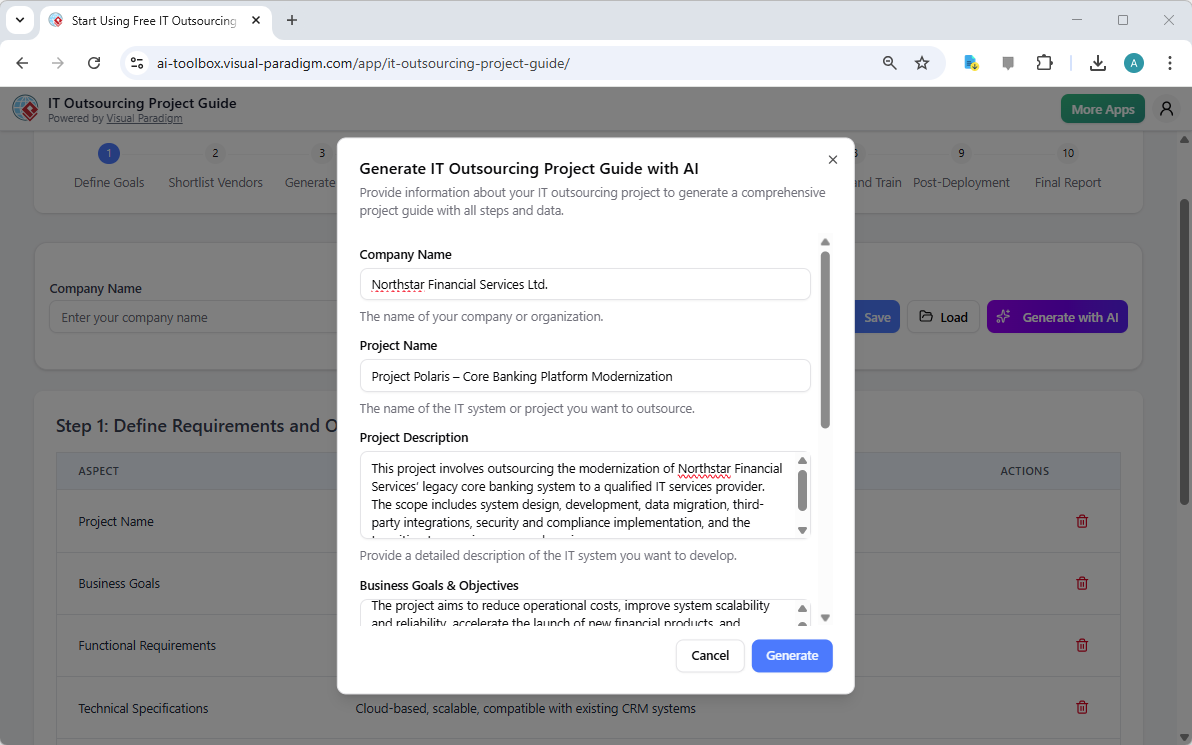
Step 1: Define Requirements and Objectives
The first step is all about laying the foundation. The guide presents a clear, structured table where you define the core aspects of your project. As seen in Image 2, the tool has already populated the table with data generated by AI, based on the initial project input. This includes the company name, project name, and a detailed project description. The AI has intelligently extracted key business goals like “Reduce operating costs by 15%” and technical requirements such as a “Cloud-native microservices architecture.” This automated data generation saves significant time and ensures no critical detail is overlooked. You can then easily edit or add to these fields to tailor the plan to your specific needs.
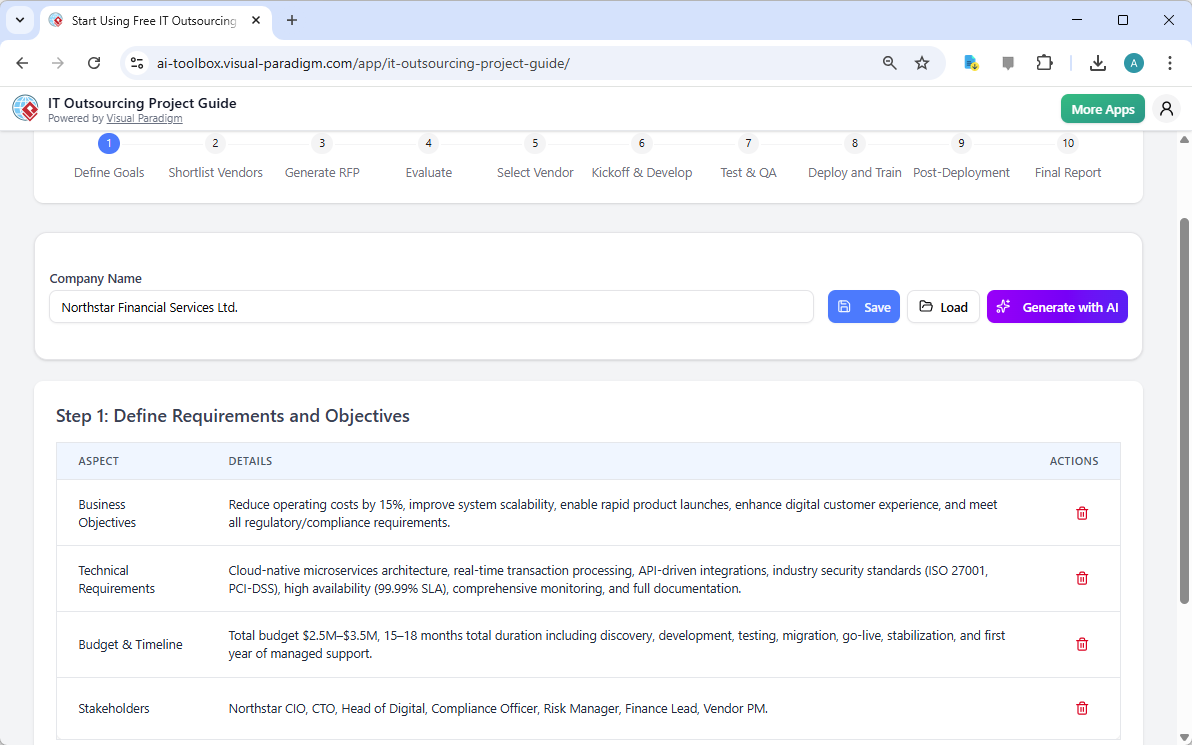
Step 2: Research and Shortlist Vendors
Once your requirements are defined, the focus shifts to finding the right partners. Image 3 shows the “Research and Shortlist Vendors” step. Here, the guide provides a data table to list potential vendors, their expertise, years of experience, and client reviews. The AI has populated this table with relevant vendors for a core banking project, such as “CloudWave Solutions” and “FinTech Dynamics,” complete with their specialties and review scores. This structured approach allows you to compare vendors side-by-side, making the initial research phase more efficient and objective.
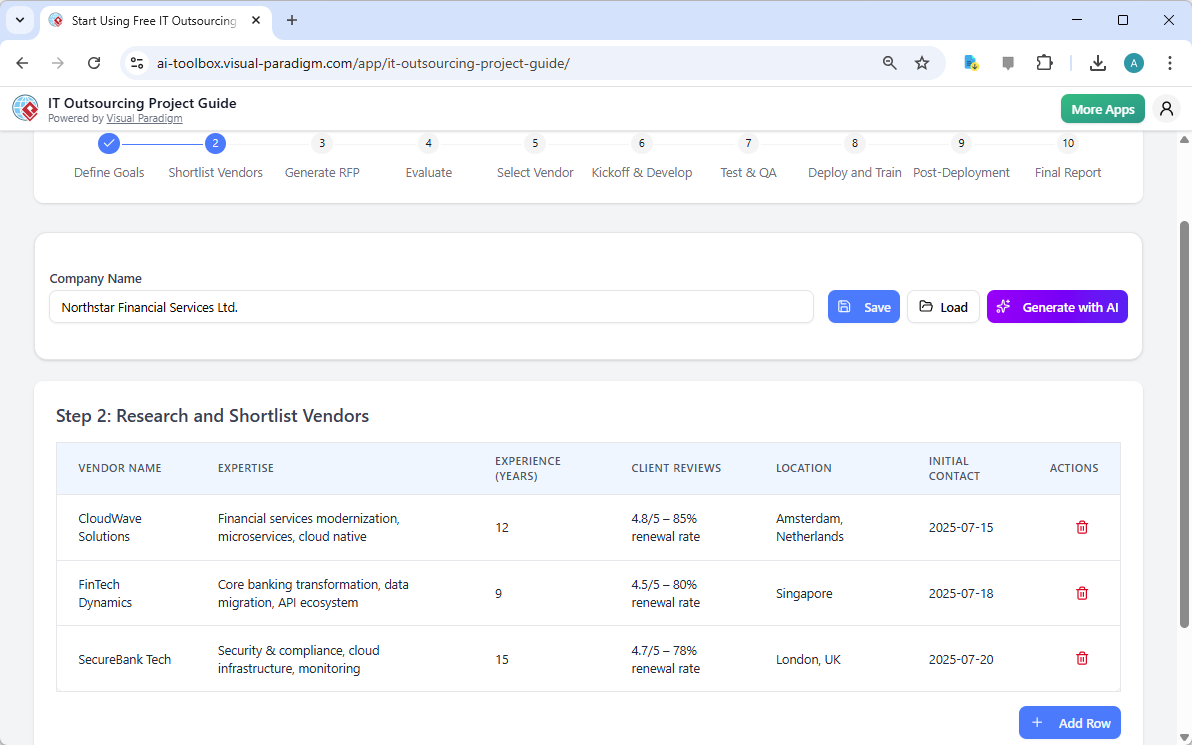
Step 3: Generate a Professional RFP
With your requirements and vendor shortlist in place, it’s time to invite bids. Image 4 displays the “Generate Request for Proposal (RFP)” screen. The tool automatically compiles a professional, comprehensive RFP document using the information from the previous steps. It includes a project overview, business objectives, and technical requirements, all tailored to your specific needs. The AI ensures the RFP is clear and detailed, so potential vendors fully understand your project scope. You can then review and edit the text to add specific submission instructions or contact details before sending it out.
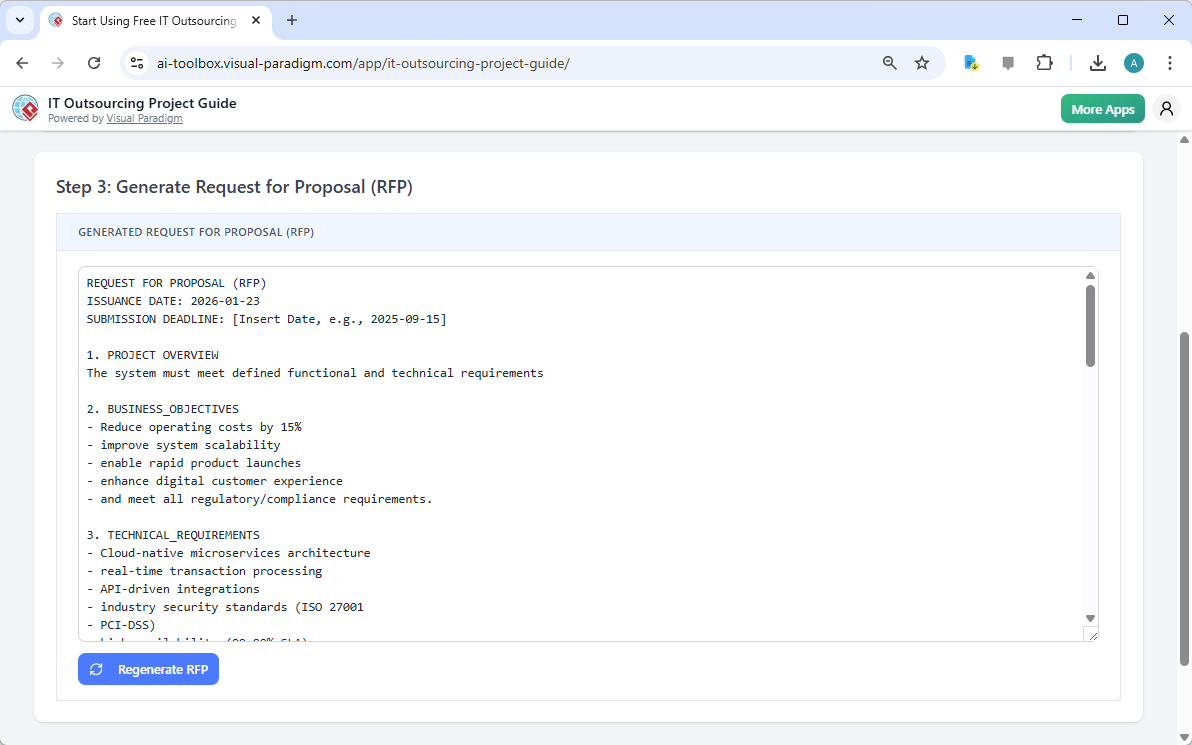
Step 4: Evaluate Proposals and Select a Vendor
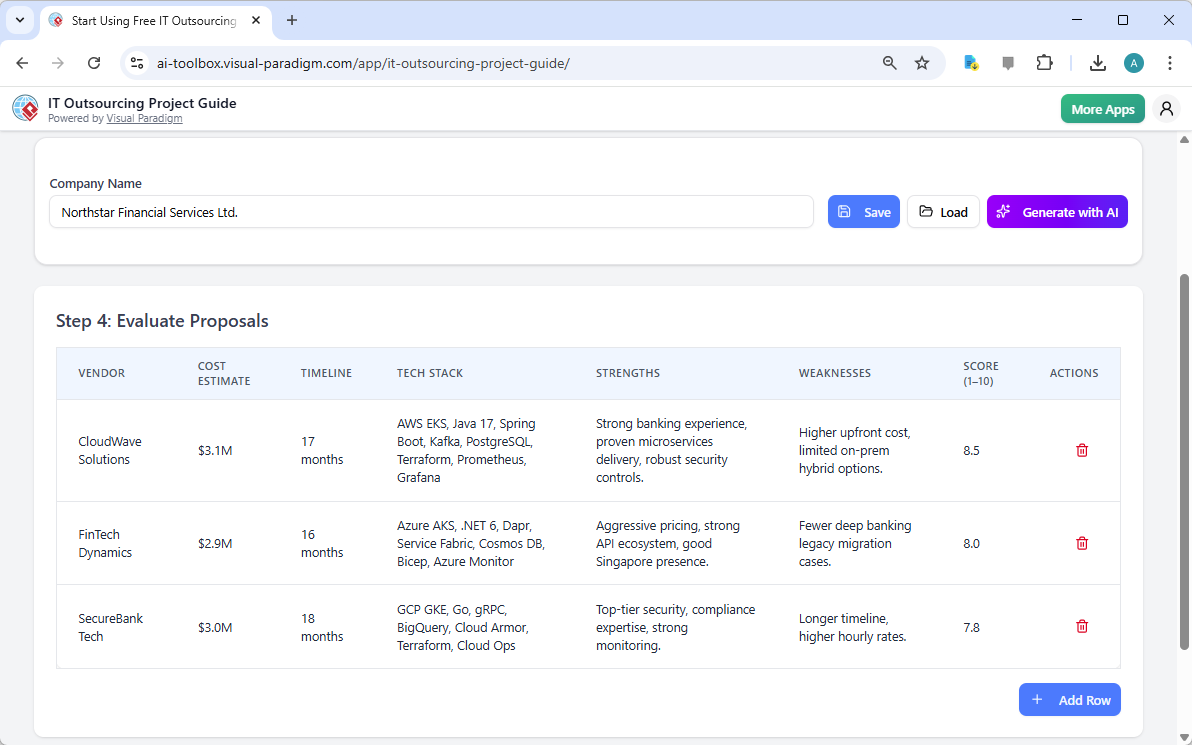
Receiving proposals is just the beginning. The real work lies in evaluation. Image 5 shows the “Evaluate Proposals” step. The guide provides a scoring table where you can input the cost estimate, timeline, and technical stack for each vendor. You can also note their strengths and weaknesses, and assign a final score. This structured evaluation allows for a data-driven comparison, helping you make an informed decision. In this example, CloudWave Solutions is rated the highest. After evaluation, you move to the next step to finalize your choice.
Step 5: Select Vendor and Negotiate Contract
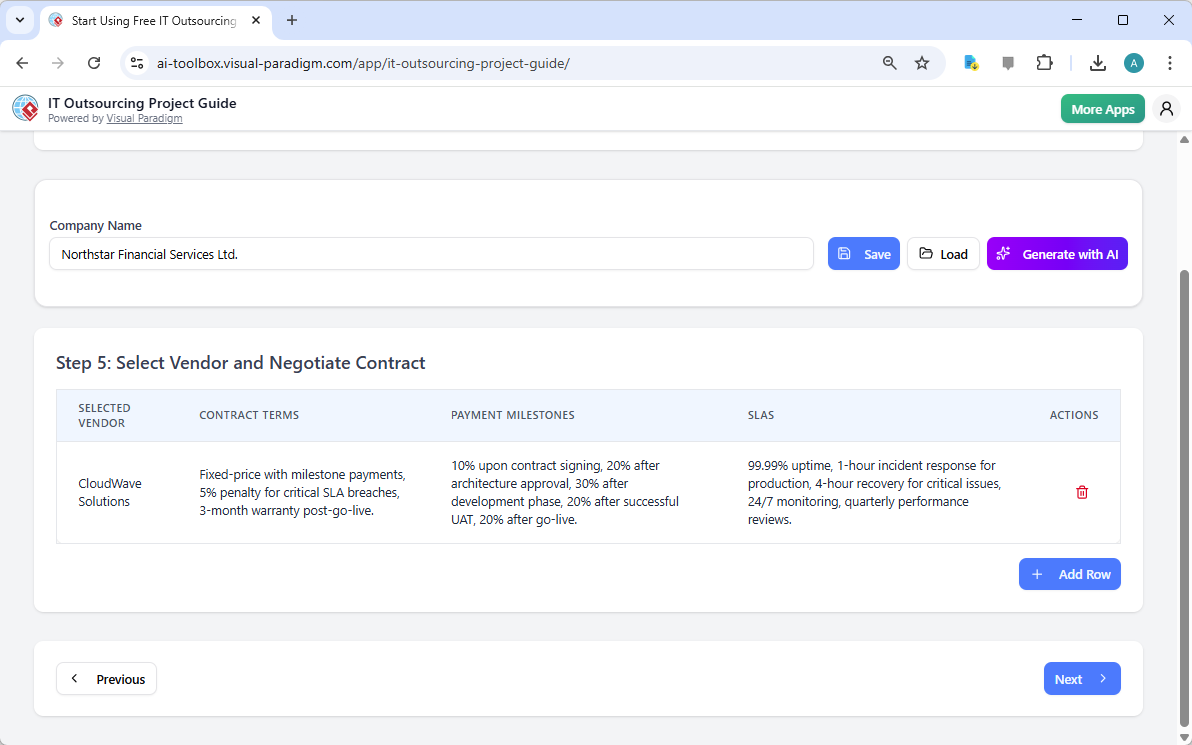
With your top vendor selected, it’s time to formalize the partnership. Image 6 shows the “Select Vendor and Negotiate Contract” step. Here, you document the selected vendor, contract terms (like fixed-price with milestone payments), and the agreed-upon Service Level Agreements (SLAs). This step ensures all critical contractual details are captured in one place, providing a clear reference point for both parties and reducing the risk of future disputes.
Step 6: Kickoff and Development
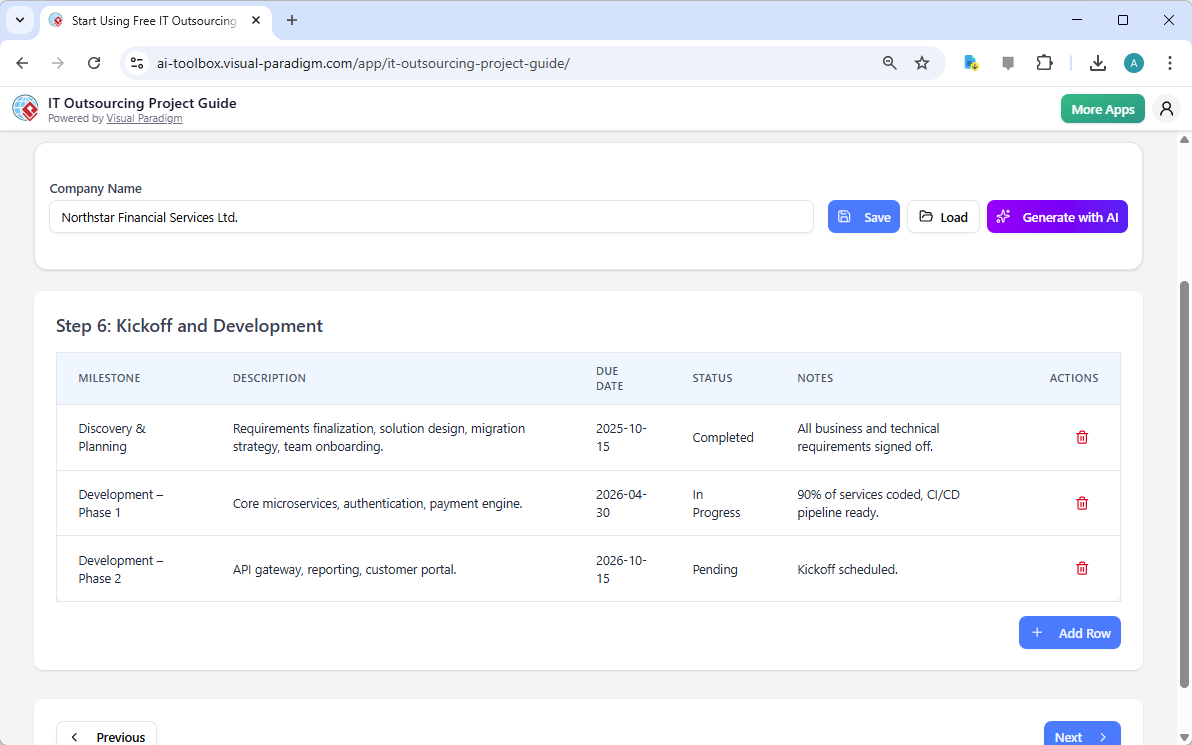
Now the project is officially underway. Image 7 illustrates the “Kickoff and Development” phase. This step is crucial for tracking progress. The guide provides a table to log key milestones, such as “Discovery & Planning” and “Development – Phase 1,” along with their due dates, current status (e.g., “Completed,” “In Progress”), and notes. This real-time tracking ensures the project stays on schedule and allows for quick identification of any delays.
Step 7: Testing and Quality Assurance
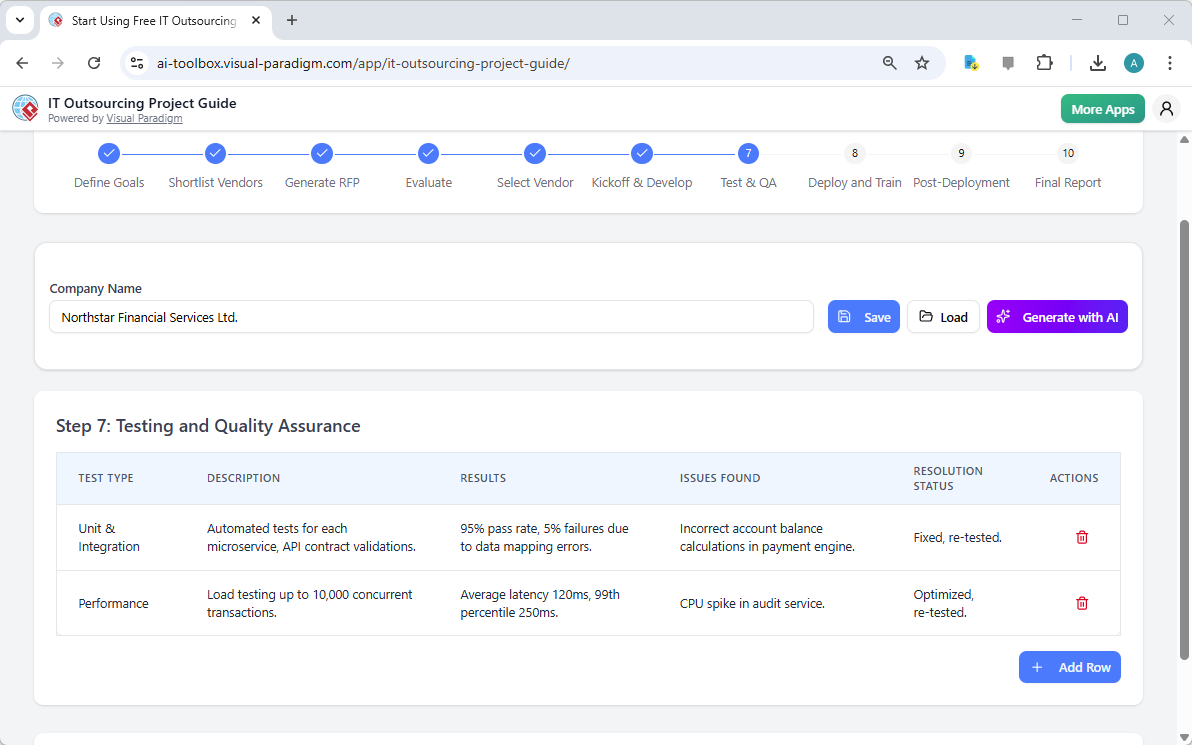
Quality is paramount in any IT project. Image 8 shows the “Testing and Quality Assurance” step. This table allows you to document different types of testing (like Unit & Integration, Performance) and record the results, any issues found, and their resolution status. This detailed tracking ensures that the system meets all functional and technical requirements before it goes live.
Step 8: Deployment and Training
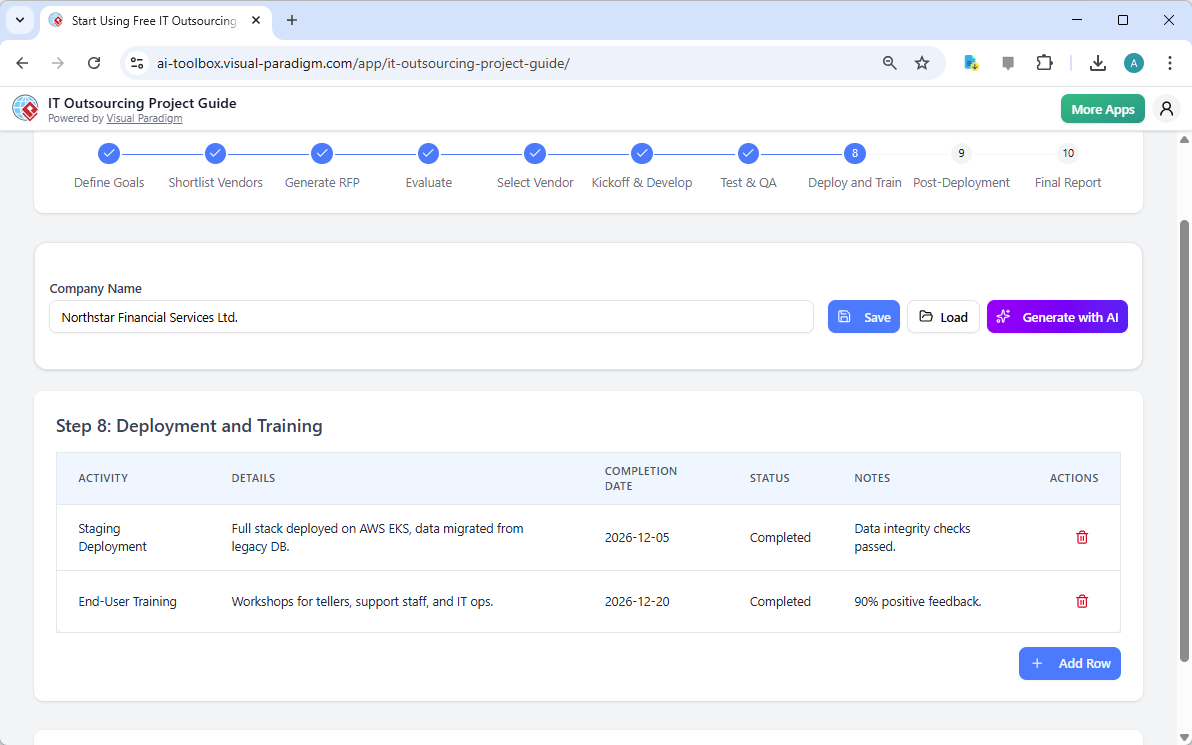
The final delivery phase is about smooth transition. Image 9 displays the “Deployment and Training” step. You can log activities like “Staging Deployment” and “End-User Training,” noting their completion dates and status. This step ensures that the new system is successfully deployed and that all users are properly trained, minimizing the risk of post-launch issues.
Step 9: Post-Deployment Support and Evaluation
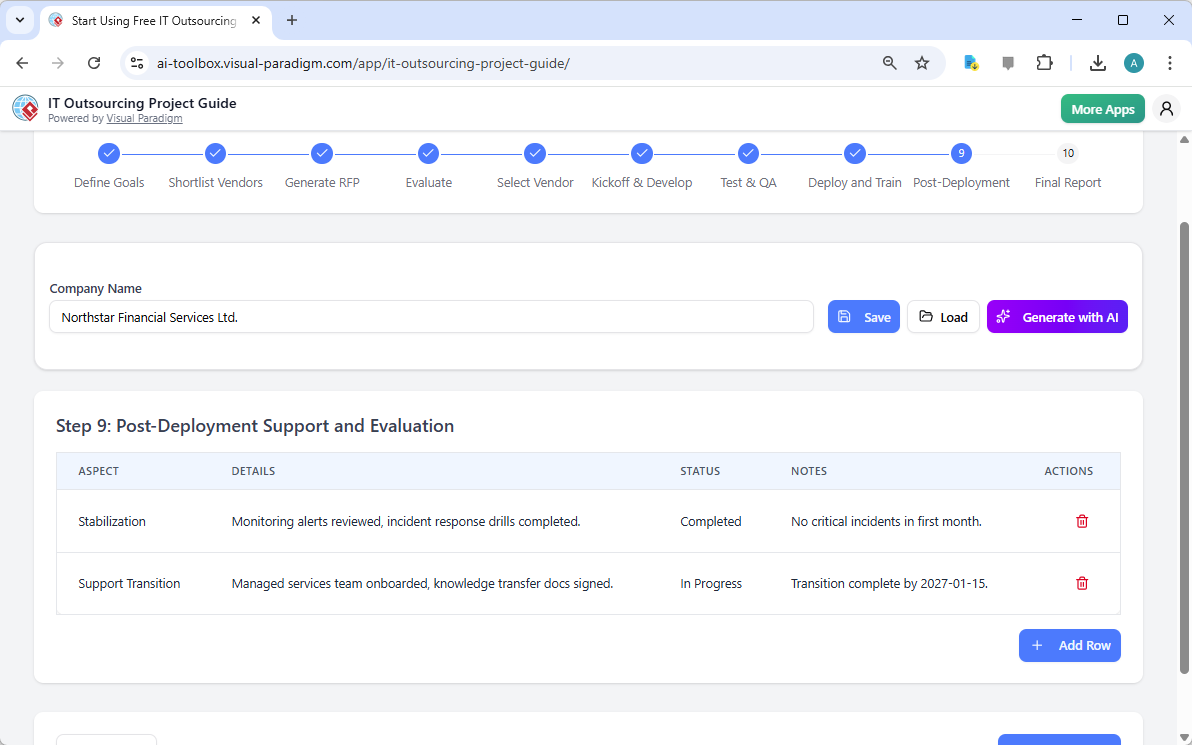
Success doesn’t end at go-live. Image 10 shows the “Post-Deployment Support and Evaluation” step. This is where you track stabilization efforts, monitor for critical incidents, and manage the transition to a managed services team. This ongoing evaluation ensures the project’s long-term success and provides valuable feedback for future initiatives.
Step 10: Generate a Final Project Summary Report
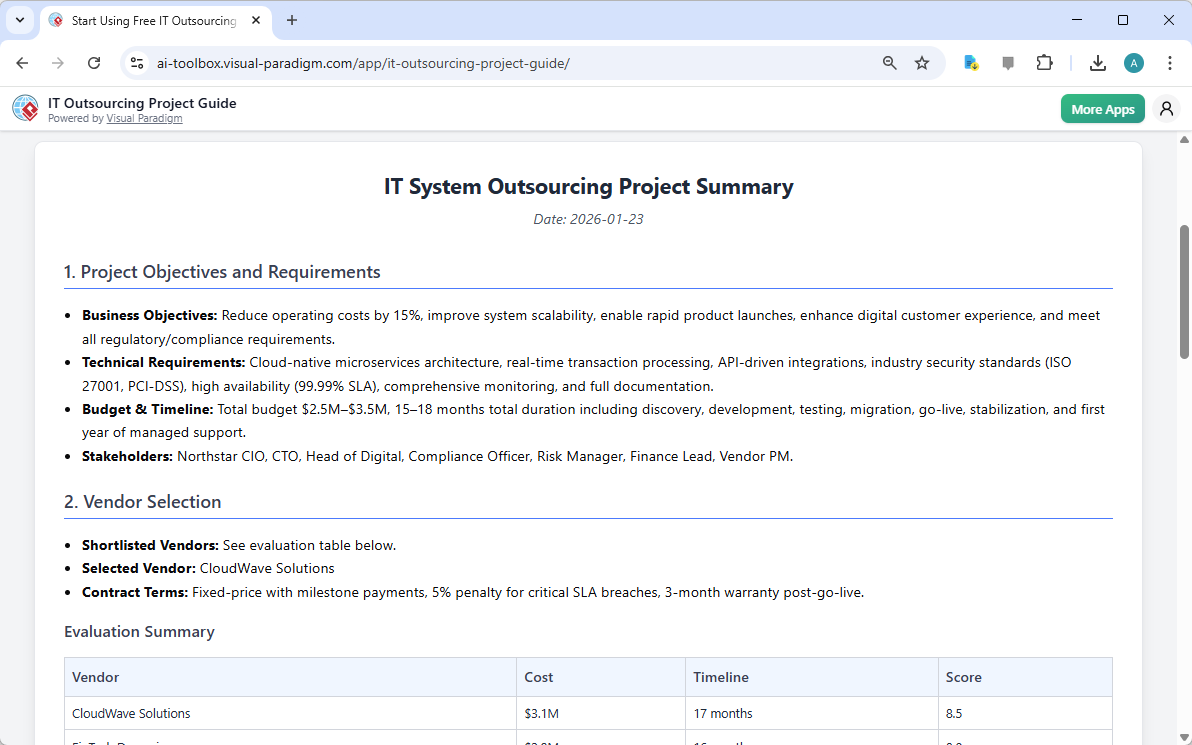
The journey culminates in a comprehensive final report. Image 11 showcases the “Final Report” generated by the tool. This report is a complete summary of the entire project, from initial objectives to final outcomes. It includes a detailed evaluation of the selected vendor and a summary of all project data. This professional document is perfect for sharing with stakeholders, providing a clear and authoritative record of the project’s success.
Key Takeaways
-
AI-Powered Efficiency: The guide uses AI to generate initial project data, saving you significant time and effort in the planning phase.
-
Structured Workflow: A clear, 10-step process ensures you cover every critical aspect of an IT outsourcing project, from requirements to final reporting.
-
Automated Documentation: Instantly generate professional RFPs and final reports, eliminating manual document creation.
-
Centralized Data Management: All project information is stored in one place, enabling easy tracking, comparison, and decision-making.
-
Reduced Risk: A standardized, data-driven approach minimizes the chances of overlooking critical details, leading to a more successful project outcome.
Streamline Your IT Outsourcing Journey Today
Don’t let the complexity of an IT outsourcing project hold you back. The IT Outsourcing Project Guide by Visual Paradigm is your essential tool for success. It combines powerful AI, a structured workflow, and robust data management to ensure your project is well-planned, efficiently executed, and successfully delivered. Whether you’re a project manager, business owner, or IT leader, this guide empowers you to achieve your goals with confidence and precision.
Ready to transform your IT outsourcing process? Try the IT Outsourcing Project Guide now and experience the power of streamlined project management.
Related Links
IT project management is a specialized discipline focused on organizing project scope, tasks, and deliverables to ensure effective planning and execution within technology environments. This field utilizes established methodologies such as Agile, Scrum, and PMBOK to foster innovation, respond to change, and mitigate project risks. Professional management solutions provide essential tools for the lifecycle, including Gantt charts for scheduling, PERT charts for estimating timelines, and Work Breakdown Structures (WBS) for decomposing scope into manageable tasks. Modern platforms now integrate AI-powered automation to generate Risk Breakdown Structures and structure Jira backlogs, significantly enhancing project visibility and team collaboration.
-
What Is Project Management? A Comprehensive Guide: A fundamental resource covering core principles, methodologies, and best practices for effective project execution.
-
Practical Guide to Gantt Charts: Master Project Planning & Scheduling: An in-depth guide on using Gantt charts to improve the accuracy of project planning and timeline management.
-
How to Use Work Breakdown Structure (WBS) in Project Management: A detailed tutorial on how to decompose project scope into manageable components for better organization.
-
Project Management Lifecycle Guide-Through: Information on a structured tool that provides step-by-step guidance for project activities and deliverable development.
-
What Is Scrum? A Complete Guide to Agile Project Management: An overview of the core principles, roles, and processes defined within the Scrum framework for agile teams.
-
The Best PMBOK Tool: Visual Paradigm for Project Management Success: Highlights the advantages of using PMBOK-compliant software to drive project efficiency and standardized outcomes.
-
Visual Paradigm: A Comprehensive Suite for IT Project Development and Digital Transformation: An exploration of how an integrated suite of tools supports digital transformation and large-scale IT development projects.
-
AI-Powered Risk Breakdown Structure Generator: Simplify Proactive Risk Management: Details on an AI tool that automates the creation of Risk Breakdown Structures for proactive risk identification.
-
Visual Paradigm Roadmap Tool – Plan and Track Product Development: A resource for creating strategic roadmaps that align business goals with long-term development milestones.
-
RACI Matrix Tool – Visual Paradigm Features: An overview of the tool used to clearly define roles and responsibilities within complex project teams.
Related posts:
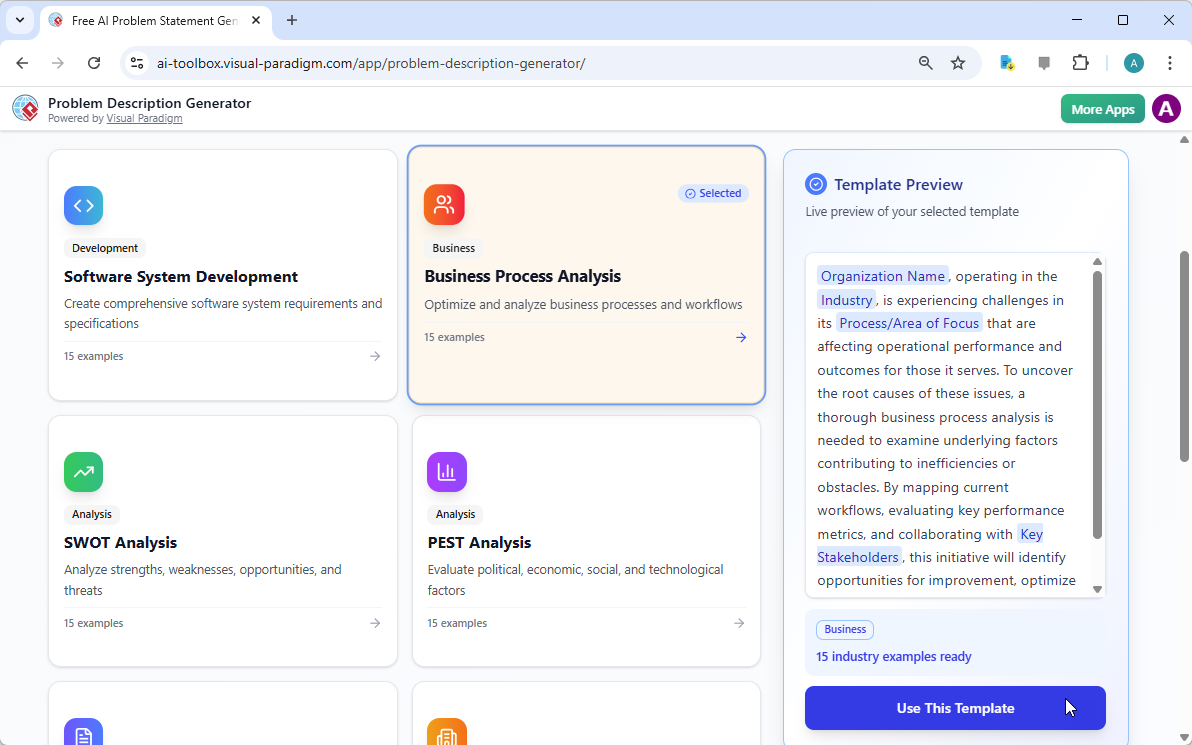 Defining Business Process Challenges: A Step-by-Step Guide with Visual Paradigm
 Best AI-Powered C4 Model Diagram Tool in 2026: Visual Paradigm’s Instant Full C4 Generation
 Visualize Your Project Timeline with a Professional Gantt Chart Builder
Visual Paradigm AI Ecosystem: A Comprehensive Guide to the Future of Intelligent Visual Modeling
Visualize Your Project Timeline with a Professional Gantt Chart Builder
Visual Paradigm AI Ecosystem: A Comprehensive Guide to the Future of Intelligent Visual Modeling



Comments (0)